
PC Power Button Desktop Switch
4.6Editor score
1.7M extension cable
Includes 1 to 2 splitter
Adhesive sticker mounting
Finding the right external PC power button can transform how you interact with your computer setup. Whether your tower is hidden under a desk or the built-in switch is broken, these devices offer convenience and reliability. We focus on options that provide long cables, clear indicators, and straightforward installation for any desktop environment.
Our team analyzed ten distinct models available on the market to identify the most practical solutions for diverse users. We considered factors like cable length, connector compatibility, additional features like USB hubs, and overall build quality. This list covers everything from basic switches to advanced units with remote control capabilities for ultimate flexibility.
Each pick in this guide highlights specific strengths tailored to different needs such as gaming rigs, office workstations, or DIY barebone systems. You will see detailed breakdowns of installation requirements and pros and cons to help you decide quickly. Please note that product availability and pricing can change over time so check current listings before buying.
4.6Editor score

4.8Editor score

4.5Editor score
As an Amazon Associate we earn from qualifying purchases.
The following table provides a side-by-side comparison of all ten models to help you quickly identify the right fit for your specific desktop configuration and needs.




The OwlTree Desktop Computer Power Button stands out as the top choice for users seeking a balance of style and function. With a solid 4.8 rating from verified buyers this unit offers a premium feel thanks to its acrylic casing. It provides essential controls including boot and reset capabilities alongside clear visual feedback for system status.
We may earn a commission when you buy through this link, at no additional cost to you.
Its main strength lies in its comprehensive feature set that goes beyond simple power switching. The inclusion of both power and hard disk indicators helps you monitor activity even when the PC is tucked away. Installation is straightforward with adhesive stickers that secure the button to your desk or panel without any drilling.
While the 1.6 meter cable is sufficient for most desk setups it may fall short for extremely large workstations or cases under the floor. However for standard home and office environments this length is usually ideal. The lack of extra USB ports is a trade-off but keeps the price point accessible for budget conscious buyers.
This product is perfect for anyone looking to replace a broken front panel or simplify access to a hard to reach tower. We recommend it for users who value build quality and clear visual cues over extensive expansion features. It remains a reliable solution for everyday computing needs.
The acrylic material gives the switch a sleek modern look that complements high end desktop setups while ensuring durability.
Having dedicated boot and reset buttons allows you to manage system states without reaching for the original case panel.
We may earn a commission when you buy through this link, at no additional cost to you.
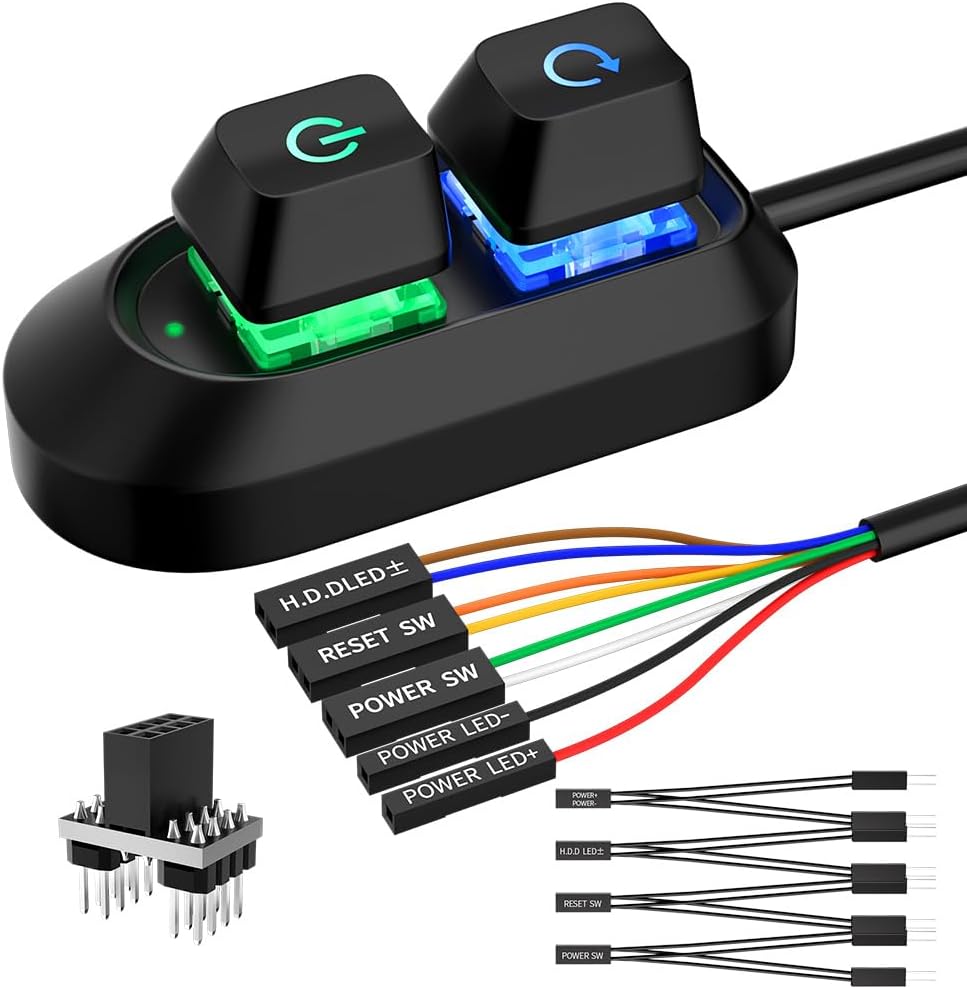
For users prioritizing value the PC Power Button Desktop Switch delivers excellent performance at a low cost. It scores a strong 4.6 rating and includes everything needed to extend power access to a comfortable spot. The 1.7 meter cable ensures you can place the switch on a desk even if the PC is far away.
We may earn a commission when you buy through this link, at no additional cost to you.
A key feature is the included splitter board which allows you to keep the original case button functional. This dual setup is ideal for scenarios where multiple users need access to the system simultaneously. The adhesive mount makes it easy to position the switch without permanent modifications to your furniture.
The build is functional but lacks the premium materials found in higher priced options. You might notice lighter plastic components compared to acrylic or aluminum alternatives. However for simple repair jobs or basic setups this reliability is sufficient and does not hinder daily operation.
Choose this option if you need a straightforward repair solution without extra bells and whistles. It is particularly suitable for students or budget gamers who want reliable power control. The included manual provides clear steps for connecting to standard ATX headers.
Despite the low cost this switch includes a splitter board that adds significant versatility to your power management.
Using adhesive stickers means you can mount the switch securely on wood or plastic surfaces in minutes.
We may earn a commission when you buy through this link, at no additional cost to you.
This model distinguishes itself with an impressive 118 inch cable that offers unmatched flexibility for placement. It is designed for situations where the PC is located across the room or in a deep cabinet. The LED indicator provides clear visual confirmation of power status which is helpful for large distances.
We may earn a commission when you buy through this link, at no additional cost to you.
The splitter functionality ensures your original case button remains operational alongside the new switch. This is useful for testing or sharing access in collaborative environments. Installation requires connecting to standard pins and using the provided stickers which simplifies the process significantly.
Managing such a long cable can be challenging in smaller desks as excess slack may drape across the floor. We recommend using cable ties to route it neatly along the back of furniture. The plastic housing is durable enough for home use but not industrial grade.
Opt for this switch if your primary goal is reaching a distant PC without moving the case. It serves well for hidden setups or multi room configurations. The combination of length and compatibility makes it a standout for specific spatial needs.
The 118 inch cable allows you to place the power switch almost anywhere within a typical room.
The LED indicator lights up when the system is on giving you peace of mind from across the room.
We may earn a commission when you buy through this link, at no additional cost to you.
This external power button adds a touch of style with its 7 color breathing LED effect. It is perfect for users who want their setup to look dynamic without extra lighting strips. The 2 meter cable provides ample reach for standard under desk installations with clean routing.
We may earn a commission when you buy through this link, at no additional cost to you.
Safety is a priority here as the low voltage design ensures no risk to your motherboard or components. The connection is standard for ATX systems meaning setup requires no special adapters. The LED cycles through colors automatically offering a pleasing ambient glow during system operation.
Because the lighting effects are hardwired you cannot control colors via software. This limitation may disappoint advanced users who prefer customization. However for those wanting a ready made aesthetic it is a minor drawback that does not impact functionality.
We recommend this switch for gaming setups where ambient lighting enhances the experience. It is also suitable for home offices seeking a subtle modern touch. The balance of function and visual appeal makes it a strong contender for style conscious buyers.
The breathing LED effect adds a soft colorful glow that integrates seamlessly with gaming desk environments.
Low voltage circuitry protects your system while delivering consistent performance during power switches.
We may earn a commission when you buy through this link, at no additional cost to you.
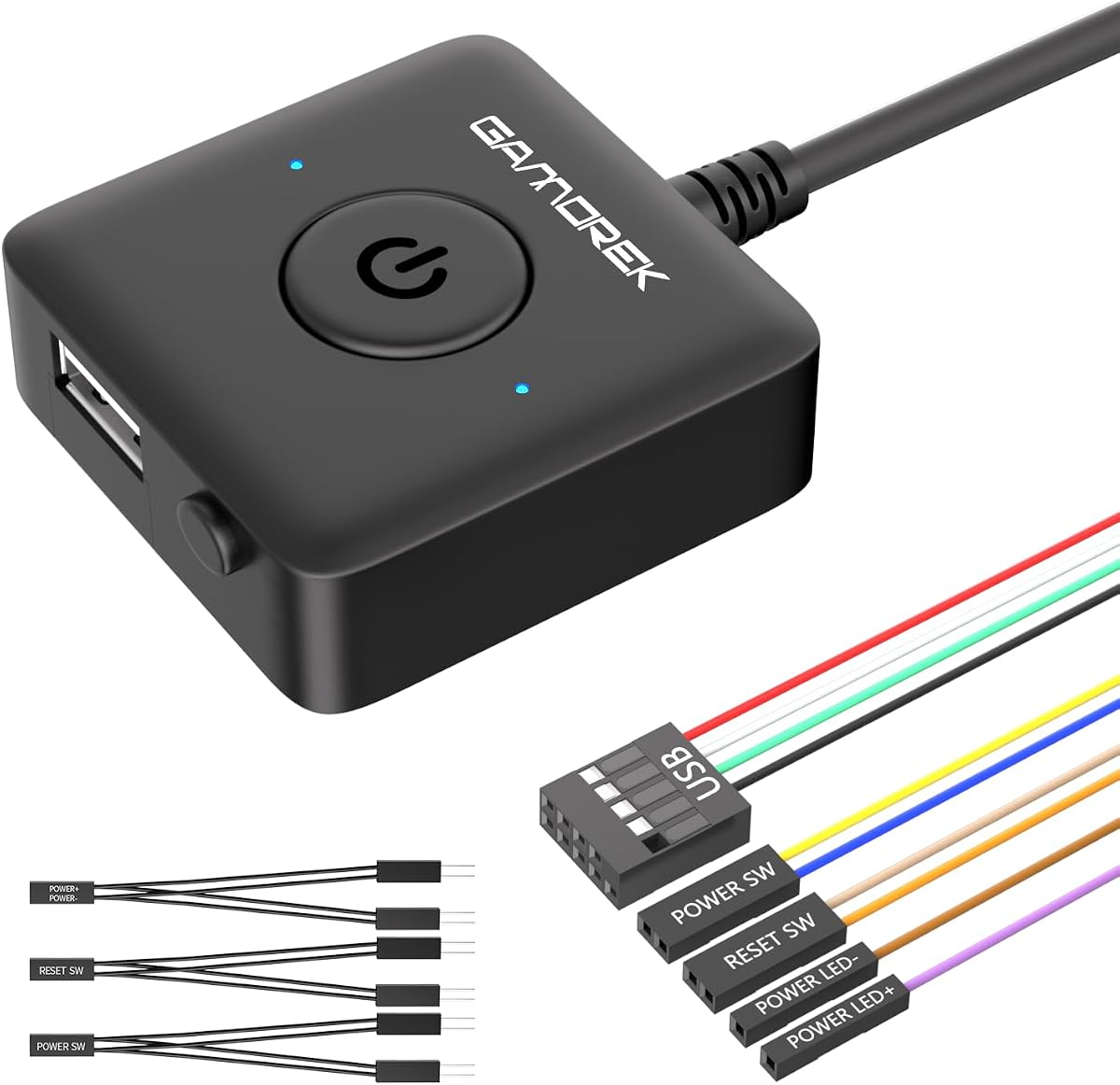
This unit combines power control with a USB extension making it highly practical for busy desktops. You gain access to a USB 2.0 port directly on the switch which is ideal for flash drives or peripherals. The included PCI bracket helps maintain a clean look by securing the button properly.
We may earn a commission when you buy through this link, at no additional cost to you.
The reset button adds functionality for quick reboots without digging into system settings. This is particularly useful for IT professionals or enthusiasts running test benches. The 1.7 meter cable allows flexible placement while keeping connections tidy behind the desk.
While USB 2.0 is not as fast as 3.0 it is sufficient for keyboards mice and basic storage devices. Users needing high speed data transfer might find this limiting. However the convenience of accessible ports often outweighs speed requirements for general use.
Choose this model if you need extra connectivity in addition to power control. It suits professionals who frequently connect drives to peripherals to the main system. The inclusion of a bracket ensures a professional installation without loose components.
By combining power control with a USB port this switch reduces clutter on your desk significantly.
The included PCI bracket allows for a secure fit in standard cases keeping your build looking clean.
We may earn a commission when you buy through this link, at no additional cost to you.
This powerful switch integrates a 4 port USB 3.0 hub directly into the power button module. It allows you to connect multiple devices like drives and keyboards with high speed 5Gbps transfer rates. This functionality transforms the switch into a central access point for your peripherals.
We may earn a commission when you buy through this link, at no additional cost to you.
The 1.2 meter cable is sufficient for desk placement but might feel short for under floor installs. You will need a free USB 2.0 header on your motherboard to power the hub feature. Once connected the hub works immediately without any drivers making it very user friendly.
While the cable is shorter than some other models the added value of USB 3.0 speeds justifies the trade-off. It reduces the need for a separate USB hub which can clutter your desk. This makes it ideal for modern setups requiring frequent high speed data access.
We recommend this for users who need extra USB ports with speed. It is especially valuable for content creators or tech users managing large file transfers. The dual function design saves space while enhancing productivity at the same time.
The USB 3.0 hub provides 5Gbps speeds allowing fast transfer of large files directly from the switch.
Combining power control and a USB hub reduces desk clutter by eliminating separate devices.
We may earn a commission when you buy through this link, at no additional cost to you.
The DKE Desktop Computer Power Switch is one of the most compact options available on the market. Measuring just 2.1cm by 2.1cm it sits discretely on any surface without taking up much space. Its 2 meter cable ensures you can place it wherever you need easy access.
We may earn a commission when you buy through this link, at no additional cost to you.
Weighing only one ounce this switch is incredibly light yet functional for daily use. The included splitter cable allows you to retain your original case button functionality. Adhesive stickers are provided for quick setup without tools or permanent fixtures.
While the small size is great for saving space it might be less convenient to press than larger buttons. Users with larger fingers may find it less comfortable to operate quickly. However for minimalists seeking a hidden solution it works exceptionally well.
Select this model if you prefer a subtle footprint for your desktop. It is perfect for small desks or hidden builds where visibility is not a priority. The strong 4.7 rating confirms its reliability despite its small physical dimensions.
The tiny 2.1cm square design allows you to hide the switch or place it subtly on crowded desks.
Weighing only one ounce makes it easy to reposition or move without affecting your desk setup.
We may earn a commission when you buy through this link, at no additional cost to you.
This model features a robust aluminum body that offers a premium professional look for any setup. It includes both power and reset functions which adds significant utility over basic switches. The 2 meter cable provides ample reach for various desktop configurations and placements.
We may earn a commission when you buy through this link, at no additional cost to you.
The aluminum material not only looks sleek but also feels more durable under regular use. The included splitter board ensures compatibility with existing chassis buttons. This dual setup is useful for testing environments where multiple access points are needed.
Since it is metal the unit is slightly heavier than plastic options but this adds to its stability. There are no RGB features so it focuses on durability and function rather than aesthetics. This makes it a strong choice for office or professional environments.
We recommend this switch for users who value build quality and a professional aesthetic. It is particularly suitable for workstations that require robust hardware. The combination of material and features ensures it lasts for many years.
The aluminum casing provides a sturdy and professional appearance that stands up to daily wear.
Both power and reset buttons are included giving you full control over your system states.
We may earn a commission when you buy through this link, at no additional cost to you.
This versatile switch includes both a splitter board and a cable for flexible configuration. It supports LED and HDD indicators allowing you to keep track of system status remotely. The 2 meter cable ensures the switch can reach even distant desks or mounts.
We may earn a commission when you buy through this link, at no additional cost to you.
The reset function adds an extra layer of utility for quick reboots without physical access to the case. You can route wires through expansion slots or rear vents to maintain a clean look. The included manual guides you through connecting to standard motherboard headers.
Having multiple accessories may make the initial setup slightly more involved than basic models. However the flexibility gained is worth the extra steps for power users. The materials are standard plastic which are adequate for most home setups.
Choose this if you need a comprehensive set of tools for power and status monitoring. It fits well in custom builds where visibility and reset access are important. The variety of included parts makes it a flexible choice for diverse needs.
Included splitter board and cable give you options to wire the switch in multiple ways.
Connect LED and HDD pins to see system activity without opening the case.
We may earn a commission when you buy through this link, at no additional cost to you.
This premium wireless remote allows you to control your PC from up to 50 feet away. It uses a PCIe receiver board to connect directly to your motherboard ensuring a stable connection. The button supports short press for power on and long press for safe shutdown.
We may earn a commission when you buy through this link, at no additional cost to you.
The plug and play design means you do not need to install any software or drivers. It resists interference from other devices which maintains reliability in busy home or office environments. This freedom of movement is ideal for living room setups or large workspaces.
Installation requires an available PCIe slot which may not be present on smaller motherboards. The price is higher than wired options but the convenience of wireless operation justifies the cost. This is a unique solution for those who want maximum flexibility.
We recommend this model for users who want to control their PC from the couch or a distance. It fits well in media centers or large offices where walking to the PC is inconvenient. The reliable connection ensures it works every time you press the button.
The 50 feet range lets you control your PC from almost anywhere in a room or office.
No software is required making setup quick and simple for any compatible motherboard.
We may earn a commission when you buy through this link, at no additional cost to you.
Selecting the right external power button involves evaluating several key factors to ensure compatibility and usability with your specific setup.
Cable length is a critical factor that determines where you can place the switch relative to your PC. Most units offer between 1.6 to 2 meters but some extend up to 118 inches for maximum flexibility. Ensure the cable is long enough to reach your desired location without straining the connectors.
Choose a length that matches your desk layout and PC placement to avoid clutter or tension on the wires.
Most external power buttons use standard ATX headers which are found on the vast majority of desktop motherboards. Check your motherboard manual to confirm the location of the front panel pins before purchasing. Some models may include adapters to fit specific pin layouts.
Verify that the switch connectors match your motherboard headers to ensure a reliable connection without issues.
Installation typically involves connecting wires to the motherboard and securing the button with adhesive stickers. Some premium models include brackets for a more permanent solution in ATX cases. Consider how you plan to mount the switch whether on a desk or inside a case.
Select a mounting option that fits your workspace requirements and provides stability during use.
Beyond basic power switching some buttons include reset functions LED indicators or USB hubs. These features can enhance usability especially for testing benches or busy workstations. Determine which extras are valuable to your workflow before buying.
Prioritize features that add real value to your daily use rather than unnecessary extras.
Materials vary from basic plastic to acrylic and aluminum affecting both look and durability. Metal or acrylic options offer a more premium feel while plastic keeps costs low. Consider the environment where the switch will be used to choose an appropriate material.
Opt for sturdy materials if the switch will be used frequently or in professional settings.
Wired models provide a direct connection while wireless units offer movement freedom through a PCIe receiver. Wireless options are ideal for media centers or large rooms but require a free PCIe slot. Decide based on your need for flexibility versus simplicity.
Choose wireless for maximum mobility or wired for straightforward plug and play simplicity.
LED indicators help you see power status without turning on the full system. Some models also include hard disk activity lights for monitoring data usage. These features add convenience especially when the PC is located out of sight.
Look for clear visible LEDs if you need to confirm system status quickly.
Some packages include splitter boards allowing you to use both the original and external buttons. This is useful if you want to keep the case button accessible as well. Check the product description to see if these adapters are included.
Ensure splitter options are available if you need dual access to power functions.
Begin by identifying the correct pins on your motherboard usually labeled as PWR_SW or PWR_BTN. Connect the switch wires to these pins ensuring the orientation matches the motherboard manual for proper functionality. Secure the button to your desk or panel using the provided adhesive stickers.
Test the switch by pressing it to power on your system. If the PC does not start check the connections for secure seating and ensure the power supply is active. For models with reset or LED features test these functions to confirm everything is working correctly.
To maintain the switch keep it clean from dust and avoid placing heavy objects on it. If it is a wireless model ensure the receiver is properly seated in the PCIe slot to prevent connection drops. Regular checks on cable integrity will prolong the life of your setup.
Most external power buttons work with standard ATX motherboards which are common in desktops. You should verify your motherboard has the necessary front panel pins before purchasing. Some units include adapters for compatibility but checking your manual is always recommended.
Yes many models come with splitter boards that allow both the original and external buttons to function. This lets you keep access to both switches without removing the case button. Simply connect the splitter to the appropriate headers on your motherboard.
Installation typically takes between 10 to 20 minutes depending on your experience with PC hardware. You need to connect wires to the motherboard and secure the switch with adhesive or brackets. The included manuals usually guide you through each step clearly.
Most wired external power buttons do not require any drivers as they connect directly to hardware pins. Wireless models may also operate without software by using a PCIe receiver board. Always check the product details for specific driver requirements.
If the original button is broken an external switch can replace it entirely for reliable power control. You can route the new switch wires from the internal case to a better accessible spot. This effectively restores power functionality without repairing the case itself.
Most switches offer cables between 1.6 to 2 meters which are sufficient for typical under desk installations. Some specialized models have much longer cables for extended reach. Measure your distance first to choose the right length for your setup.
External power buttons are designed for desktop motherboards with ATX headers and not laptops. Laptops typically have integrated power circuits that do not support these external connectors. This solution is best suited for tower or SFF desktop systems.
Wireless models often use batteries for the remote component but the receiver is powered by the PC. You may need to replace batteries periodically depending on usage frequency. The unit generally provides instructions on battery replacement for continuous operation.
We have explored ten top models ranging from basic switches to advanced wireless remote options. Each pick offers distinct advantages whether you need long cables robust build quality or extra USB features. Our top three choices cover various budgets and specific requirements.
When choosing prioritize factors like cable length and compatibility with your motherboard to ensure a smooth setup. Also consider whether additional features like reset buttons or USB hubs fit your daily workflow. Selecting the right one will make controlling your PC much more convenient.
Please remember that product availability and pricing can change so verify current details before purchasing. Check user reviews for real world insights on durability and ease of installation. With the right choice you can enjoy easier power control and a cleaner workspace.