
Netgate 1100 pfSense+ Security Gateway
4.1Editor score
Compact desktop form factor
Dual core ARM processor
Free technical assistance
This guide compares the top hardware firewalls for businesses, analyzing performance, security features, and ease of use to help you secure your network
Hardware firewalls provide essential protection for business networks by filtering traffic before it reaches internal devices. These dedicated appliances offer robust security features that software solutions often cannot match, ensuring your data remains safe from external threats.
We evaluated ten leading hardware firewalls based on throughput, user capacity, and advanced threat protection capabilities. Our analysis focuses on real-world performance, manageability, and scalability to help you choose the right appliance for your specific network environment.
Each pick highlights key strengths and ideal use cases to guide your decision-making process. Note that availability and specifications may vary by region and time, so verify details before purchasing to ensure compatibility with your current infrastructure.
4.1Editor score
4.2Editor score

5.0Editor score
This table provides a side-by-side comparison of the top hardware firewalls available today. Review the key specifications and capabilities of each model to determine which best fits your security requirements and network scale.


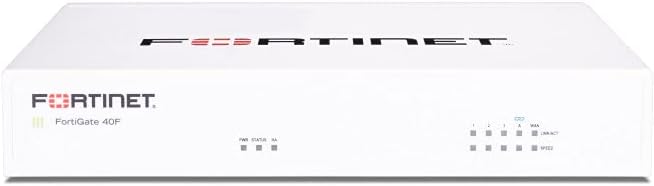
The FortiGate-40F stands out as a top choice for small to mid-sized businesses seeking robust network security. With a rating of 4.2 stars, it delivers exceptional value through its compact fanless design and powerful security capabilities tailored for branch offices.
We may earn a commission when you buy through this link, at no additional cost to you.
Its high-performance security engine provides up to 1 Gbps IPS throughput and 600 Mbps threat protection throughput. The appliance leverages Fortinet's purpose-built security processor technology to ensure industry-leading performance even when handling SSL encrypted traffic efficiently.
While the appliance is sold without a subscription, the integration with Fortinet's AI-powered FortiGuard Labs offers comprehensive threat protection. You will need to acquire separate services for full functionality, but the hardware itself provides a solid foundation for network security.
This firewall is ideal for small businesses needing simplified deployment and visibility. The user-friendly management console and Zero Touch Integration with Fortinet's Security Fabric make setup straightforward, ensuring your network is secure without excessive complexity.
The fanless desktop form factor minimizes space usage and ensures quiet operation, making it perfect for office environments where noise is a concern.
Equipped with 5 GE RJ45 ports including WAN and internal ports, it provides essential flexibility for various small-scale network configurations.
We may earn a commission when you buy through this link, at no additional cost to you.
The Netgate 1100 pfSense+ Security Gateway is an excellent option for those seeking a reliable and affordable hardware firewall solution. Rated at 4.1 stars, it comes pre-loaded with pfSense+ software allowing you to get up and running quickly.
We may earn a commission when you buy through this link, at no additional cost to you.
Powered by a dual core ARM Cortex-A53 1.2 GHz processor, it delivers near gigabit routing capabilities and over 650 Mbps of firewall throughput. This makes it suitable for common home and small business traffic without breaking the budget.
You should note that shipping requires an adult signature to ensure secure delivery. While the hardware warranty and technical support are included, you must verify your specific network needs against its three 1 GbE switched ports.
Ideal for AI security workloads or general edge networking, this device runs unnoticed on a desktop or wall. The flexible port configuration allows you to create separate WAN LAN and OPT ports for secure network segmentation.
Pre-loaded with pfSense+ software updates included for product lifetime, the system simplifies setup and ensures you have the latest security patches immediately.
Three 1 GbE switched ports allow you to configure three separate ports for up to a gigabit of bi-directional traffic for diverse network needs.
We may earn a commission when you buy through this link, at no additional cost to you.
The Zyxel USGFLEX700 ZyWALL Cyber Security Firewall earns a perfect 5.0 rating for its comprehensive approach to network security. Designed for mid-size to large offices, it supports up to 500 users with impressive throughput capabilities.
We may earn a commission when you buy through this link, at no additional cost to you.
This firewall offers a complete security bundle including one year of anti-malware ransomware blocking and web filtering services. Its SPI firewall throughput reaches 5400 Mbps ensuring that your network remains fast even under heavy security scrutiny.
Management is streamlined through Zyxel's award winning Nebula Cloud Management solution. You can easily configure and monitor security policies from a centralized location which simplifies IT administration across multiple devices.
Ideal for businesses prioritizing robust security and ease of management, this appliance delivers high performance for internet speeds up to 900 Mbps. The inclusion of UTM security services out of the box makes it a valuable premium choice.
Includes 1 year anti-malware ransomware blocking and application control services ensuring comprehensive protection without immediate additional subscription costs.
Equipped with 12x configurable GbE and 2x SFP Gigabit fiber ports allowing flexible configuration and fast local network connectivity.
We may earn a commission when you buy through this link, at no additional cost to you.
The SonicWall TZ280 delivers next-gen firewall capabilities tailored for small business and branch security needs. With a strong rating of 4.7 stars, it provides high inspection speeds and advanced threat protection features for distributed environments.
We may earn a commission when you buy through this link, at no additional cost to you.
Its performance is driven by SonicWall's patented Reassembly-Free Deep Packet Inspection engine enabling up to 2.5 Gbps firewall inspection. This ensures that threats are identified and blocked efficiently without significant latency for your users.
Note that the appliance is sold without a service subscription so you must purchase security services separately. However zero-touch deployment and management via the cloud Network Security Manager simplify initial setup and ongoing administration significantly.
This appliance is well suited for small businesses requiring secure SD-WAN and VPN capabilities. Whether you need site-to-site networking or remote access protection it offers the connectivity and security features necessary for modern branch offices.
Delivers intrusion prevention gateway anti-malware and application control to secure networks against sophisticated threats without manual rule creation.
Manage on-box or via cloud Network Security Manager for centralized visibility and control over your distributed network security policies.
We may earn a commission when you buy through this link, at no additional cost to you.
The Fortinet FortiGate-70G Firewall is designed specifically for branch and small offices requiring high-speed network connectivity. Rated at 5.0 stars, it offers robust security with built-in NGFW IPS and web filtering capabilities.
We may earn a commission when you buy through this link, at no additional cost to you.
With 10 Gigabit Ethernet RJ45 ports this appliance ensures that your network can handle high bandwidth demands efficiently. The Secure SD-WAN feature improves cloud and SaaS performance while maintaining consistent security policies across your infrastructure.
Deep visibility with SSL inspection allows you to identify and govern encrypted traffic effectively. This is crucial in modern networks where most threats hide within encrypted channels without detection by traditional filters.
This firewall is ideal for businesses needing simple deployment and centralized management via FortiGate Cloud. The seamless integration with FortiSwitch and FortiAP creates a unified secure wired and wireless network for your staff.
Optimizes cloud and SaaS performance while keeping security policies consistent across all branch sites for reliable user experiences.
SSL inspection and application control help you identify and govern encrypted traffic to prevent hidden threats from entering your network.
We may earn a commission when you buy through this link, at no additional cost to you.
The Sophos XGS 128 (Gen2) Network Security Appliance is engineered for high performance and reliability in large business networks. While the rating is currently N/A the hardware specifications suggest it is built to handle heavy enterprise traffic loads.
We may earn a commission when you buy through this link, at no additional cost to you.
Its nine 2.5 GE copper ports plus one SFP fiber port deliver up to 19.1 Gbps firewall throughput. This capacity ensures that even the busiest offices maintain fast connectivity without bottlenecks during peak usage times.
The appliance is purpose built for high performance visibility and reliable operation in business networks. It requires a Sophos subscription to enable IPS web security and advanced threat defense features fully for complete protection.
This device is ideal for enterprises needing resilient connectivity and intelligent traffic routing across multiple WAN connections. The VPN ready architecture supports secure site to site networking and encrypted remote employee access seamlessly.
Provides up to 19.1 Gbps firewall throughput which is essential for larger offices handling heavy traffic loads without slowdowns.
Intelligent traffic routing across multiple WAN connections ensures resilient connectivity and better user experience during internet failures.
We may earn a commission when you buy through this link, at no additional cost to you.
The Zyxel USGFLEX100H Firewall is tailored for small businesses with around 25 users requiring reliable multi-layered security hardware. With a 4.0 rating it offers essential security features while maintaining a compact and efficient design.
We may earn a commission when you buy through this link, at no additional cost to you.
Its SPI firewall throughput reaches 4,000 Mbps with 1,500 Mbps IPS capacity ensuring robust protection against threats. The offline-capable setup allows you to configure via the Nebula portal wizard even without an active internet connection initially.
Security features include reputation filtering and SecuReporter visibility in the Entry Defense Pack. Additional capabilities like anti-malware and sandboxing require an optional Gold Security Pack license for full unified threat management.
This appliance is ideal for businesses needing centralized configuration and policy sync through Nebula Management. The flexible software-defined ports allow WAN load balancing and active-backup failover for resilient connectivity in dynamic environments.
Entry Defense Pack includes reputation filtering and visibility while optional Gold Pack unlocks anti-malware sandboxing and full UTM capabilities.
8 x 1G RJ-45 ports assignable as WAN or LAN support load balancing and VLAN interfaces for tailored network configurations.
We may earn a commission when you buy through this link, at no additional cost to you.
The SonicWall TZ680 is built for distributed and high-end SMBs requiring powerful firewall inspection speeds. While the rating is currently N/A its specifications indicate it is ready for high-performance network security challenges.
We may earn a commission when you buy through this link, at no additional cost to you.
Performance is driven by the Reassembly-Free Deep Packet Inspection engine enabling up to 5 Gbps firewall inspection and 2.5 Gbps IPSec VPN throughput. This ensures that large networks remain protected without sacrificing speed for users.
It includes advanced threat protection features like gateway anti-malware and TLS/SSL decryption when an active service subscription is applied. Cloud Secure Edge integration keeps distributed sites and remote workers protected through Zero-Trust Network Access.
Ideal for businesses needing resilient connectivity and intelligent traffic routing, this device offers Secure SD-WAN capabilities. The desktop form factor allows easy installation on your network rack without requiring specialized cooling solutions.
Intrusion prevention gateway anti-malware and application control with TLS/SSL decryption ensure comprehensive protection against modern cyber threats.
Cloud Secure Edge keeps distributed sites and remote workers protected with Zero-Trust Network Access for secure remote connectivity.
We may earn a commission when you buy through this link, at no additional cost to you.
The Fortinet FortiGate 60F Hardware offers a comprehensive bundle with 36 Month Unified Threat Protection included for medium-sized businesses. With a 4.4 rating it provides robust security services without needing separate contracts initially.
We may earn a commission when you buy through this link, at no additional cost to you.
The unified threat protection secures against advanced online threats with comprehensive web filtering and anti-botnet technologies. This ensures your network remains safe from sophisticated threats while simplifying your security management.
Customer support is backed by FortiCare Premium ensuring high-quality assistance and service continuity. You can rely on reliable help when needed which adds significant value for organizations lacking dedicated security teams.
This appliance is tailored for businesses needing robust security without the infrastructure of larger enterprises. Its effective protection technologies safeguard against sophisticated threats making it a strong choice for medium-sized operations.
Includes 3 years of FortiCare Premium and FortiGuard Unified Threat Protection offering comprehensive security without extra upfront subscriptions.
Secures against advanced online threats with comprehensive web filtering and anti-botnet technologies for robust protection across your network.
We may earn a commission when you buy through this link, at no additional cost to you.
The Cisco ASA5525-X Security Appliance Firewall (Renewed) offers a cost-effective entry point for businesses seeking reliable enterprise security. With a 4.3 rating it provides standard firewall features through an 8 port Gigabit Ethernet configuration.
We may earn a commission when you buy through this link, at no additional cost to you.
This model is designed to meet the demands of enterprise networks requiring solid firewall protection. The renewed status allows you to acquire enterprise-grade hardware at a lower cost while still maintaining the Cisco security ecosystem.
While the renewed product status suggests it may be refurbished it still delivers essential security capabilities. You should verify the specific warranty terms and condition of the unit to ensure it meets your operational standards.
Ideal for businesses with budget constraints needing trusted enterprise security this device provides a standard firewall platform. It supports basic network protection requirements and integrates well into existing Cisco infrastructure setups.
Delivers standard firewall features tailored for enterprise environments requiring reliable network protection and secure traffic management.
Renewed model option allows businesses to access enterprise-grade hardware at a lower cost without sacrificing essential security capabilities.
We may earn a commission when you buy through this link, at no additional cost to you.
Selecting the right hardware firewall depends on your specific network size and security needs. Understanding key factors will help you make an informed decision that aligns with your business goals.
The number of users your network supports is a critical factor. Appliances are rated for specific user caps like 25 or 500 to ensure performance remains stable. Choosing a model that matches your current staff size prevents bottlenecks as you grow.
Select a firewall that accommodates your current users while leaving room for expansion.
Throughput determines how much data the firewall can inspect per second. Higher throughput values ensure that security scanning does not slow down your internet speeds. Evaluate your internet bandwidth and application needs to choose a sufficient rate.
Ensure the firewall throughput meets or exceeds your total internet bandwidth to avoid performance slowdowns.
Modern appliances offer various Ethernet port types including Gigabit and 2.5 Gigabit. You need enough ports to connect your router switches and access points directly. Flexible ports allow you to assign WAN and LAN roles based on your layout.
Count your devices and verify the appliance provides enough physical connections for your needs.
The interface should be intuitive for administrators or IT teams. Some models offer cloud management dashboards for centralized control across multiple sites. A good interface simplifies policy changes and monitoring without requiring complex commands.
Choose a model with a user-friendly interface that matches your team's technical expertise.
Look for features like intrusion prevention web filtering and anti-malware. Advanced models integrate AI or sandboxing to catch unknown threats. Comprehensive protection ensures that your network stays secure against evolving cyber risks.
Verify that the appliance includes essential security services like IPS and web filtering.
Some hardware units are sold without security service subscriptions. You may need to purchase separate licenses to enable protection features like threat updates. Check if the model includes bundled security packs to save on initial costs.
Confirm whether security services are included or must be purchased separately.
Consider how the appliance will be installed. Desktop models suit small offices while rack-mount units fit enterprise server rooms. Zero-touch deployment features can significantly reduce the time needed to set up your network.
Select a form factor and deployment method that fits your physical environment.
Warranty and technical support are vital for business continuity. Reliable vendors offer technical assistance centers or premium support tiers. Ensure you have access to help when hardware issues arise to minimize downtime.
Check the warranty terms and support options before finalizing your purchase.
Begin by connecting the appliance to your network with Ethernet cables following the manufacturer's diagram. Assign IP addresses to the WAN and LAN ports to establish a connection with your internet service provider and internal devices.
Access the web interface to configure security policies and update firmware regularly. Ensure you enable automatic updates or check frequently to stay protected against new vulnerabilities. Regular updates are critical for maintaining strong network security.
Monitor system logs through the management dashboard to identify any suspicious activity. Keep the appliance in a well-ventilated area to prevent overheating. Proper care ensures longevity and consistent performance for your network.
Many hardware firewalls require subscriptions to enable advanced threat protection services. These subscriptions provide essential updates like anti-malware signatures and IPS rules. Without them, the device may still route traffic but lacks comprehensive security.
Hardware firewalls are physical devices protecting an entire network while software firewalls protect individual computers. Hardware solutions generally offer higher performance and centralized management. They are ideal for businesses needing enterprise-grade security.
Hardware firewalls are effective against external threats but cannot prevent malware on internal devices. They should be paired with endpoint security on workstations for full protection. A layered security approach provides the best defense for businesses.
Most models allow firmware updates via the web interface or management console. You can download updates from the vendor or or use automatic updates. Regular updates are vital to patch security vulnerabilities in the operating system.
SD-WAN optimizes internet connections to improve application performance across multiple branches. It allows intelligent traffic routing and failover during internet outages. This feature is valuable for businesses with remote sites needing reliable access.
While basic setup can be managed by IT generalists, complex policies may need expertise. Many modern appliances offer user-friendly interfaces for non-specialists. Consider managed services if your team lacks dedicated security resources.
Hardware appliances typically last 5 to 7 years depending on usage and environmental factors. Regular maintenance and firmware updates can extend their operational life. Replacing older models ensures you benefit from modern security technologies.
Renewed models can be reliable if they come with a warranty and pass testing. They are a cost-effective option for businesses on a budget. Ensure you buy from reputable vendors to guarantee functionality and support.
We have reviewed ten top hardware firewalls suitable for various business sizes and security needs. Each option brings unique strengths like high throughput compact design or comprehensive security bundles.
When choosing, prioritize features like user capacity and threat protection capabilities to match your requirements. A firewall that fits your network ensures optimal performance and security without unnecessary complexity.
Remember to verify current availability and service requirements before purchasing to ensure compatibility. Regular maintenance and updates will keep your network secure against evolving threats.