
Hamile for iPad 9/8/7th Generation Case with Keyboard 10.2 Inch
4.5Editor score
Magnetically Detachable Keyboard
7 Color Backlit Keys
Long Life Battery
Finding the right keyboard case for your 8th Generation iPad transforms it into a powerful laptop alternative. These accessories combine protection with typing functionality, allowing you to work efficiently on the go without sacrificing portability or comfort.
We evaluated ten top-rated options based on compatibility, build quality, battery life, and typing experience. Our analysis focuses on models specifically designed for the 10.2 inch screen, ensuring a snug fit and reliable performance for daily tasks and creative projects.
Each pick highlights key strengths like backlighting, trackpads, or budget-friendly pricing to suit different needs. Note that product details and availability can change frequently, so verify specifications before purchasing to ensure the best fit for your specific iPad model.
4.5Editor score

4.4Editor score

4.4Editor score
As an Amazon Associate we earn from qualifying purchases.
This table provides a quick side-by-side comparison of the top ten keyboard cases available for the 8th Generation iPad, highlighting key specifications to help you decide quickly.

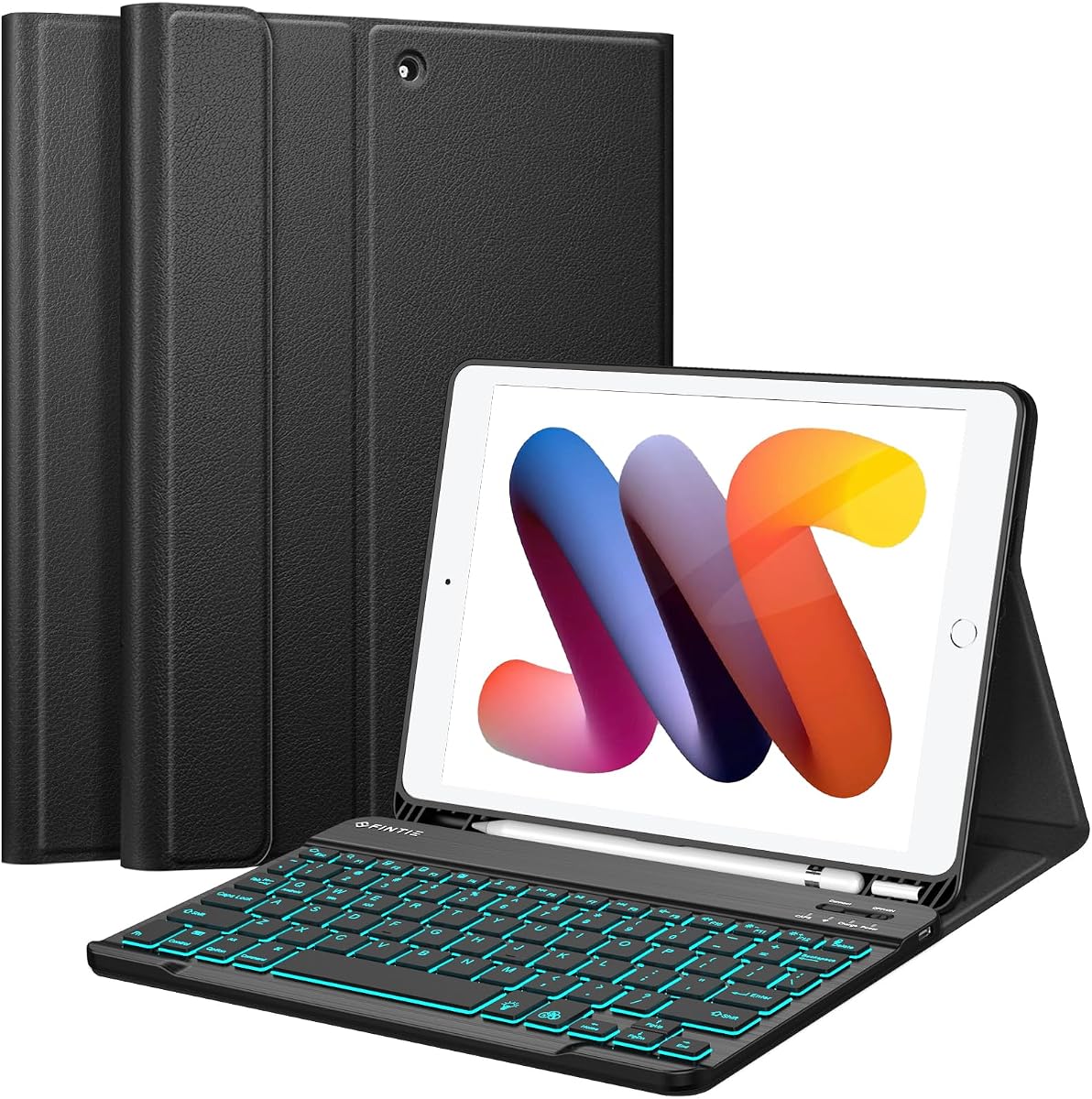


This keyboard case offers exceptional value by including a Bluetooth mouse alongside a detachable keyboard for the 8th Generation iPad. It features a strong magnetic connection and a honeycomb interior for protection and heat management.
We may earn a commission when you buy through this link, at no additional cost to you.
The 7-color backlight allows for comfortable typing in low light, and the case supports multiple viewing angles for versatile use. The built-in pencil holder ensures your Apple Pencil stays secure and accessible.
While the inclusion of a mouse is a major plus, users should note that the pencil is not included in the package. The initial setup and pairing process might require a few minutes to get right.
Ideal for users seeking a complete productivity bundle under one price point. It balances functionality and protection well, making it a solid choice for students and professionals alike.
The inclusion of a Bluetooth mouse transforms your tablet into a full workstation setup without needing extra purchases.
Built-in slots ensure your Apple Pencil is always within reach and protected from loss or damage during transport.
We may earn a commission when you buy through this link, at no additional cost to you.
The FINTIE case is designed for long sessions with a battery life reaching up to 230 hours. It uses Type-C fast charging to minimize downtime during your workday.
We may earn a commission when you buy through this link, at no additional cost to you.
Typing is comfortable thanks to ergonomic scissor keys that reduce noise and provide good tactile feedback. The exterior uses durable PU leather with a soft TPU shell for solid impact protection.
While the battery life is impressive, you cannot use this case with models outside the specified iPad generations. It also lacks a mouse, which might be a downside for some power users.
This case is perfect for those who prioritize battery efficiency and typing comfort over extra accessories. It is a reliable daily driver for students and casual users.
With a 420mAh battery, you can work for weeks on a single charge thanks to its energy-saving design.
Mechanical scissor keys offer a responsive feel that reduces fatigue during long typing sessions.
We may earn a commission when you buy through this link, at no additional cost to you.
The typecase model stands out with a precision trackpad that makes navigating iOS menus much easier. Its patented 360-degree hinge offers versatile positioning for any task from typing to watching videos.
We may earn a commission when you buy through this link, at no additional cost to you.
The keyboard features laser-etched keys with a 10-color RGB backlight for a premium look. The auto sleep/wake function helps conserve battery life effectively during idle times.
However, this premium functionality comes at a higher price compared to basic models. Some users might also find the additional hardware makes the case slightly heavier than others.
Choose this if you need precise cursor control and a versatile stand for professional work. It offers a laptop-like experience that justifies the extra cost for power users.
The trackpad supports multi-gesture controls, allowing for smooth browsing and editing without touching the screen.
The 360-degree hinge allows you to use your iPad as a laptop, tent, or standalone tablet effortlessly.
We may earn a commission when you buy through this link, at no additional cost to you.
Hamile delivers strong performance at a budget-friendly price point. It includes a 400mAh battery that ensures long usage times without needing frequent recharges during the day.
We may earn a commission when you buy through this link, at no additional cost to you.
The keyboard is detachable and magnetic, allowing for easy transport and flexible usage modes. The case itself uses soft TPU to provide cushioning against drops and bumps.
While the build material is not premium, it effectively protects the iPad and offers good value. The warranty is standard, so be mindful of the coverage period before purchasing.
This is the ideal pick for students or families wanting a reliable keyboard case without spending too much. It covers all the essentials well.
You get essential features like backlit keys and a pencil holder without paying for premium branding.
The wireless keyboard connects quickly and offers responsive keys for fast text entry.
We may earn a commission when you buy through this link, at no additional cost to you.
This model features a honeycomb grid design on the back to prevent overheating during heavy use. It works seamlessly across iOS, Android, and Windows with shortcut keys.
We may earn a commission when you buy through this link, at no additional cost to you.
The keyboard is magnetic and wireless, attaching firmly to the case for stability. The base includes non-slip rubber lining to keep the iPad steady on desks.
Standby time is shorter compared to some competitors, so you might need to charge it more often. It also lacks a trackpad, relying on touch for navigation.
Best for users who need a versatile keyboard that switches between devices easily. The heat dissipation feature is a unique advantage for long work sessions.
Easy switching between operating systems makes this a versatile choice for mixed-device households.
The honeycomb design helps vent heat effectively, protecting your iPad during extended usage.
We may earn a commission when you buy through this link, at no additional cost to you.
Logitech is a trusted brand known for durable peripherals. This Slim Folio case integrates the keyboard and cover perfectly to provide robust protection and comfortable typing.
We may earn a commission when you buy through this link, at no additional cost to you.
The battery life is outstanding, lasting up to four years with standard daily use. It uses replaceable coin cells, so you avoid waiting for recharge cycles during work.
The main drawback is the lack of backlight, which can limit usage in dark environments. You also need to keep spare batteries on hand for long-term maintenance.
Choose this for reliability and a premium feel. It is excellent for users who type frequently and prefer a minimalist, integrated design.
Built to withstand daily use, this case maintains its integrity and functionality over years.
The slim profile protects your device without adding unnecessary bulk to your bag.
We may earn a commission when you buy through this link, at no additional cost to you.
This KBCASE model stands out with its attractive light blue finish and slim profile. It offers a detachable keyboard that is lightweight and easy to carry in a bag.
We may earn a commission when you buy through this link, at no additional cost to you.
The case features wave shock absorption for improved protection against drops. A built-in pencil holder keeps your stylus secure and accessible whenever needed.
It lacks some advanced features like a trackpad or complex lighting options. The color is limited, so check if the available options match your aesthetic preferences.
A great choice for users who value style and lightness. It provides essential functionality while keeping the overall setup portable.
The slim profile ensures the device remains easy to carry without adding excessive weight.
A stylish color option that adds a personal touch to your professional or casual setup.
We may earn a commission when you buy through this link, at no additional cost to you.
Dexnor offers a unique floating stand design with an aluminum alloy hinge for stability. It includes a built-in trackpad for precise cursor control on your iPad.
We may earn a commission when you buy through this link, at no additional cost to you.
The keyboard has a large 650mAh battery, ensuring plenty of power for daily use. It also features 7-color backlighting with adjustable brightness levels.
The advanced features make this option pricier and heavier than basic cases. It may be less ideal for users prioritizing ultra-light portability.
Pick this for a premium, laptop-like feel. The floating stand and trackpad make it excellent for productivity tasks and media consumption.
The floating stand offers a modern look and sturdy support for comfortable typing angles.
The trackpad allows you to scroll and select items with ease, reducing screen taps.
We may earn a commission when you buy through this link, at no additional cost to you.
This case offers reliable performance with a zero-lag magnetic keyboard that locks securely in place. It includes a precision trackpad for intuitive navigation on the screen.
We may earn a commission when you buy through this link, at no additional cost to you.
The keys are backlit with multiple colors to suit different environments. The form-fitting case protects against scratches and minor bumps effectively.
While it does not have unique standout features, it covers all the basics very well. You should pay attention to the setup instructions to ensure proper function.
A safe choice for those wanting balanced features without a high price tag. It offers good utility for both work and play.
The magnetic keyboard connects instantly, reducing delays for efficient typing sessions.
Combines lighting, a trackpad, and protection into one reliable package.
We may earn a commission when you buy through this link, at no additional cost to you.
This KBCASE model features a 360 swivel hinge for flexible positioning and viewing. It comes with a precision trackpad for easy cursor control without touching the screen.
We may earn a commission when you buy through this link, at no additional cost to you.
The hardshell design protects all sides of your tablet from dust and damage. It also includes a pencil holder to keep your stylus secure during transport.
The compatibility is strictly limited to specific iPad generations, so check your model number. The build is functional but not premium in feel.
A good option for users needing a trackpad in a compact form. It balances control and protection well for everyday tasks.
The swivel hinge allows you to rotate the keyboard to any angle for comfortable use.
Hardshell design ensures that the edges and corners of your iPad stay safe.
We may earn a commission when you buy through this link, at no additional cost to you.
Selecting the right keyboard case requires balancing features like battery life, connectivity, and build quality with your specific needs.
Ensure the case is explicitly designed for the 8th Generation iPad 10.2 inch model. Check the model numbers on the back of your device to avoid fit issues.
Always verify the exact model number listed on the product page before purchasing.
Bluetooth connectivity is essential for wireless typing without cluttered cables. Look for low-energy protocols to preserve your iPad battery.
Choose models with easy pairing mechanisms for hassle-free setup.
Consider how long the keyboard lasts on a single charge to ensure it lasts through your work or study sessions. Rechargeable batteries are generally more sustainable.
Check charging times to minimize downtime during usage.
Key spacing and travel distance impact comfort during long typing sessions. Scissor-switch mechanisms usually offer a satisfying feel.
Prioritize ergonomic designs that support natural hand positioning.
A good case should shield your iPad from scratches, drops, and bumps. Look for materials like hard shells or reinforced interiors.
Ensure the cover closes securely to keep the screen safe.
Backlights, trackpads, and pencil holders add convenience depending on your workflow. Decide which extras justify the cost for your needs.
Balance necessary features with budget constraints to find value.
Reliable customer support can resolve issues quickly if you face technical problems. Look for sellers offering clear warranty terms.
Check reviews regarding manufacturer responsiveness before buying.
Prices range widely based on features and brand reputation. Set a budget but do not compromise on essential compatibility and safety.
Compare options carefully to find the best value for your money.
To start using your keyboard case, ensure the battery is charged and pair it with your iPad via the Bluetooth settings menu in seconds.
Clean the keyboard regularly with a soft cloth to avoid dust buildup in the keys. Keep the case closed when not in use to protect your screen.
Store your iPad in a cool, dry place to maintain battery health. If the keyboard disconnects, try turning Bluetooth off and on again on both devices.
Yes, all products listed are specifically designed for the 8th Generation iPad 10.2 inch model. Always verify your exact model number on the back of the device before purchasing.
Most cases come with a built-in holder for the Apple Pencil 1st Gen but do not include the pencil itself. You must purchase the pencil separately to use it with these cases.
Most modern cases use a USB-C cable for fast charging. Simply connect the included cable to the keyboard and a power adapter to recharge the battery efficiently.
No, these cases are designed for specific models like the 8th Generation. Using them with other sizes or generations will result in poor fit and function.
Yes, most cases feature a detachable magnetic keyboard that can be used independently. This allows you to type on the keyboard while holding the iPad in hand.
Many models feature multi-color LED backlighting to assist with typing in low light. Check specific product details to confirm brightness levels and color options.
We reviewed ten top options ranging from budget-friendly picks to premium models with advanced features. Each case offers unique benefits like trackpads, long battery life, or stylish designs.
Prioritize your needs such as typing comfort and protection when choosing. A reliable keyboard case can significantly enhance your productivity on the go.
Remember to check current availability and product details before purchasing to ensure the best fit for your device. Prices and inventory may change over time.