
HDMI KVM Switch 3 Monitors 2 Computers 4K@60Hz
4.2Editor score
Supports 4K@60Hz resolution
4 USB 3.0 ports included
Panel and wired switching options
This guide compares the top KVM switches for triple monitors across resolution, compatibility, and USB performance to help you choose the ideal switch for your
Choosing the right KVM switch for triple monitors can transform your productivity and streamline your workspace significantly. You need a device that handles high resolutions and supports multiple peripherals without compromising performance or stability during heavy usage sessions.
We evaluated ten leading models based on resolution support, port connectivity, switching methods, and overall build quality. Our analysis focuses on real-world usability for professionals and enthusiasts who demand reliable dual-computer control with three displays simultaneously.
Each pick highlights specific strengths like docking capabilities or gaming performance while noting important compatibility requirements. Please verify your system specifications before purchasing since prices and stock levels change frequently on online retail platforms.
4.2Editor score

3.9Editor score

4.9Editor score
The following table compares all ten models side by side highlighting key specifications and included accessories to help you make an informed decision quickly.




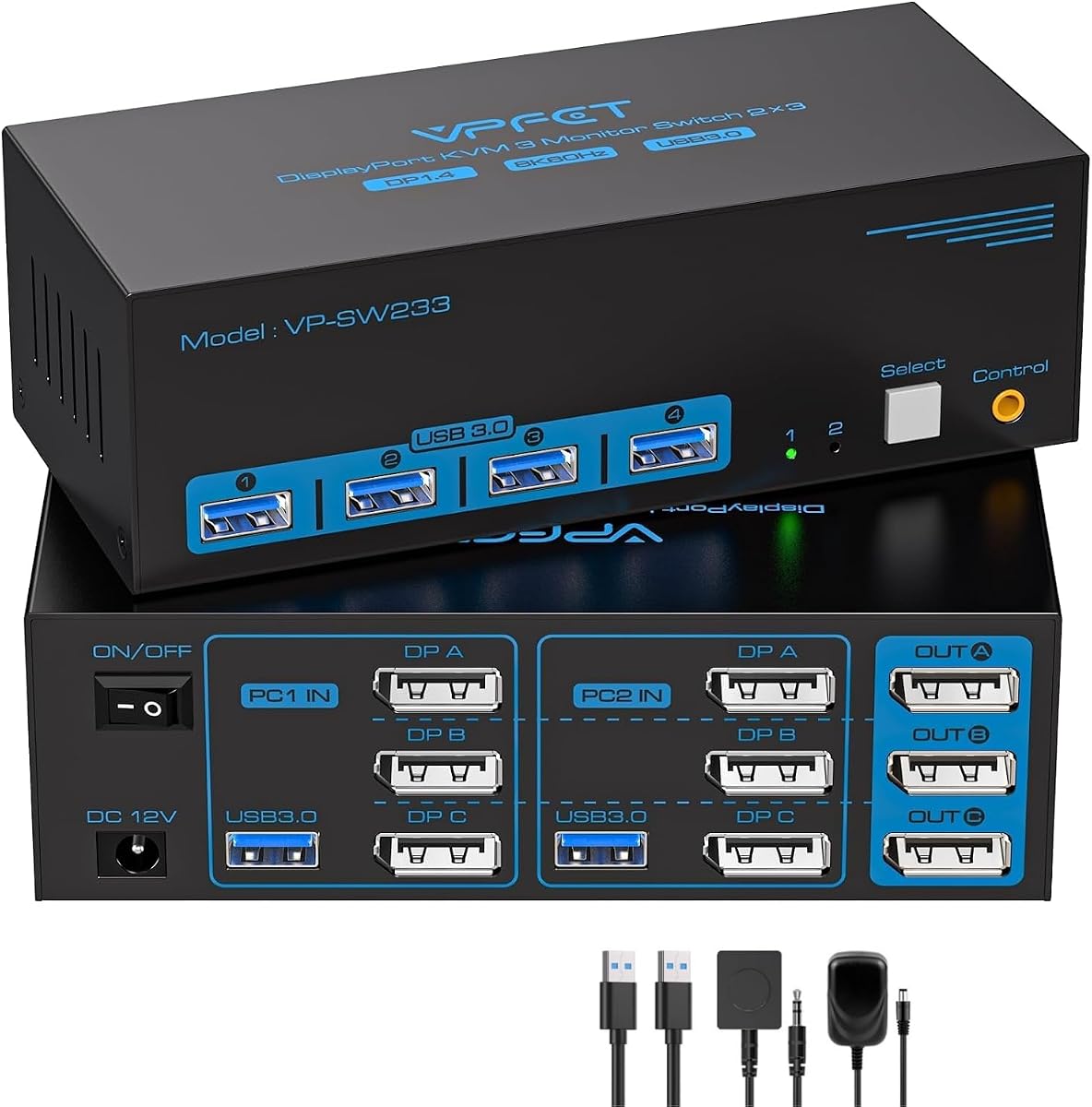

This budget-friendly KVM switch delivers solid performance for users who need triple monitor support across two computers. It supports resolutions up to 4K@60Hz and includes four USB 3.0 ports for peripheral sharing. The package comes with a 12V power adapter to ensure stable USB device operation even with high-power devices like external hard drives.
We may earn a commission when you buy through this link, at no additional cost to you.
The unit supports both extended and duplicate display modes allowing flexible setup configurations. You can switch between computers using either the panel button or an external wired controller. This flexibility helps keep your workspace organized since you can place the switch outside your main work area for easier access during active sessions.
While the switch lacks keyboard shortcut hotkeys it remains user-friendly with clear LED indicators showing the active device. Compatibility requires that both computers support triple monitor output natively meaning extra monitors won't activate if a PC only supports one or two screens. The included USB cables ensure immediate plug and play without driver installation.
This model is ideal for home offices or entry-level workstation setups where cost is a primary concern. Users should ensure their systems support 4K@60Hz on both sources and cables meet the required specifications. Overall it provides a reliable cost-effective solution for sharing three displays and peripherals between two systems efficiently.
The switch supports 4K@60Hz resolution ensuring crisp visuals for productivity or multimedia tasks.
The included 12V adapter ensures stable power for USB 3.0 devices like hard drives and webcams.
We may earn a commission when you buy through this link, at no additional cost to you.
This premium UGREEN KVM switch stands out with its support for 8K@60Hz and 4K@240Hz resolutions ideal for high-end gaming or content creation. It features two DisplayPort 1.4 ports and one HDMI 2.1 port supporting VRR FreeSync and G-Sync to eliminate screen tearing. The aluminum housing ensures durability while the included set of cables reduces initial setup complexity significantly.
We may earn a commission when you buy through this link, at no additional cost to you.
The switch supports mirror and extend display modes allowing you to duplicate images or use screens independently. You can switch computers via panel button or external controller for flexible desk layouts. Note that to achieve 8K resolution your computers monitors and cables must all support it with 28AWG cables kept within two meters for signal integrity.
Compatibility notes emphasize that each PC must have 2 DP ports plus 1 HDMI port for triple monitor output. The device supports Windows and Linux but does not support EDID emulation which may affect plug and play behavior with some displays. The included 28AWG cables are optimized for high resolutions ensuring stable signal transmission over short distances.
Ideal for professionals who need future-proof high-resolution support this model balances performance and build quality well. Users should verify their hardware supports the required DisplayPort and HDMI versions before purchasing. It offers robust connectivity for complex setups where multiple displays and USB peripherals must be shared seamlessly across two computers.
Supports 8K@60Hz and 4K@240Hz ensuring readiness for next-gen display technology.
Includes four DP and two HDMI cables reducing initial setup cost and compatibility risk.
We may earn a commission when you buy through this link, at no additional cost to you.
This docking station transforms laptop and desktop workflows by consolidating triple monitor support USB peripherals network and audio into one device. It delivers up to 100W Power Delivery over USB-C keeping your laptop powered while reducing cable clutter. The shared Ethernet connection ensures downloads and updates continue on the unselected PC while you work on the other.
We may earn a commission when you buy through this link, at no additional cost to you.
Performance spans 8K@60Hz on desktops and 4K@60Hz on laptops making it suitable for design coding and gaming. High-speed USB ports support transfer rates up to 10Gbps while additional 5Gbps ports handle peripherals. The included wired remote allows easy switching without reaching for the top-mounted button ensuring a clean desk experience.
Windows laptops with USB-C video output support extended mode while MacBooks are limited to mirrored displays only. HDMI and DisplayPort cables for desktop connections are not included so you must purchase them separately. This setup excels for hybrid users who need professional docking capabilities alongside traditional KVM switching features.
Best for power users who demand maximum convenience and performance this device justifies its premium cost with advanced features. Verify your laptop supports video output over USB-C before purchasing and plan for separate video cables. It offers unparalleled integration for multi-computer environments needing high-speed data and reliable display switching.
Single USB-C connection handles video data and 100W charging reducing cable clutter.
Shared Ethernet maintains network tasks on both PCs regardless of active control.
We may earn a commission when you buy through this link, at no additional cost to you.
This KVM switch expands sharing capabilities to four computers while maintaining triple monitor support. It supports resolutions up to 8K@60Hz via HDMI and 4K@144Hz via DisplayPort making it versatile for mixed setups. The included wired remote allows easy switching across all four inputs without reaching for the panel button on the device itself.
We may earn a commission when you buy through this link, at no additional cost to you.
Each computer requires 2 DP plus 1 HDMI connections to drive three monitors simultaneously. The switch comes with four USB 3.0 cables enabling immediate peripheral sharing without extra purchases. This feature saves time and ensures consistent performance across all connected systems regardless of input choice during active sessions.
The extended and copy modes allow flexible display configurations for different workflows. Note that discrete and integrated graphics cards must both belong to the discrete card for proper multi-display support. This requirement ensures signal integrity but adds complexity when configuring hybrid graphics setups for specific workstation needs.
Ideal for environments requiring more than two workstations this model provides robust sharing for multiple users. Ensure all PCs support triple monitor output before connecting to avoid inactive screens. It delivers strong performance for shared spaces where cost efficiency and flexible connectivity are paramount priorities for daily tasks.
Supports four distinct computer inputs sharing triple monitors across multiple workstations.
Includes four USB 3.0 cables enabling immediate peripheral connection without extra purchases.
We may earn a commission when you buy through this link, at no additional cost to you.
This switch supports 8K@30Hz via DisplayPort and 8K@60Hz via HDMI 2.1 for high-end resolution needs. It includes a dedicated power switch allowing quick restarts when signal recognition issues occur without unplugging cables. The unit supports Windows Mac OS Chrome OS and Linux systems making it flexible for heterogeneous IT environments.
We may earn a commission when you buy through this link, at no additional cost to you.
To reach maximum resolution cable lengths must stay within 1.5 meters for optimal signal integrity. The switch requires active adapters for HDMI to DP connections and passive adapters are not recommended. This ensures compatibility with native video ports reducing signal loss during long cable runs in large office spaces.
USB 3.0 ports support data transfer up to 5Gbps for quick file sharing between computers. Clear LED indicators show the active computer making navigation intuitive during work sessions. The included 12V power port ensures stable USB performance even with power-hungry devices like external storage or webcams.
This model suits users needing high resolution support without bundled cables reducing cost. Verify your monitors and PCs support the required resolutions before purchasing to avoid disappointment. It offers a reliable and versatile solution for sharing three displays and peripherals across two computers efficiently.
Includes a power switch for quick resets without unplugging cables during troubleshooting.
Supports Windows Mac OS Chrome OS and Linux ensuring flexibility across different environments.
We may earn a commission when you buy through this link, at no additional cost to you.
This docking station supports refresh rates up to 480Hz ideal for competitive gaming scenarios alongside 8K@60Hz clarity for productivity. It delivers 100W charging over USB-C while maintaining active Ethernet connections on both PCs for uninterrupted downloads. The SDXC card reader provides convenient media access without extra dongles or adapters for photographers.
We may earn a commission when you buy through this link, at no additional cost to you.
Laptops connect via a single USB-C cable handling video data and power simultaneously. Desktops require HDMI and DisplayPort cables not included with the unit requiring separate purchases. The built-in SDXC reader supports various memory cards for immediate data access during media review or editing sessions.
Both computers remain online during switching thanks to the shared Ethernet connection ensuring background tasks continue. This feature enhances workflow continuity for cloud sync and remote access without interrupting network tasks on the inactive system. It simplifies dual-computer setups reducing clutter while maximizing peripheral sharing across three displays.
Ideal for gamers and creatives needing high refresh rates and fast charging this dock excels in performance. Verify your laptop supports USB-C video output before purchasing. It offers premium integration for complex setups prioritizing speed and continuous connectivity during multitasking workflows.
Supports refresh rates up to 480Hz ensuring ultra-smooth motion for competitive gaming.
Shared Ethernet connection keeps background tasks running on both PCs during switching.
We may earn a commission when you buy through this link, at no additional cost to you.
This KVM switch supports resolutions up to 8K@60Hz and 4K@120Hz ensuring sharp visuals for demanding applications. It includes a 12V 1A adapter for stable USB power even with high-wattage devices. The unit operates without requiring driver installations ensuring quick setup and reliable performance across Windows systems immediately.
We may earn a commission when you buy through this link, at no additional cost to you.
Switching options include a wired controller for desktop tidiness or the body button for direct access. USB 3.0 ports enable rapid file sharing and device connectivity between computers and peripherals. The included controller reduces clutter by keeping the main switch unit accessible for active workspace management.
Compatibility relies on your computers supporting multiple monitors natively to activate all three displays simultaneously. Backward compatibility includes 4K@30Hz and 1080P ensuring flexibility for older monitors or lower-resolution setups. The dedicated power port ensures stable performance regardless of peripheral load during active usage sessions.
This model offers a cost-effective solution for high-resolution needs without bundled video cables. Verify your systems support the required resolutions before purchasing to avoid display issues. It provides reliable multi-monitor sharing with robust USB support for a streamlined dual-computer workflow setup.
Plug and play design eliminates the need for software driver installation on any system.
12V 1A adapter ensures stable USB power for high-wattage devices like hard drives.
We may earn a commission when you buy through this link, at no additional cost to you.
This KVM switch allows three computers to share three monitors and four USB 3.0 ports. It supports 8K@60Hz via HDMI and 4K@144Hz via DisplayPort accommodating diverse display requirements. The included USB cables ensure immediate peripheral connectivity without extra purchases reducing initial setup time and cost.
We may earn a commission when you buy through this link, at no additional cost to you.
Extended and copy display modes allow flexible screen configurations. You can switch computers using the panel button or included wired remote controller for flexible desk layouts. Clear LED indicators show the active computer making navigation intuitive and reducing errors during frequent switching sessions.
The USB input port must connect to the computer for peripherals to function correctly. Omitting this connection disables keyboard and mouse recognition entirely for the active system. This requirement ensures stability but demands careful cable management during initial installation in complex workstation environments.
This unit suits shared workstations needing three inputs without expensive costs. Ensure all computers support triple monitor output before purchasing. It provides solid connectivity for collaborative spaces prioritizing flexible sharing and reliable dual-computer control across three displays.
Supports three distinct computer inputs sharing three monitors and USB peripherals simultaneously.
Includes USB 3.0 cables reducing extra purchases during initial setup.
We may earn a commission when you buy through this link, at no additional cost to you.
This DisplayPort-only KVM switch delivers up to 4K@144Hz high refresh rates ideal for professional applications. It includes a wired controller for seamless switching between two computers without reaching for the panel button. USB 3.0 ports enable transfer speeds up to 5Gbps ensuring efficient file access across shared peripherals.
We may earn a commission when you buy through this link, at no additional cost to you.
Each computer requires three DisplayPort outputs to support three monitors simultaneously. The switch maintains a dual-computer workflow while managing multiple displays with ease. Stable signal transmission ensures reliable daily work performance even in demanding professional workstation environments with complex setups.
This model simplifies setups where DisplayPort is preferred over HDMI. It supports extended and duplicate modes for flexible display configurations. The clean design reduces cable clutter while maintaining reliable signal stability across three active displays during intense work sessions.
Ideal for professionals relying on DisplayPort for multiple monitors this unit offers robust performance. Verify each PC has three DisplayPort outputs before purchasing. It provides a stable efficient solution for dual-PC setups prioritizing high-speed data and fluid motion during active workflows.
Delivers up to 4K@144Hz ensuring fluid motion for editing or professional applications.
Includes a wired controller for quick access without reaching for the device panel.
We may earn a commission when you buy through this link, at no additional cost to you.
This KVM switch includes HDMI 2.1 and DP 1.4 cables enabling immediate setup without extra purchases. It supports 8K@60Hz and 4K@144Hz delivering crisp visuals across three displays. The included wired remote allows flexible switching for tidier desk layouts while maintaining stable performance during active work sessions.
We may earn a commission when you buy through this link, at no additional cost to you.
Each computer requires 2 DP plus 1 HDMI ports for triple monitor output. USB 3.0 ports ensure transfer speeds up to 5Gbps for rapid data sharing. The package includes all necessary cables and adapters reducing initial complexity and compatibility issues for new users.
Windows macOS and Linux systems are supported with plug and play operation. A 1-year warranty provides added confidence for your investment in this switch. Shorter cable lengths are recommended for optimal performance ensuring signal stability across all connected displays.
This model stands out for its complete package and warranty support. Verify your PCs support triple monitor output before purchasing. It offers a reliable comprehensive solution for sharing three displays and peripherals across two computers efficiently.
Includes HDMI 2.1 and DP 1.4 cables reducing initial setup cost and complexity.
Provides 1-year warranty service ensuring peace of mind for your purchase.
We may earn a commission when you buy through this link, at no additional cost to you.
Selecting the right KVM switch involves evaluating resolution support, port compatibility, and additional features like charging or Ethernet sharing.
Ensure the KVM supports the native resolution and refresh rates of your monitors. Many models support 8K@60Hz or 4K@240Hz but require specific HDMI or DisplayPort versions to achieve these speeds.
Verify that both your computers and monitors support the required standards before purchasing to avoid inactive displays.
Triple monitor setups often require specific video port combinations like 2 DisplayPort plus 1 HDMI. Check your computers have enough outputs before selecting a switch.
Mismatched ports can prevent one or more monitors from activating even with a high-performance KVM.
Consider whether you prefer panel buttons, wired remote controllers, or hotkeys for switching between computers. Wired controllers help tidy up the workspace by placing the switch away from your desk.
Hotkey support is rare in this category so confirm if physical controls are sufficient for your workflow.
USB 3.0 ports support transfer rates up to 5Gbps or higher which are ideal for fast file sharing. USB 2.0 speeds may suffice for peripherals but lack speed for external storage.
Select switches with 3.0 ports for better compatibility with high-speed devices like SSDs or webcams.
High-power USB devices like external hard drives require dedicated power adapters to avoid performance issues. Ensure the KVM includes a 12V adapter if you plan to connect such devices.
External power helps maintain stable signal transmission across all connected peripherals without interruptions.
Some premium KVM docking stations offer shared Ethernet to keep both computers online during switching. This ensures background tasks like downloads continue uninterrupted even when control switches systems.
This feature is valuable for collaborative workflows where network uptime is critical.
Many KVM switches do not include video cables which adds to setup costs. Units with HDMI and DisplayPort cables save money and reduce compatibility risks.
Verify the package contents carefully before purchasing to ensure you have all necessary components.
Check that the KVM supports your specific OS. Most units support Windows Linux and macOS but some features like extended display may vary on MacBooks.
MacBooks often only support mirrored displays over USB-C so confirm before purchasing if extended setups are needed.
Connect each computer to the KVM switch using the specified video and USB cables ensuring all monitors are linked before powering on. Verify your PCs support triple monitor output to activate all displays simultaneously.
Use the wired remote or panel button to toggle between computers and ensure the LED indicator matches the active system. Adjust display settings on your operating system if one computer fails to show all three screens.
Keep the KVM switch well-ventilated and avoid placing it directly under heat sources to maintain performance longevity. Clean dust regularly from vents and ports to prevent signal degradation over time.
Most switches require each computer to have three video outputs configured correctly to activate all displays. Verify both PCs support triple monitor output and that cables connect to the correct ports on the KVM. Missing connections often cause inactive displays.
Active adapters are required for conversions between HDMI and DisplayPort standards. Passive adapters are not recommended and may result in signal loss or inactive monitors. Check compatibility notes before purchasing adapters for your setup.
Extend mode allows each monitor to show different content while copy mode duplicates the same image across all screens. You can switch between these modes using Windows+P on most systems to meet your workflow needs.
Most models in this category rely on panel buttons or wired controllers for switching. Hotkey support is rare and rarely advertised so check product specifications carefully if this feature is essential for your setup.
Most MacBooks only support mirrored displays via USB-C and cannot show extended content across three external monitors. Verify your laptop supports extended multi-monitor mode via MST if you need independent screens.
High-power USB devices often require a 12V power adapter connected to the KVM switch. Without external power the host computer may not provide enough current for stable operation of external storage devices.
Yes achieving 8K resolution typically requires HDMI 2.1 or DisplayPort 1.4 cables with high shielding and specific length limits. Check package contents and cable ratings before purchasing to ensure you meet these strict requirements.
Some docking KVMs with shared Ethernet maintain network tasks on both PCs while others do not. Check the product details to confirm if network access remains active on the inactive computer during switching.
The top three picks offer distinct strengths whether you need budget-friendly basics premium docking features or high-resolution support. The HDMI KVM Switch is ideal for cost-conscious users while the UGREEN model excels with bundled cables and high refresh rates.
Prioritize resolution support port compatibility and power requirements before making your decision to avoid setup issues. Verify your computers support triple monitor output and that your system meets all technical requirements listed.
Prices and stock levels fluctuate frequently so check current availability before purchasing. Always review package contents to ensure you have the necessary cables and adapters for your specific setup.