
LeapFrog 2-in-1 LeapTop Touch
4.7Editor score
Flip screen converts to tablet
Five learning modes included
Affordable price point
This guide compares the best laptop for 5 year old kids with educational games, durable designs, and parental controls to help parents choose the right device.
Choosing the right laptop for a five year old child can be challenging for parents who want to balance education with entertainment. These devices are designed to introduce young learners to technology while keeping content safe and age appropriate for their developmental stage.
We have carefully evaluated ten top rated options based on educational value, durability, ease of use, and child friendly features. Each product offers unique benefits ranging from bilingual learning modes to interactive cameras that engage children in creative play and skill building activities.
Each pick highlights specific strengths and ideal use cases to help you find the perfect match for your child needs and preferences. Please note that product availability and pricing may change over time so verify details before making your final purchase decision.
4.7Editor score

4.5Editor score

4.2Editor score
The following table provides a side by side comparison of all ten selected laptops highlighting their key specifications and educational features to help you make an informed decision.





This VTech Genio laptop stands out as a top choice for young learners seeking a realistic computer experience with rich educational content. It holds an impressive 4.5 rating from users who appreciate its comprehensive curriculum and durable build quality.
We may earn a commission when you buy through this link, at no additional cost to you.
The device offers over eighty preloaded activities that cover math, science, language arts, music, and Spanish. Its full-size QWERTY keyboard and cursor controller help children develop essential typing and navigation skills in a safe offline environment.
While the battery requirement might seem high compared to rechargeable options, the offline functionality ensures uninterrupted play without needing a Wi-Fi connection. The bilingual feature allows seamless switching between English and Spanish to support language immersion at home.
Parents looking for a standalone educational tool that grows with their child will find this laptop an excellent investment. It bridges the gap between toy and real computer while keeping content focused and age appropriate.
Switching between English and Spanish modes helps children build vocabulary and comprehension in both languages without extra cost.
With no internet connection needed, parents can be confident their child is exploring curated content without exposure to external risks.
We may earn a commission when you buy through this link, at no additional cost to you.
The Lexibook Unicorn laptop delivers a focused learning experience with an emphasis on mathematics, logic, and music. Its engaging design appeals to children who enjoy creative play alongside structured educational activities.
We may earn a commission when you buy through this link, at no additional cost to you.
Features include clock reading, dactylography, and general knowledge quizzes that test understanding at different skill levels. The music section lets kids learn notes and compose melodies, fostering creativity and auditory skills.
Its ergonomic design with a realistic mouse and keyboard ensures comfortable use during extended play sessions. The slim profile makes it easy to carry and store without taking up too much space in a play area.
This option is ideal for children who thrive on repetition and creative expression. While it lacks bilingual support, its strong focus on core skills makes it a solid companion for early elementary learning.
Learning notes and composing simple melodies helps develop auditory processing and rhythm skills in a playful way.
Multiple knowledge testing levels allow children to grow at their own pace without feeling overwhelmed or bored.
We may earn a commission when you buy through this link, at no additional cost to you.
This colorful kids laptop offers a broad range of learning modes that cover alphabet, math, colors, and general knowledge. The TFT color screen provides lifelike visuals that enhance engagement and help children visualize concepts better.
We may earn a commission when you buy through this link, at no additional cost to you.
With forty eight distinct learning modes, children can explore logic puzzles, memory games, and calendar reading. The realistic keyboard and mouse setup encourages proper hand positioning and interaction styles that mimic real computing.
The screen comes with a protective film that needs to be removed for optimal clarity, which is a minor setup step parents should note. Its compact size fits well in small hands and makes it easy to transport for travel.
For families seeking a cost-effective option with solid educational content, this laptop provides excellent value. It balances fun and learning effectively to keep children motivated to explore new topics regularly.
The vibrant TFT screen helps children distinguish colors and shapes clearly, supporting early visual learning skills.
From logic to music, the diverse modes ensure no two play sessions are the same, keeping interest levels high.
We may earn a commission when you buy through this link, at no additional cost to you.
The LeapFrog 2-in-1 LeapTop Touch offers incredible versatility by flipping from a keyboard laptop into a touch tablet. It holds a high 4.7 rating thanks to its user-friendly interface and strong brand reputation for quality educational toys.
We may earn a commission when you buy through this link, at no additional cost to you.
Kids can pretend to send emails and customize the device with their own name and avatar for a personalized touch. Five core learning modes cover ABCs, numbers, games, music, and messages to build foundational skills progressively.
Its affordability makes it accessible for families on a budget while still delivering trusted LeapFrog educational content. The lightweight design ensures even smaller hands can hold it comfortably during play sessions.
This is a perfect starting laptop for younger children transitioning into more complex tech experiences. Its dual mode capability adds play value that justifies the low price point for parents seeking flexibility.
Switching between keyboard and tablet modes keeps play fresh and teaches different interaction skills naturally.
Adding a child name makes them feel more connected to the device and encourages consistent usage.
We may earn a commission when you buy through this link, at no additional cost to you.
This sleek VTech laptop mimics a grown-up computer closely while offering thirty personalized learning activities. It features a high 4.6 rating for its engaging content and ability to adapt to a child individual progress and interests.
We may earn a commission when you buy through this link, at no additional cost to you.
Children can create an avatar and learn basic Spanish words, letters, and numbers through interactive tasks. Music games and animal sound exploration add entertainment value that keeps sessions lively and enjoyable for young users.
The leveling system ensures activities remain challenging enough to promote growth without causing frustration or disengagement. Its compact build makes it easy to store and transport for family trips or playdates.
Ideal for preschoolers ready for structured digital play, this laptop introduces tech concepts gently. The personalization options make it feel like a unique tool rather than a generic toy.
Creating an avatar and entering details helps children feel ownership and identity with their learning device.
Learning animal sounds and footprints builds knowledge about nature while keeping the experience fun.
We may earn a commission when you buy through this link, at no additional cost to you.
The LEXiBOOK LAPTAB stands out as a genuine Android laptop with a touchscreen and full app access for advanced learners. Its 4.2 rating reflects strong performance and features that bridge the gap between toy and real computer effectively.
We may earn a commission when you buy through this link, at no additional cost to you.
Children can use thousands of educational apps and games via Google Play while parents retain control through Qwant Junior browser. The 128GB storage and WiFi connectivity offer versatility for offline and online learning activities.
While it is pricier than toy laptops, its longevity and real computing skills make it a valuable investment. Parental controls allow time limits and app management to ensure safe and focused usage.
This laptop suits tech-savvy kids ready to explore beyond basic toy interfaces. It prepares them for future school devices while keeping content appropriate with robust safety features.
Google Play access allows children to download educational apps that grow with their learning needs over time.
The Qwant Junior browser filters content to keep internet exploration safe and educational by design.
We may earn a commission when you buy through this link, at no additional cost to you.
This creative kids laptop integrates a camera for photos with sixty four educational modes for a well-rounded experience. Its 4.6 rating comes from parents who appreciate the blend of learning and artistic expression features.
We may earn a commission when you buy through this link, at no additional cost to you.
The camera includes cute frames and filters that let children record memories and express creativity safely. Beyond photos, the curriculum covers math, colors, and alphabet in a clear TFT display that is easy on young eyes.
Its realistic design encourages proper interaction habits while keeping the focus on fun and skill building. The portability makes it a great travel companion for family trips or playdates.
For children who enjoy both learning and taking pictures, this laptop offers unique value. It keeps them engaged longer by switching between educational tasks and creative photo sessions.
Photo modes with filters encourage storytelling and memory keeping in a safe digital format.
With sixty four modes, children have plenty of options to explore without running out of fresh content.
We may earn a commission when you buy through this link, at no additional cost to you.
The LeapPad Academy is a rugged tablet designed for reading, writing, and coding with educator-approved apps. It scores a 4.3 for its strong curriculum support and durable build that withstands typical kid use.
We may earn a commission when you buy through this link, at no additional cost to you.
The three-month trial of LeapFrog Academy provides over 2,000 games and eBooks to keep learning fresh. Its shatter-safe screen and bumper case offer protection while allowing comfortable touch interactions.
Parents can set time limits and manage apps easily to ensure balanced screen time usage. The rechargeable battery eliminates the need for frequent replacements found in toy laptops.
Ideal for school-age kids, this tablet grows with them through grades. The writing and coding tools make it a powerful tool for developing essential academic skills.
Educator-approved apps ensure that the content aligns with learning standards and academic goals.
The tough bumper and shatter-safe screen are designed to survive drops and rough handling.
We may earn a commission when you buy through this link, at no additional cost to you.
This themed laptop combines popular Barbie design with serious educational content covering math, logic, and music. It earns a 4.3 rating for its comprehensive activity list that engages children with familiar branding.
We may earn a commission when you buy through this link, at no additional cost to you.
Over one hundred twenty four activities ensure there is plenty to explore across multiple skill levels. The bilingual support allows switching between English and Spanish for language building practice anytime.
Its slim and elegant design makes it easy to pack for trips without taking up much space. The realistic mouse and keyboard help children practice using standard input devices comfortably.
For fans of the brand, this laptop offers a perfect blend of style and substance. The compact form factor keeps it practical for daily home use or outings.
Familiar branding helps children connect emotionally with the device to encourage consistent use.
The slim design makes it easy to store in bags or carry for learning on the go.
We may earn a commission when you buy through this link, at no additional cost to you.
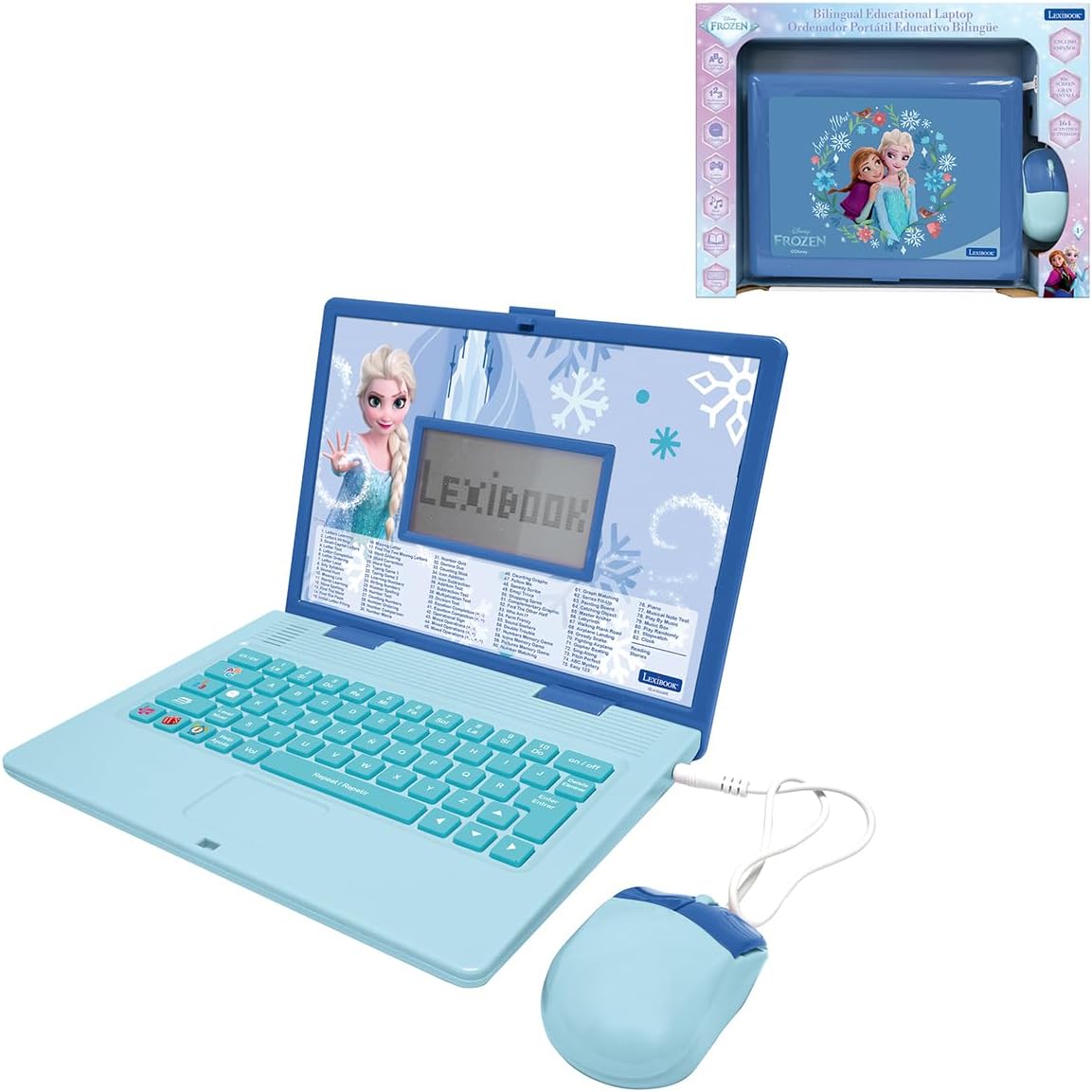
The Frozen-themed laptop delivers a high volume of activities to keep children engaged in learning and games. It is designed for portability with a lightweight build that fits easily in a child hands.
We may earn a commission when you buy through this link, at no additional cost to you.
One hundred sixty four activities include vocabulary, spelling, math, and logic to support comprehensive skill growth. The bilingual feature lets users switch between English and Spanish to practice comprehension and fluency.
As a trusted brand, Lexibook ensures quality and safety standards are met for all products. The clear LCD screen and keyboard make navigation simple for young users.
This device works well as a travel companion or daily learning tool. Its thematic appeal ensures children are excited to pick it up and start learning.
Character themes help motivate kids to explore educational content they might not otherwise find interesting.
Switching between languages supports bilingual households or introduces second language basics gently.
We may earn a commission when you buy through this link, at no additional cost to you.
Selecting the right laptop involves balancing educational value, durability, and ease of use for young learners.
Look for devices with preloaded activities that cover key skills like math, reading, and logic. A variety of modes keeps children engaged and prevents boredom as they grow.
Choose laptops with diverse activities to support different learning styles and interests.
If you want your child to learn a second language, select a model with English and Spanish options. Bilingual features allow easy switching to reinforce vocabulary in both languages.
Bilingual laptops provide flexible language learning without extra apps or fees.
Children handle toys roughly so durable plastics and sturdy screens are essential. Ergonomic designs with lightweight bodies prevent strain during extended play.
Prioritize robust materials and comfortable grip for daily use.
Decide between battery-powered toys and rechargeable devices. Battery models may need frequent replacements while rechargeables offer convenience with longer usage.
Consider cost and convenience when choosing a power source.
A clear color screen enhances learning by showing visuals effectively. Larger screens reduce eye strain and help children see details more easily.
Opt for screens that are bright and easy to read.
Advanced devices like tablets often include time limits and app restrictions. These features help maintain balance and safety during digital play.
Ensure the device has controls that fit your parenting needs.
Some laptops work without internet which is safer and prevents distractions. Offline features allow focus on core lessons without needing a connection.
Offline mode ensures uninterrupted learning in any location.
Budget options provide basic learning while premium models offer advanced features. Determine how much you are willing to spend based on your child needs.
Balance cost with the features your child will use most.
Keep the device clean by wiping the screen and keyboard with a soft cloth. Dust and fingerprints can affect visibility and interaction quality.
Store batteries separately when not in use to prevent leakage and damage to the device. Always use fresh batteries for reliable performance.
Limit screen time to ensure children balance digital play with physical activity and social interaction for healthy development.
These devices are designed for children around 5 to 8 years old but can accommodate those as young as 3 or up to 10 depending on the model. Check the specific age range on the product packaging for best fit.
Most educational toy laptops work offline without needing a connection. However some advanced models with app access may require Wi-Fi for additional features or updates.
Battery duration varies by model but typically lasts several hours of continuous play. Rechargeable tablets may offer longer usage while battery-powered ones depend on battery quality.
Yes all reviewed products meet safety standards for children. Non-toxic materials and rounded edges help prevent injury during regular use.
Many models include parental controls that limit time and access to certain apps. Advanced tablets often offer more robust management tools than basic toy laptops.
They cover math, reading, logic, music, and basic computer skills. Some also introduce coding, typing, and second languages to broaden learning opportunities.
We have reviewed ten top options ranging from affordable toy laptops to advanced tablets with real computing power. Each provides unique educational value and design features to suit different needs and budgets.
Prioritize durability, educational content, and parental controls when making your final choice. Consider your child interests and how you plan to use the device at home.
Check current availability and pricing before purchasing as details may change over time. The right laptop can spark a love of learning while keeping play safe and structured.