
Thibault Aluminum Laptop Stand
4.6Editor score
Sturdy aluminum alloy
Ventilated design
Easy assembly
Laptop overheating can slow performance and shorten device lifespan. Effective cooling solutions help maintain optimal temperatures during heavy use like gaming or video editing.
We evaluated ten top-rated cooling pads and stands based on fan performance, ergonomic design, portability, and user feedback. Each option offers unique features to suit different needs.
Each pick highlights key specs and real-world benefits. Prices and availability change frequently, so verify details before purchasing to ensure you get the best value for your setup.
4.6Editor score

4.4Editor score
4.4Editor score
As an Amazon Associate we earn from qualifying purchases.
The following table compares all ten selected solutions side by side. Review key specs like fan count, compatibility, and ergonomic features to find the perfect match for your laptop.


The havit HV-F2056 is a highly rated cooling pad with three ultra-quiet fans. Its ergonomic design doubles as a stand with two height settings for comfortable viewing.
We may earn a commission when you buy through this link, at no additional cost to you.
Its metal mesh provides a stable surface while the extra USB port allows connecting more devices. The fans create a noise-free environment ideal for focused work.
While the USB cable is USB-A, users with Type-C may need an adapter. This minor limitation does not outweigh its effective cooling and solid build quality.
Buyers seeking a reliable, quiet solution for 15.6 to 17 inch laptops will find this pad a versatile and affordable choice for daily use.
Two adjustable height settings let you tailor the viewing angle to reduce strain during long sessions.
An extra USB port lets you plug in peripherals without using up your laptop's limited ports.
We may earn a commission when you buy through this link, at no additional cost to you.
The TECKNET Slim Pad features three powerful fans that operate quietly at 1200 RPM. It includes double USB ports and ergonomic comfort for 12 to 17 inch laptops.
We may earn a commission when you buy through this link, at no additional cost to you.
Its triple fan setup pulls cool air from the bottom effectively. Blue LED indicators confirm fans are running and the design is simple to use without an adapter.
The USB-A cable may require an adapter for Type-C devices. LEDs stay on whenever powered but this does not impact performance or comfort significantly.
This pad is ideal for users needing a portable cooler with solid heat dissipation and extra connectivity for peripherals during extended use.
Three powerful fans work together to prevent overheating during intense gaming or extended work sessions.
One port powers the cooler and the other allows connecting external devices like mice or keyboards.
We may earn a commission when you buy through this link, at no additional cost to you.
The Kootek Cooling Stand offers five built-in fans with blue LEDs and dual USB hub connectivity. It supports six adjustable height settings for ergonomic comfort.
We may earn a commission when you buy through this link, at no additional cost to you.
Its whisper-quiet fans let you focus without distractions. Two switches enable control of fans and LEDs while stoppers keep the laptop secure during use.
The USB cable is USB-A and fans are grouped rather than individually controlled. These minor limits do not affect its strong cooling and flexible design.
Users wanting maximum fan coverage and adjustable height for 12 to 17 inch laptops will appreciate this stand’s versatility and quiet performance.
Six height settings enable you to customize the angle for optimal comfort during gaming or movie watching.
Dual USB hub lets you connect additional devices to your laptop without losing extra ports.
We may earn a commission when you buy through this link, at no additional cost to you.
The KeiBn Cooling Pad provides two strong fans and metal mesh for quick heat dissipation. It includes five adjustable heights and a hidden phone holder on the side.
We may earn a commission when you buy through this link, at no additional cost to you.
Its ergonomic design acts as a stand with baffles to prevent slipping. Two USB ports and a blue LED indicator help maintain connectivity and monitor status easily.
It supports only two fans which may be less powerful for heavy gaming. The USB-A cable may need an adapter for newer laptops with Type-C ports.
This is a great option for budget-conscious buyers who need a portable solution with a phone stand for 10 to 15.6 inch laptops.
A hideable phone holder on the side releases your hands and keeps your device within view.
Five adjustable height options let you find the perfect angle for comfort during extended use.
We may earn a commission when you buy through this link, at no additional cost to you.
The Thibault Aluminum Stand offers a passive cooling solution using aluminum alloy for heat dissipation. Its ventilated design lets air flow under the laptop easily.
We may earn a commission when you buy through this link, at no additional cost to you.
It elevates your laptop for comfortable typing and optimal viewing. Soft rubber pads protect your desk and laptop while assembly is quick and effortless.
It lacks fans and USB ports which limits its active cooling capabilities. However its sturdy build and ergonomic lift make it a strong low-maintenance option.
This stand is perfect for users who prefer a clean desk setup with reliable passive cooling for laptops up to 17 inches.
Elevating your laptop allows efficient airflow beneath it where exhaust fans are located to keep your device cool.
Soft rubber pads on base and surface protect your laptop and desk from scratches during use.
We may earn a commission when you buy through this link, at no additional cost to you.
The Hagibis Invisible Cooler uses magnetic feet to elevate laptops for better airflow and heat dissipation. These two stands are small, portable, and fit in pockets.
We may earn a commission when you buy through this link, at no additional cost to you.
High quality silica gel pads prevent scratches and slipping. Elevating your laptop enhances bottom air circulation and reduces temperature without electricity or cables.
These are passive solutions with no fans which limits active cooling. They are best used as a supplement to other cooling methods or for light tasks.
Buyers wanting the most portable and minimal cooling support will find these magnetic feet a discreet and effective add-on for their setup.
Nd-Fe-B magnets provide durable strong suction that adsorbs to the laptop base securely.
By elevating the laptop physical heat dissipation is achieved without needing extra power.
We may earn a commission when you buy through this link, at no additional cost to you.
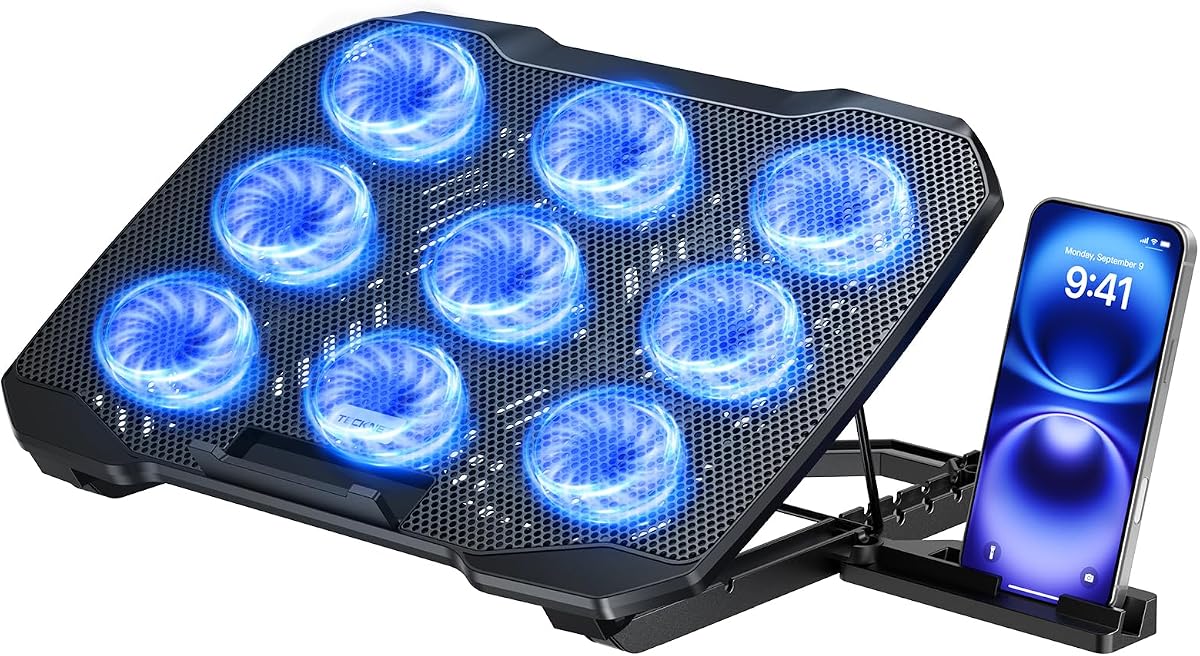
The TECKNET with Phone Stand features nine fans with stepless speed control and a built-in phone holder. It offers 360° airflow and 5-level height adjustment.
We may earn a commission when you buy through this link, at no additional cost to you.
Its alloy mesh provides excellent heat dissipation while the anti-slip baffle secures the laptop. LED brightness syncs with fan speed to show operating status.
This model is more expensive and the cable is USB-A. The higher price matches its superior cooling and ergonomic design for gamers and power users.
Users seeking a full-size premium cooler with maximum fan coverage and extra convenience will find this pad a comprehensive and reliable solution.
Nine high-performance fans deliver surround airflow to quickly dissipate heat during long sessions.
Five height settings and a phone holder deliver comfort and keep notifications within sight.
We may earn a commission when you buy through this link, at no additional cost to you.
The AIMIUZI Cooling Stand includes five low noise fans with a honeycomb mesh and five adjustable angles. It provides more airflow to keep laptops cool down quickly.
We may earn a commission when you buy through this link, at no additional cost to you.
A switch wheel turns fans on and off and a metal bar offers ergonomic elevation. The flip-up anti-slip pad helps secure devices during use.
It does not support USB-C and fans are controlled as a group. These limits are acceptable given its reliable cooling and versatile height options.
This stand suits users who need a balanced mix of quiet cooling and ergonomic adjustability for 12 to 15.6 inch laptops.
Honeycomb style metal mesh provides better airflow for heat dissipation and cooling efficiency.
Five adjustable stand heights give you room for better heat dissipation and desk clearance.
We may earn a commission when you buy through this link, at no additional cost to you.
The TECKNET Lap Fan uses two large fans and an internal channel to direct airflow to the CPU. It features both USB-C and A ports for broad compatibility.
We may earn a commission when you buy through this link, at no additional cost to you.
Its flat base isolates heat from your legs and works well on laps. A side switch lets you adjust speed from zero to max for noise control.
It includes only an A-A cable and fans are controlled together. These small limits do not reduce its value as a versatile portable solution.
Buyers wanting a portable lap cooler with flexible connectivity and targeted cooling will find this pad a reliable and comfortable choice.
Internal channel design draws air from sides and bottom to center it where the laptop gets hottest.
Flat base effectively isolates heat from your legs so you can work or game comfortably on your lap.
We may earn a commission when you buy through this link, at no additional cost to you.
The Targus Lap Chill Mat offers dual fans powered by USB-A and a soft neoprene base for lap comfort. It features an ergonomic tilt for easy typing.
We may earn a commission when you buy through this link, at no additional cost to you.
Open mesh top allows airflow to move away from the laptop. Four rubber stops keep the laptop stable while cushioned comfort protects your legs.
It only supports USB-A and has a larger size which may be less portable. These limits suit users focused on comfort for 17 inch devices.
Buyers prioritizing lap comfort and cushioned support for larger laptops will find this mat a reliable and comfortable cooling solution.
Soft neoprene material provides cushioned comfort while the ergonomic tilt makes typing easy on hands and wrists.
Four rubber stops prevent laptop slipping and keep it stable during use.
We may earn a commission when you buy through this link, at no additional cost to you.
Selecting the right solution depends on your laptop size, usage patterns, and portability needs. Consider these factors before purchasing.
More fans often mean better heat dissipation but can also mean more noise. Look for models with adjustable speeds to balance cooling with quiet operation.
Prioritize models with multiple fans and adjustable speeds for intense workloads while quieter options suit office environments.
Ensure the pad or stand fits your laptop dimensions exactly. Larger pads offer more stability but reduce portability.
Match the product range to your laptop size to ensure full coverage and stability during use.
Adjustable height settings help reduce neck and wrist strain. Stand-only models offer good lift but lack active cooling.
Choose models with multiple height options for long-term comfort during extended use sessions.
Travelers should prioritize slim, lightweight models. Passive stands take less space but provide less cooling than fans.
Select ultra-lightweight or compact models if you move between locations regularly.
Check if the product supports USB-A, USB-C, or both. Extra ports can help hub peripherals without extra cables.
Look for dual USB ports or USB-C support to maintain device connectivity and ease of use.
Metal mesh and sturdy frames offer better heat dissipation and durability. Plastic models are lighter but may wear faster.
Opt for metal mesh or aluminum for better airflow and longer product lifespan.
Phone holders, LED indicators, and built-in hubs add convenience. These extras improve workflow but may increase cost.
Evaluate extras like phone holders and indicators to decide their value to your workflow.
Prices vary from affordable passive stands to premium active coolers. Balance performance with cost based on your primary usage.
Set a budget that covers your needs without sacrificing essential cooling performance and comfort.
Place your laptop centered on the pad or stand to ensure even airflow. Ensure vents are not blocked by surfaces or fabrics.
Clean fans regularly using compressed air to prevent dust buildup. Wipe surfaces with a dry cloth to avoid scratches and residue.
If using a lap mat, keep it flat on your lap. Avoid placing on soft bedding which can block airflow and reduce cooling.
Yes cooling pads actively pull air through your laptop vents to lower internal temperatures. Users report noticeable improvements in fan noise and sustained performance during heavy loads.
Active coolers with fans provide stronger heat removal which is ideal for gaming or video editing. Passive stands offer basic airflow and are more portable but less effective.
Measure your laptop width and depth to find a matching pad. Most models cover 12 to 17 inches so confirm dimensions before buying.
Some models are designed specifically for lap use with soft bottoms. Ensure the pad is flat and stable to avoid discomfort or blocking airflow.
Yes active cooling pads need USB power to run fans. Some models include USB hubs so you can connect other peripherals while cooling.
Use compressed air to clear dust from fans and vents regularly. Wipe the surface with a dry cloth to avoid scratches and residue build-up.
Slim and lightweight pads or passive stands are most portable. Avoid large multi-fan models if you frequently move locations.
Keeping your laptop cooler reduces thermal stress on components which can prolong lifespan. Consistent cooling prevents overheating-related hardware failures.
The havit HV-F2056, Thibault Aluminum Stand, and TECKNET with Phone Stand lead our list for performance and value. Each offers unique strengths to suit different needs.
Prioritize fan count for power users or ergonomic lift for comfort. Consider portability if you move your workspace often.
Always check current prices and availability since deals change frequently. Verify USB type and dimensions to ensure a perfect match for your setup.