
ASRock J4125M
3.4Editor score
Quad Core J4125
DDR4 Memory Support
Compact ATX Layout
This guide compares the top ten low power motherboard options for energy efficient computing NAS home servers and compact builds across various performance
Finding the right low power motherboard is essential for building energy efficient systems that run quietly and cool. These boards are designed to minimize electricity consumption while still delivering reliable performance for home servers and office PCs.
We have evaluated ten real products based on their specifications connectivity and power efficiency features. Each entry offers unique strengths ranging from industrial NAS designs to standard consumer AM4 platforms for flexible building options.
Every pick highlights key features and trade offs so you can make an informed decision. Note that availability and pricing may change over time so verify details before finalizing your purchase for your specific setup.
3.4Editor score

4.5Editor score

5.0Editor score
The following table provides a side by side overview of all ten boards. It highlights core specifications and form factors to help you quickly identify which model fits your project requirements and budget constraints.





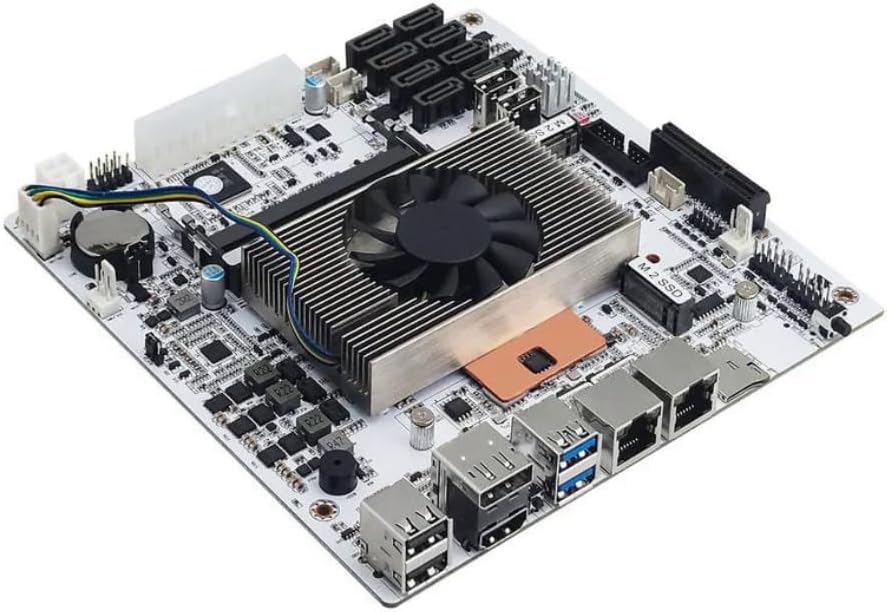
This industrial motherboard stands out as a top choice for users needing reliable low power performance. With its Intel Celeron N5105 processor and robust networking features it is ideal for home servers and NAS builds.
We may earn a commission when you buy through this link, at no additional cost to you.
The standout feature is the four 2.5GbE network ports which provide exceptional connectivity for high throughput tasks. It also supports up to thirty two gigabytes of RAM and offers six SATA ports alongside two M.2 slots.
While the build quality is strong there are minor inconveniences like the need for both a pin and four pin power connections. Boot times may also take a few minutes as the system reads memory info.
Buyers looking for a dedicated server or firewall appliance should consider this board. It balances efficiency and capability better than most consumer options in the current market.
Four 2.5GbE ports allow for link aggregation and high speed data transfers essential for NAS and firewall tasks.
With six SATA ports and dual M.2 slots this board supports extensive storage configurations without needing extra expansion cards.
We may earn a commission when you buy through this link, at no additional cost to you.
This Micro ATX board is a great option for users on a tight budget who need basic computing power. It uses the Intel J1800 processor which provides sufficient performance for everyday tasks and light office work.
We may earn a commission when you buy through this link, at no additional cost to you.
The board supports DDR3 memory which is often more affordable than newer standards. It includes essential ports like HDMI and DVI for display connectivity and offers standard USB options for peripherals.
Performance is naturally limited by the older architecture so it is not suited for heavy multitasking or modern applications. However for simple file serving or kiosks it remains a functional choice.
Consider this if you need a no fuss board for light use cases. It is best paired with budget friendly components to keep the total system cost low.
The use of DDR3 memory and legacy ports helps keep the overall cost of the system significantly lower than modern builds.
Ports like PS/2 and VGA make this board useful for older monitors and peripherals that require these standard connectors.
We may earn a commission when you buy through this link, at no additional cost to you.
The B550M K offers solid performance for AMD Ryzen users looking for an affordable entry into the AM4 platform. It supports the latest 5000 series processors which means you get modern performance with a budget friendly base.
We may earn a commission when you buy through this link, at no additional cost to you.
Features include support for PCIe 4.0 which allows for faster storage and graphics card speeds. The board also comes with dual M.2 slots for high speed NVMe drives and USB 3.2 Gen 1 ports for quick data transfer.
The power delivery system is functional but basic meaning it might not handle extreme overclocking on higher end CPUs. This makes it best suited for mid range builds where stability is more important than raw power.
If you need a reliable base for a Ryzen build this board delivers good value. It is particularly useful for users who want PCIe 4.0 features without paying a premium.
Support for Ryzen 5000 series allows for future proofing and access to the latest CPU performance improvements available on the AM4 socket.
Dual M.2 slots and PCIe 4.0 support enable ultra fast NVMe SSD usage which is critical for system responsiveness and load times.
We may earn a commission when you buy through this link, at no additional cost to you.
The MSI PRO B550M-P is designed for users who prioritize stability and reliability in their builds. It features Core Boost technology which ensures steady power delivery to supported processors for consistent performance over time.
We may earn a commission when you buy through this link, at no additional cost to you.
It supports DDR4 memory speeds up to 4400 plus MT/s with OC and includes a Gen4 M.2 slot for fast storage. The chipset heatsink helps with passive cooling which reduces noise in quiet environments.
While the visual design is simple the functionality is solid for daily workloads. It is a good match for users who want a professional looking board without extra bloat or marketing features.
Choose this if you need a dependable AM4 motherboard for workstations. The memory boost features make it suitable for users who want to leverage faster RAM speeds.
Core Boost technology ensures that power remains stable during operation which helps maintain performance and longevity of the CPU components.
The Gen4 M.2 slot supports ultra fast NVMe drives which significantly improve system boot times and application loading speeds.
We may earn a commission when you buy through this link, at no additional cost to you.
This board is a great choice for those needing a simple compact solution without breaking the bank. The Intel J4125 quad core processor provides enough power for basic tasks and media handling without needing a separate CPU.
We may earn a commission when you buy through this link, at no additional cost to you.
It supports DDR4 memory which is an upgrade over older DDR3 boards and includes an M.2 Key E slot for wireless connectivity. The layout is designed for small cases where space is at a premium.
The performance is adequate for light duties but it is not intended for high end gaming or heavy rendering tasks. For home office or lightweight server roles it remains a solid budget pick.
Buyers focused on cost effectiveness should consider this model. It is easy to install and works well for users who do not need extensive expansion options.
The integrated processor means you do not need to buy a separate CPU which reduces both cost and complexity of the build process.
Designed for small cases this board allows for energy efficient systems that take up minimal space in any environment.
We may earn a commission when you buy through this link, at no additional cost to you.
This Micro ATX board offers impressive memory speeds and stable power delivery for AMD Ryzen builds. With support for DDR4 speeds up to 4733 plus OC it allows users to leverage faster RAM for better system performance.
We may earn a commission when you buy through this link, at no additional cost to you.
The six power phase design ensures that supported processors get steady power which is important for stability. It also includes comprehensive connectivity options including HDMI DVI and VGA for broad monitor compatibility.
The limitation to two RAM slots means total capacity is lower than four slot boards. However for most users the speed and stability provided by the VRM design offer strong value.
Consider this board if you want high speed memory support on a budget. The multiple video outputs make it flexible for various display setups.
Support for speeds up to 4733 plus OC allows for faster data access which can improve performance in memory intensive tasks.
Three video output ports ensure compatibility with a wide range of monitors whether you need HDMI for modern screens or VGA for legacy devices.
We may earn a commission when you buy through this link, at no additional cost to you.
The A520I AC is designed for small form factor builds where space is limited. It features a six phase digital PWM design with DrMOS for efficient power delivery which helps in quiet and compact environments.
We may earn a commission when you buy through this link, at no additional cost to you.
WiFi and Bluetooth are built in which saves the need for separate network cards. The board supports dual display outputs and includes a slot M.2 slot for storage expansion within the tight layout.
While it lacks PCIe 4.0 support it is sufficient for many standard uses and gaming builds. The focus is on delivering stable performance in a tiny footprint without compromising on essential features.
Users building compact PCs should look closely at this option. It offers a balance of power and size that is hard to match in the Mini ITX category.
Intel WiFi and Bluetooth are built directly into the board which simplifies assembly and reduces the need for external network cards.
The Mini ITX design allows for incredibly small PC builds that still offer modern connectivity and reliable power management.
We may earn a commission when you buy through this link, at no additional cost to you.
This Micro ATX board offers premium features including Wi Fi 6E and high speed memory support. It is designed for users who want top tier connectivity and performance without sacrificing power efficiency.
We may earn a commission when you buy through this link, at no additional cost to you.
The eight phase power design ensures that Ryzen processors run smoothly. It also includes a premium audio codec which enhances sound quality for media and gaming experiences.
While the price is higher than basic boards the added features justify the cost for demanding users. It is a solid choice for builds that require modern wireless standards and reliable power.
Buyers looking for the best balance of features and performance should consider this model. It is ideal for high end home office or entertainment setups.
Wi Fi 6E support ensures low latency and high speed wireless connections which are critical for modern gaming and streaming applications.
The high end audio codec provides immersive sound quality that enhances the overall user experience for media consumption.
We may earn a commission when you buy through this link, at no additional cost to you.
This board is designed for serious server tasks with an eight thread processor and fast networking. It supports virtualization and offers extensive storage options which makes it ideal for home labs and NAS systems.
We may earn a commission when you buy through this link, at no additional cost to you.
The dual 2.5GbE LAN ports provide high speed connectivity for data transfers. It also includes eight SATA ports and two M.2 slots which allows for massive storage capacity in a compact case.
There are known sleep mode bugs that may require users to work around them in certain use cases. However the raw performance and connectivity features make it a powerful tool for dedicated server builds.
Tech enthusiasts building virtualization hosts should find this board compelling. It delivers high throughput and flexibility in a small package.
Support for VT-x and VT-d allows for efficient virtualization which is essential for running multiple servers or systems on one machine.
Eight SATA ports and dual M.2 slots provide immense flexibility for storing large amounts of data efficiently.
We may earn a commission when you buy through this link, at no additional cost to you.
This NAS focused motherboard is built for users needing eight drive bays and solid processing power. The Core i5 8265U provides enough compute for data management and virtualization without consuming excessive power.
We may earn a commission when you buy through this link, at no additional cost to you.
It includes dual 2.5GbE LAN ports which are crucial for fast network access to your storage array. The board also supports TF card boot options which adds flexibility for system recovery or installation.
Users should note that sleep mode is not supported on this board which makes it ideal for always on servers. The dual power input requirement is standard for industrial grade motherboards.
Consider this board for serious storage and NAS projects. It offers a rare combination of high core count and massive storage expansion in a compact form.
Eight SATA ports allow for direct connection of eight drives which simplifies cabling and increases overall storage capacity significantly.
The i5 processor provides better performance than standard low power chips which helps when handling complex NAS tasks or virtualization.
We may earn a commission when you buy through this link, at no additional cost to you.
Choosing the right low power motherboard requires understanding your specific needs. Here are key factors to consider to ensure compatibility and efficiency.
The processor type determines how much energy the system uses. Look for chips with low TDP values to keep running costs down and reduce heat output.
Select a CPU that matches your workload needs without over spending on performance you do not require for daily tasks.
Mini ITX and Micro ATX boards are common for low power builds due to their compact sizes. Ensure the board fits your chosen chassis before purchasing.
A smaller form factor often means fewer ports but can save space in home or office environments.
For server or NAS use fast network ports are vital. Look for 2.5GbE or better options if you need high throughput for data transfers.
Standard Gigabit LAN is sufficient for basic office tasks but not for heavy file sharing or backups.
Count how many SATA and M.2 slots you need for your storage plans. Some low power boards offer many SATA ports for large arrays.
Ensure the board supports the type of drives you plan to use to avoid bottlenecks or compatibility issues.
Check the supported memory type and speed. DDR4 is standard now but older boards might use DDR3 which limits future upgrades.
Choose a board that allows enough capacity for your multitasking or server workload needs.
Industrial boards often require both 24 pin and 4 pin power connections. Ensure your power supply has the right connectors available.
Standard consumer boards usually only need the main 24 pin connector which simplifies setup.
Look for PCIe slots if you plan to add network cards or capture devices. Low power boards sometimes limit expansion to save space.
Verify the slot generation to ensure it matches your expansion card speeds for optimal performance.
Most low power boards include multiple video outputs for display support. Check if HDMI or DisplayPort matches your monitor requirements.
Some boards support multiple screens which is useful for kiosks or dual monitor office setups.
Install the motherboard in a clean well ventilated case to prevent overheating. Ensure all power cables are securely connected before turning on the system.
Update the BIOS immediately after installation to get the latest stability fixes. This step is crucial for low power systems to avoid boot issues.
Regularly clean dust from the board to maintain airflow. Use compressed air gently to remove debris without damaging components.
Low power motherboards reduce electricity usage and heat output. This makes them ideal for 24/7 systems like home servers or silent office PCs.
Most low power boards are not designed for high end gaming. They work best for light gaming or non gaming tasks like media playback.
Industrial boards often require dual power connectors. Check the manual before buying to ensure your PSU has the right connectors.
Capacity depends on the number of slots and type. Most support up to 32GB or 64GB which is enough for typical low power tasks.
Basic boards rarely include built-in WiFi. Premium options like the ASRock B550M WiFi include it for convenience.
Many low power boards support virtualization features like VT-x. This makes them suitable for running multiple virtual machines at once.
Most modern boards include M.2 NVMe slots. Check for PCIe 4.0 support if you need the fastest possible SSD speeds.
Mini ITX boards fit most Mini ITX cases. Ensure the case has the right mounting holes and power supply fit.
We have covered ten excellent options ranging from budget to premium. The Celeron N5105 stands out for servers while the ASRock B550M WiFi offers top features.
Prioritize your needs such as network speed or storage capacity when making a choice. This ensures you get the best value for your specific setup.
Always check current pricing and availability before buying. These details can change frequently so verify them on the official pages.