
abxylute C6 Wireless PC Controller
4.3Editor score
Hall Effect joysticks prevent drift
Supports macOS and iOS devices
1000Hz polling rate in wired mode
This guide compares the top Mac game joysticks for flight sims, arcade games, and general gaming to help you choose the best controller for your setup.
Finding the right Mac game joysticks can transform your gaming experience significantly. Whether you are flying fighters or playing retro classics, a quality controller offers precision and comfort that standard gamepads cannot match.
We evaluated ten top-rated options based on compatibility, build quality, and specific use cases. Our analysis covers flight sticks, arcade fight sticks, and modern wireless controllers designed to work seamlessly with macOS systems.
Each pick highlights unique strengths to help you decide based on your needs. Prices and availability change often so please verify current details on the product pages before making your final purchasing decision today.
4.3Editor score
4.6Editor score

4.0Editor score
Below you will find a side-by-side comparison of all ten selected Mac game joysticks. This table highlights key specifications and features to help you quickly identify which model fits your specific gaming requirements.


The abxylute C6 Wireless PC Controller stands out as a versatile choice for Mac gamers who want modern wireless performance. It features Hall Effect joysticks which eliminate drift and ensure long-term precision. With a 1000Hz polling rate in wired or dongle mode, it delivers responsive inputs suitable for competitive play.
We may earn a commission when you buy through this link, at no additional cost to you.
Its wide compatibility extends to macOS, iOS, and various gaming platforms like the Steam Deck. The controller includes dual turbo modes and 4-level vibration that enhance immersion during action sequences. A 600mAh rechargeable battery supports up to 18 hours of continuous gameplay before needing a recharge.
While the Bluetooth connection is convenient, the manufacturer recommends the USB dongle for the lowest latency. Mac users should verify game compatibility as some titles may require specific mapping software. The gyro features work well on Switch games but may have limited utility in pure macOS environments.
This controller is an excellent pick for Mac owners who also game on Switch or PC. It balances affordability with advanced features like Hall Effect sensors. If you want a wireless solution that adapts to multiple platforms without breaking the bank, this is a strong candidate to consider.
The use of Hall Effect sensors means the joysticks use magnetism rather than contact. This prevents the stick drift issue common in older controllers and extends the lifespan of the device significantly.
Switching between devices is seamless thanks to multiple connectivity options. You can use it on a Mac laptop at work and switch to a Switch or mobile device at home without needing new hardware.
We may earn a commission when you buy through this link, at no additional cost to you.
The Thrustmaster T-Flight Stick X offers a classic flight simulation experience that is recognized immediately by most systems. It features an ergonomic design with a built-in throttle and rudder twist, providing comprehensive control for flight simulators. The weighted base ensures the stick stays firmly planted on your desk during intense maneuvering.
We may earn a commission when you buy through this link, at no additional cost to you.
Customization is a key strength with twelve reprogrammable buttons and preset memory. This allows you to configure different profiles for various aircraft types without manual adjustments during gameplay. The adjustable resistance control lets you fine-tune stick tension to match your personal flying style and preference.
One limitation is that it is primarily marketed for Windows flight sims so Mac compatibility depends on the specific game supporting the device. Since it relies on a USB cable it does not offer the convenience of wireless freedom. Users with limited desk space may appreciate the compact integrated design.
This stick is best for those who focus on flight simulation and want a proven reliable device. The plug-and-play setup saves time compared to complex alternatives. If you prioritize tactile feedback and stability over modern wireless features this remains a solid option for sim enthusiasts.
Having the throttle and rudder built into the stick eliminates the need for extra pedals or separate units. This integration simplifies your cockpit setup while maintaining high fidelity in flight control.
The construction uses high-quality materials like a solid base and durable plastic components. This ensures the stick can withstand frequent aggressive inputs during combat simulation scenarios.
We may earn a commission when you buy through this link, at no additional cost to you.
The MAYFLASH F300 provides an affordable entry into arcade fighting games on various platforms including Mac. It supports Sanwa Denshi buttons and joystick components which are highly regarded in the fighting community. This compatibility makes it easy to upgrade parts later as your skills develop.
We may earn a commission when you buy through this link, at no additional cost to you.
It functions seamlessly on macOS via USB allowing you to play fighting games without complex setups. The stick supports both XINPUT and DINPUT modes on PC ensuring flexibility across different game engines. Turbo functions with different speed settings add versatility for players who need rapid-fire inputs.
While it lacks some premium features found in elite models it covers all the basics well. The build is functional but you might find the buttons less responsive than higher-end options. Users needing PS5 support will require a separate adapter which adds to the total cost.
This fight stick is perfect for beginners or casual gamers who want an arcade feel. The ability to swap components gives it longevity beyond typical budget controllers. If you want to start your arcade gaming journey on a Mac without spending a fortune this is an ideal starting point.
The design allows for easy access to internal components. You can replace the joystick or buttons with premium Sanwa parts to customize the feel to your liking.
It works across many systems from Switch to PC. This makes it a versatile purchase if you game on multiple devices beyond just your Mac computer.
We may earn a commission when you buy through this link, at no additional cost to you.
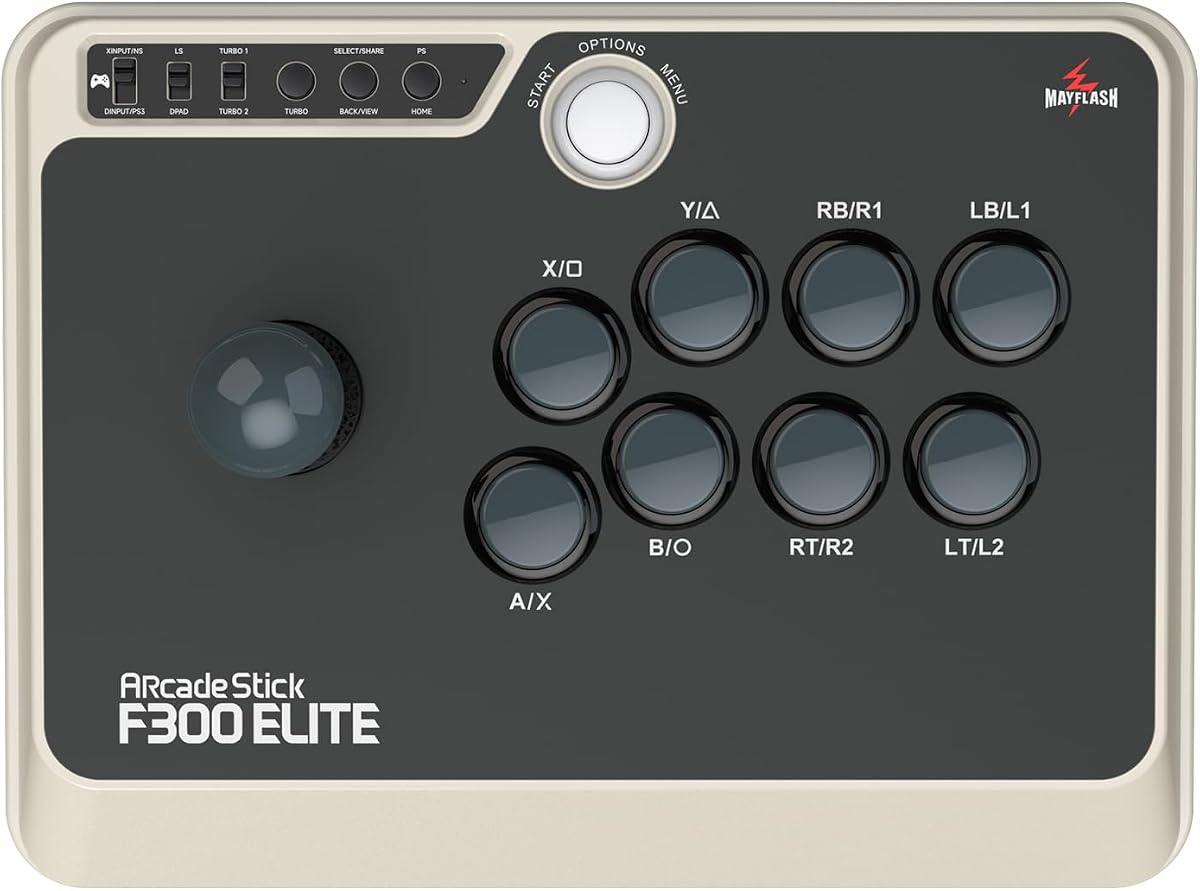
The MAYFLASH F300 Elite elevates the arcade experience by including premium Sanwa buttons and joysticks right out of the box. These components are known for their responsiveness and durability ensuring you can strike instantly and surely game after game. The internal platform is accessible for further customization appealing to modding enthusiasts.
We may earn a commission when you buy through this link, at no additional cost to you.
It maintains broad compatibility with macOS and Windows making it a strong choice for fighting game players on Mac computers. The stick supports Turbo functions to help you execute complex combos more easily. Quality control is strict with all products tested before shipping to ensure reliability.
While it is more expensive than the standard F300 the included components save you from buying upgrades separately. Some users may find the assembly slightly loose compared to fully factory sealed options. However this looseness is often intentional to allow for easier customization and repair.
This elite model is perfect for serious players who value precision and customization. If you plan to upgrade your setup later this stick offers a solid foundation. For Mac users seeking a high-end arcade experience that rivals dedicated fighting cabinets this is a top contender.
Using Sanwa parts ensures consistent input registration. This reduces missed inputs during critical combos in competitive fighting games.
MAYFLASH provides strong warranty support and customer service. If you encounter any issues with the device you can reach out for assistance quickly.
We may earn a commission when you buy through this link, at no additional cost to you.
The Hyperkin Trooper 2 is designed for fans of retro gaming who want a premium USB controller. It features an ergonomic design with chamfered corner grips that provide increased comfort for long gaming sessions. The joystick offers a classic Atari feel complemented by modern upgrades like a ten-foot cable.
We may earn a commission when you buy through this link, at no additional cost to you.
Its construction uses durable materials like a solid base and soft rubber grommet to ensure longevity. The joystick movement is quiet which is beneficial if you play in shared spaces. Six mappable buttons allow for various console mappings making it versatile for emulation purposes.
While it does not offer wireless connectivity it excels at wired simplicity and reliability. It works well on Mac systems for old school arcade games and computer games. It is not a high-performance modern controller but it serves its purpose for specific retro needs.
This controller is an excellent choice for retro emulation enthusiasts. It brings back the nostalgia of classic gaming with modern reliability. If you play a lot of arcade emulators on your Mac this controller will provide a satisfying and comfortable experience.
The stick mimics the tactile feel of vintage controllers. This attention to detail enhances the retro gaming experience significantly.
Built with a solid base and quality cord it is meant to last. This ensures your retro gaming setup remains stable over time.
We may earn a commission when you buy through this link, at no additional cost to you.
The Logitech G X56 H.O.T.A.S represents a high-end flight simulator system with military-grade precision. It offers customizable options including all control surfaces required for combat pilots. With over 189 programmable controls you can map nearly every function of a complex flight simulation setup to this device.
We may earn a commission when you buy through this link, at no additional cost to you.
The adjustable stick force via an advanced four-spring system lets you tailor the resistance to your preference. Twin throttles with friction adjusters and locks add another layer of realism. The RGB backlighting allows you to customize the look to match your gaming rig.
While it is primarily designed for Windows systems advanced Mac users may find some software limitations. It requires two USB ports and significant desk space to install fully. However the VR support and accurate axis sensors make it ideal for immersive simulations.
This system is for serious flight sim enthusiasts who need maximum realism. The depth of customization is unmatched in the consumer market. If you want to build a full cockpit setup for flight or space simulations this is a top-tier choice.
The four-spring system allows you to change how hard you have to push the stick. This adaptability helps reduce fatigue during long simulation sessions.
Use the software to set lighting colors to match your setup. This feature adds a professional and immersive aesthetic to your gaming room.
We may earn a commission when you buy through this link, at no additional cost to you.
The 8Bitdo Ultimate 2 Wireless Controller is designed for Apple users and PC gamers who value precision. It features TMR joysticks that offer higher sensitivity and durability than Hall Effect sensors. The wireless technology uses a 2.4G connection for ultra-low latency making it feel like a wired device.
We may earn a commission when you buy through this link, at no additional cost to you.
You can switch between linear Hall Effect triggers and non-linear tactile triggers depending on the game. The controller includes extra paddle buttons on the back for faster response and better ergonomics. A multifunctional charging dock ensures you always have a charged controller ready for use.
The only trade-off is the need to manually switch trigger modes which can interrupt gameplay. It is also restricted to wired or dongle connectivity on Mac for the best performance. The white design is clean and modern matching well with Apple aesthetics.
This is the best wireless pick for those deeply invested in the Apple ecosystem. The build quality and precision are top notch. If you want a reliable wireless controller that performs well on macOS and iOS this is an excellent choice.
The 8Speed technology delivers stable connections with minimal lag. This ensures your inputs register instantly even in fast-paced competitive games.
The included dock keeps the controller charged and organized. You can dock it when not in use to save on desk clutter.
We may earn a commission when you buy through this link, at no additional cost to you.
The SPEEDLINK SL-650212-BKRD brings a nostalgic design taken from the original Competition Pro's arcade machine. It is a digital USB joystick perfect for retro games that require simple directional inputs. The anniversary edition includes a collection of 20 retro games for download to get you started immediately.
We may earn a commission when you buy through this link, at no additional cost to you.
It supports PCs and Android devices making it versatile for older game emulation. The red and black color scheme looks great on a desk. However because it uses a digital stick it lacks the precision needed for modern analog games.
Users should expect a classic feel that matches the aesthetic of 80s arcades. It is not ideal for complex flight sims or modern competitive titles. The simplicity makes it easy to use without any driver installation.
This stick is best for collectors or fans of retro gaming. The included games collection adds immediate value to the purchase. If you want a piece of gaming history on your desk this is a great conversation starter.
The download collection gives you instant access to classic titles. This feature adds significant value to the hardware purchase.
The design mimics vintage arcade sticks accurately. This enhances the immersion for anyone playing older games.
We may earn a commission when you buy through this link, at no additional cost to you.
The Moonag Wireless PC Controller offers strong value with Hall Effect joysticks that prevent drift. It supports both wireless and wired modes with a 1000Hz polling rate for fast responses. The ergonomic design features textured non-slip grips to reduce fatigue during extended gaming sessions.
We may earn a commission when you buy through this link, at no additional cost to you.
It is compatible with Windows PC and Switch via Bluetooth or USB receiver. However it is not compatible with Xbox or PlayStation consoles which limits its platform versatility. RGB lighting around joysticks and buttons adds a dynamic touch to your setup.
Battery life is supported by an 800mAh rechargeable battery allowing for long play times. You can play while charging via cable which is convenient for marathon sessions. The build feels balanced and the buttons are responsive enough for action games.
This is an excellent budget option for PC gamers who want modern features. If you do not need to connect to other consoles this controller delivers high performance. It is a solid choice for those seeking reliability without paying premium prices.
The 1000Hz polling rate ensures fast input registration. This is ideal for games where split-second reactions matter most.
The shape fits comfortably in hands for long periods. This reduces hand strain during long gaming sessions.
We may earn a commission when you buy through this link, at no additional cost to you.
The Thrustmaster SimTask FarmStick is designed specifically for Farming Simulator 25 and similar heavy machinery simulations. It features a realistic 3-axis joystick that provides precise control for operating tractors and loaders. The design is ambidextrous allowing flexible setups with racing wheels or dual joysticks.
We may earn a commission when you buy through this link, at no additional cost to you.
Up to 33 programmable inputs allow you to manage every function without relying on a keyboard. H.E.A.R.T technology uses Hall Effect magnetic sensors to eliminate drift and ensure long-term precision. This makes it reliable for demanding simulation gameplay.
It requires a racing wheel to be used in conjunction for a complete cockpit experience. This adds to the cost and desk space needed. It is not a general-purpose gaming controller but a specialized tool for farming enthusiasts.
This joystick is essential for serious farming sim players. It transforms the experience from a keyboard setup to a realistic one. If you want to build a dedicated farming simulator setup this is a necessary component to consider.
The layout matches controls found on real heavy machinery. This realism enhances the immersion for farming simulation games significantly.
Magnetic sensors ensure your inputs remain accurate over time. This reliability is crucial for managing detailed farming tasks.
We may earn a commission when you buy through this link, at no additional cost to you.
Selecting the right controller for your Mac requires understanding your specific gaming needs and compatibility requirements.
Ensure the device supports macOS before purchasing. Some flight sticks and arcade sticks are primarily designed for Windows and may have limited driver support on Mac. Always check the product page for official Mac OS compatibility.
Verify that the controller works with your specific game titles. Even if a device lists macOS support it may not function correctly with every game in your library.
Decide between wired and wireless based on your preference. Wired controllers often provide more stable latency while wireless options offer freedom of movement. Consider if your Mac has enough USB ports for the receiver.
Modern controllers often support both Bluetooth and dongle modes. A 2.4G dongle is usually preferred for low latency over standard Bluetooth connections.
Look for durable materials like metal bases and quality plastics. A sturdy build prevents the device from sliding during intense gameplay. Check reviews for mentions of long-term durability.
Joysticks with Hall Effect sensors are becoming standard for durability. They prevent stick drift which is a common issue in older controllers.
High-end sticks often allow you to remap buttons and store profiles. This is crucial for flight sims where every button matters. Arcade sticks may allow component swapping for customization.
Software support is key for customization. Ensure the manufacturer provides a reliable app for configuring buttons on your Mac.
Consider how the device feels in your hands. An ergonomic design reduces fatigue during long sessions. Check if the weight is appropriate for your desk setup.
Some users prefer a lighter controller while others want a weighted base for stability. Choose based on your comfort preferences.
Identify specific features you need such as programmable triggers or vibration feedback. Flight sticks should have throttle integration while arcade sticks need responsive buttons.
Advanced features like RGB lighting are aesthetic but do not impact performance. Focus on functional features that improve your gaming experience.
Set a budget range before shopping. Basic retro sticks are affordable while complex flight systems can be expensive. Ensure you are getting value for the price.
Consider the cost of necessary accessories like adapters or separate throttles. These hidden costs can add up quickly.
Check the warranty period offered by the manufacturer. A longer warranty suggests confidence in the product. Look for brands known for good customer service.
If you encounter issues it is important to be able to reach support easily. Reliable support ensures you can resolve problems without hassle.
Connect your controller to your Mac using the appropriate USB cable or receiver. If using wireless ensure the device is charged and paired via Bluetooth or dongle. Install any necessary drivers from the manufacturer's website.
Configure button mappings within your game settings or using dedicated software. Test each button to ensure it registers correctly. Adjust sensitivity settings to match your comfort level for precise control.
Clean the joystick regularly with a soft cloth to remove dust. Store it in a dry place when not in use to prevent moisture damage. Avoid placing heavy objects on the stick to maintain internal sensor accuracy.
Not all flight sticks are compatible with macOS. While some universal controllers work out of the box, many high-end flight systems are optimized for Windows. Always check product descriptions for explicit Mac support before purchasing.
A flight stick is designed specifically for flight simulations offering precise control over pitch and roll. A gamepad is more general-purpose for standard gaming. Flight sticks provide a more immersive experience for sim games.
Many Mac game joysticks work well with emulators like RetroArch. You may need to configure mappings within the emulator settings. Ensure the controller is recognized by your system first.
Drift is often caused by worn internal sensors. Newer models use Hall Effect sensors to prevent this issue. If your stick drifts, recalibration may help, but replacement is often necessary.
You can use an arcade stick for regular gaming but it may not be ideal for all genres. It excels in fighting games but can be cumbersome for other types. Ensure it supports your specific games.
Visit the manufacturer's website to download the latest drivers. Install them following the instructions provided. Always restart your Mac after installation to ensure changes take effect.
A polling rate of 1000Hz is standard for competitive gaming. It ensures low latency and precise inputs. Check if your controller supports this rate via wired or dongle connection.
Some sticks require software to map buttons effectively. Others work as plug and play devices. Check the product details to see if custom mapping software is included.
Choosing the right Mac game joysticks depends on your specific gaming goals and budget. Whether you want flight precision or arcade action there is an option for you.
Prioritize compatibility and build quality to ensure a long-lasting experience. Consider the specific games you play most often when making your final decision.
Prices and availability change frequently so please check the latest details before buying. Visit the product links provided to see current offers on these top picks.