
ProtoArc XK04 Foldable Compact Keyboard
4.5Editor score
Ultra-compact foldable design
Bluetooth 5.1 connectivity
USB-C rechargeable battery
This expert guide compares the top compact editing keyboard options for creators, writers, and professionals seeking portable efficiency and advanced control.
Finding the right compact editing keyboard can transform your workflow significantly. Whether you are editing video on the go or typing documents in a small cafe, having a reliable portable typing solution is essential for modern professionals who value efficiency and speed in their daily tasks.
We have carefully evaluated ten top models based on portability, build quality, battery life, and specific features tailored for editing and creative work. Our comparison covers wireless Bluetooth options, dedicated shortcut keyboards, and traditional layouts designed to save space while maintaining full functionality for your computing needs.
Each pick in this list highlights unique strengths such as multi-device switching, ergonomic design, or specialized keys for creative software. Please note that availability and costs can fluctuate over time, so we recommend verifying the latest details directly with the retailer before making your final purchase decision today.
4.5Editor score

4.3Editor score

4.4Editor score
The following table provides a side-by-side overview of all ten compact editing keyboards we reviewed. Compare their key specifications, connectivity options, and unique features to find the model that best suits your specific editing and writing requirements.


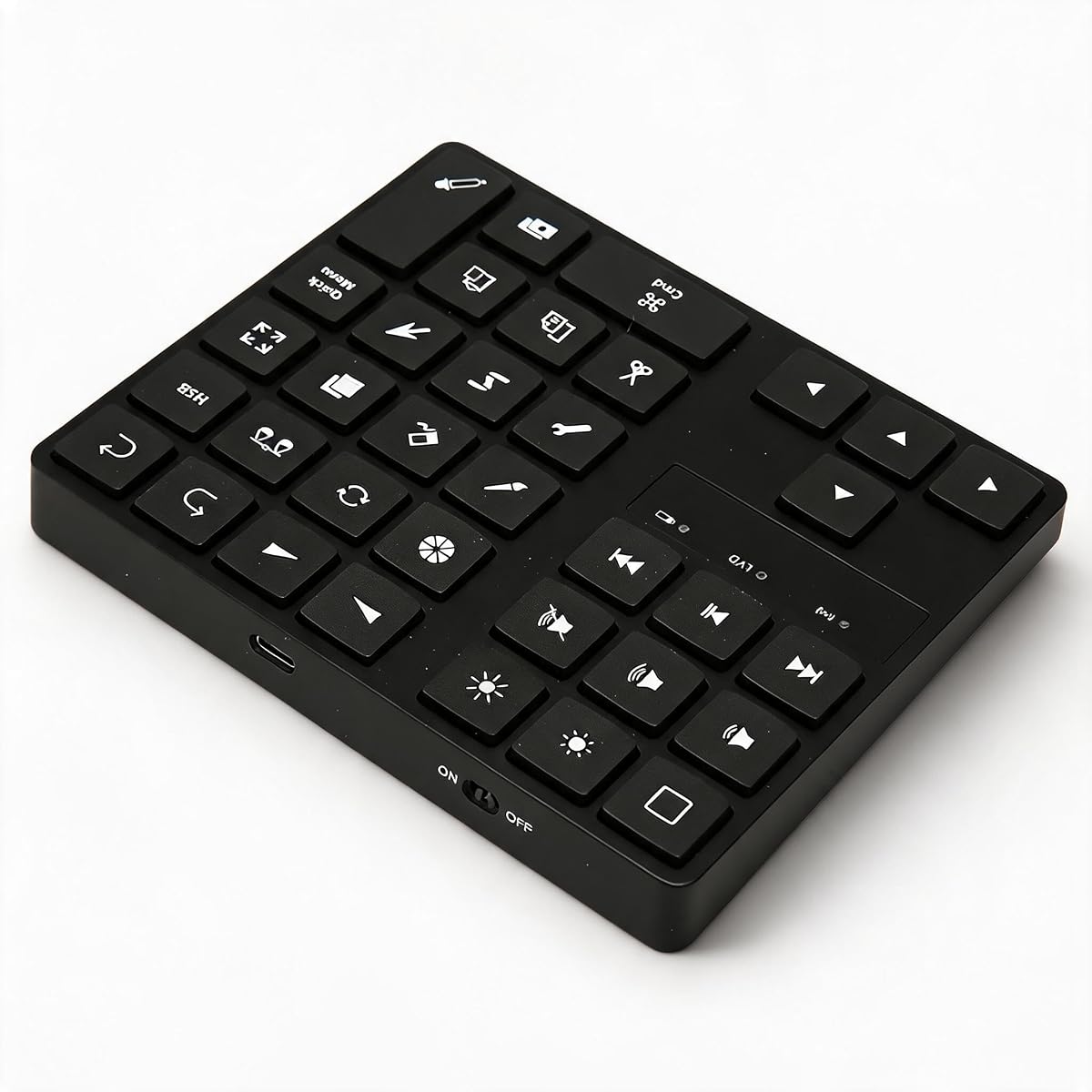

The ProtoArc XK04 stands out as a top contender for those needing a highly portable solution. With a 4.5 rating, it offers a unique foldable design that makes it easy to slip into any bag. Its lightweight nature and compact footprint make it ideal for travelers who still need physical typing capabilities.
We may earn a commission when you buy through this link, at no additional cost to you.
Key strengths include its Bluetooth 5.1 connectivity which allows switching between three devices seamlessly. The integrated PU leather cover not only protects the keys but also adds a premium aesthetic. Additionally, the auto-sleep feature ensures the battery lasts for up to 150 days on standby.
Trade-offs exist in the form of smaller keycaps which might feel cramped for long sessions. The folding mechanism, while portable, adds a slight learning curve for typing accuracy. However, these are acceptable for the immense convenience of a keyboard that fits in a jacket pocket.
We recommend this to digital nomads and students who need a reliable input device on the go. If you prioritize portability above all else and need a dedicated physical keyboard for your tablet or phone, this is the top recommendation to consider for your needs.
The foldable form factor allows it to fit into tight spaces like airplane tray tables or small cafe desks effortlessly.
Switch between your phone, tablet, and laptop instantly using dedicated keys without needing to re-pair via Bluetooth settings.
We may earn a commission when you buy through this link, at no additional cost to you.
The Microsoft Designer Compact Keyboard offers a streamlined experience at an accessible price point. With a solid 4.3 rating, it is designed to save desktop space while maintaining a comfortable typing experience. Its matte black finish complements modern workspaces effectively and professionally.
We may earn a commission when you buy through this link, at no additional cost to you.
Strengths include optimized key spacing that reduces hand strain during extended use. The expressive input key provides quick access to emojis and symbols which speeds up communication workflows. It connects to three devices allowing you to manage multiple machines without extra dongles.
One trade-off is that while versatile, it is best optimized for Windows environments. The lack of backlighting means it may not be suitable for very dark environments without external lighting. These factors are minor given its budget-friendly positioning and sleek aesthetic.
Buyers looking for a cost-effective upgrade to their desk setup should consider this option. It balances space saving features with reliable wireless performance making it a great entry level choice for productivity.
Its compact design allows the mouse to be placed closer to your body improving ergonomics and reducing wrist movement.
Access emojis and symbols with a single keystroke enhancing your communication speed without switching to a phone.
We may earn a commission when you buy through this link, at no additional cost to you.
The Logitech Pebble Keys 2 K380s brings a modern look to portable typing. Rated 4.3 it features a slim design made with recycled plastic appealing to eco-conscious users. Its round scooped keys offer a familiar laptop-like feel that many users find comfortable.
We may earn a commission when you buy through this link, at no additional cost to you.
Key strengths involve its Easy-Switch technology enabling instant switching between three devices across different operating systems. The keyboard is incredibly quiet reducing noise in shared workspaces. The battery life is exceptional lasting up to three years on a single set of batteries.
A trade-off is the reliance on replaceable batteries rather than a rechargeable port. The key travel is also lower than mechanical options which might not satisfy tactile enthusiasts. These are acceptable trade-offs for the convenience of a lightweight and versatile wireless device.
This model is perfect for users switching between a Mac and a PC often. It offers a balance of style function and reliability making it a top recommendation for general productivity tasks.
Seamlessly connects to Windows macOS iPadOS and ChromeOS providing universal compatibility for mixed device setups.
The quiet keys minimize sound output ensuring you do not disturb colleagues or neighbors during late night work.
We may earn a commission when you buy through this link, at no additional cost to you.
The Logitech MX Keys Mini delivers premium features in a smaller frame. With a 4.4 rating it focuses on precision with keys shaped for your fingertips. The smart illumination is a standout feature lighting up when you approach and adjusting to light levels automatically.
We may earn a commission when you buy through this link, at no additional cost to you.
Strengths include the ability to type across multiple computers if paired with compatible mice. The USB-C rechargeable battery ensures you stay powered up for up to ten days. The minimalist form factor fits well on cluttered desks while offering high functionality.
A trade-off is the higher price compared to basic wireless models. It also benefits most from being part of a broader Logitech ecosystem to unlock full features. These are acceptable for users who value advanced customization and premium ergonomics highly.
This keyboard is best for professionals needing advanced typing precision and lighting. If you want a polished look and smart features it is a strong choice for high productivity environments.
The keys light up instantly when your hands approach and adjust brightness to suit your room lighting perfectly.
Use MX Flow to type across different computers seamlessly improving efficiency when working on multiple projects.
We may earn a commission when you buy through this link, at no additional cost to you.
The XPPen Mini Keydial ACK05 is a specialized tool for creators needing quick access to tools. Rated 4.3 it features a wireless connection and a rotating dial for zooming or brush adjustment. Its compact size makes it easy to hold in one hand during work.
We may earn a commission when you buy through this link, at no additional cost to you.
Key strengths include the ability to customize up to forty shortcuts across four sets. The anti-ghosting feature allows multi-key presses which is crucial for complex shortcuts. The rotating dial offers tactile feedback for precise control over canvas operations.
A trade-off is the requirement to download drivers for customization. It acts as a regular keyboard without this software which limits its utility. These are acceptable for users who specifically need extra controls for creative software workflows daily.
Buyers focused on digital art or video editing should consider this device. It complements a full keyboard well by adding specialized controls to streamline creative processes efficiently.
Rotating the dial provides clear click feedback allowing precise zoom or brush size adjustments without looking away.
Switch between four sets of shortcuts using a single key to adapt to different software needs instantly.
We may earn a commission when you buy through this link, at no additional cost to you.
The Macally Compact Wireless offers a simple plug and play experience. With a 4.4 rating it uses a 2.4G wireless connection for reliable performance. Its slim design makes it easy to transport without taking up much space in your bag.
We may earn a commission when you buy through this link, at no additional cost to you.
Strengths include immediate connectivity without needing software or drivers. The 78-key layout provides essential shortcuts while saving space compared to full size models. It works well with Chromebooks and laptops that support USB-A ports natively.
A trade-off is the lack of Bluetooth connectivity which limits pairing options. You must have a USB port free for the dongle which might not suit ultra thin modern laptops. These are acceptable for users prioritizing simplicity and reliability over advanced connectivity.
This is a great choice for basic users needing a second keyboard for travel. It delivers standard typing functionality in a compact package suitable for quick editing tasks anywhere.
Plug the USB dongle into your computer and start typing immediately without installing any additional software drivers.
The thin build fits easily into laptop sleeves making it an ideal companion for business trips or daily commutes.
We may earn a commission when you buy through this link, at no additional cost to you.
The Logitech K250 provides a compact experience with the inclusion of a number pad. Rated 4.2 it features a spill resistant design making it durable for daily office use. The deep profile keys offer a comfortable feel that reduces fatigue during long typing sessions.
We may earn a commission when you buy through this link, at no additional cost to you.
Key strengths include the Bluetooth connectivity which eliminates the need for extra dongles. The battery life lasts up to twelve months ensuring you rarely need to replace batteries. It also includes handy F key shortcuts for quick actions.
A trade-off is that the number pad increases the overall footprint significantly. The adjustable tilt legs add a bit more bulk to the profile than flat models. These are acceptable for users who need numerical input frequently in their editing work.
Buyers needing a balance of compactness and number entry should look at this model. It provides essential numeric functionality without the full bulk of a traditional desktop keyboard.
The design protects internal components from minor spills giving you peace of mind in busy environments.
Access numeric entry without extra devices which speeds up data input tasks significantly during editing workflows.
We may earn a commission when you buy through this link, at no additional cost to you.
The Blackmagic Davinci Resolve Speed Editor is designed specifically for video professionals. With a high 4.7 rating it offers dedicated keys matching edit functions precisely. The built-in search dial helps navigate timelines efficiently without using a mouse.
We may earn a commission when you buy through this link, at no additional cost to you.
Strengths include a bundle that includes DaVinci Resolve Studio software which adds value. It connects via Bluetooth or USB-C providing flexible integration. The layout is optimized for video editing workflows to speed up tasks like trimming and marking clips.
A trade-off is the high cost compared to general purpose keyboards. It is also specialized for specific software which limits its use as a general typing device. These are acceptable for dedicated editors who need professional controls regularly.
This keyboard is ideal for professional video editors seeking efficiency. It streamlines complex editing tasks with physical shortcuts that are hard to replicate with a mouse or standard keyboard.
Keys match exact edit functions allowing you to execute complex commands with single presses for faster editing.
Use the dial to navigate search results quickly saving time when looking for specific clips or effects.
We may earn a commission when you buy through this link, at no additional cost to you.
The One-Handed Ergonomic Keyboard offers a unique solution for reducing physical strain. Rated 4.0 it features a design that promotes a neutral wrist posture to prevent fatigue. It is ideal for artists who need to use a stylus simultaneously with typing.
We may earn a commission when you buy through this link, at no additional cost to you.
Strengths include 35 programmable shortcuts that can be customized via software. The wired connection ensures zero lag which is critical for precise design work. Its ultra-compact size makes it easy to fit on crowded desks alongside tablets.
A trade-off is that it requires using both hands to operate simultaneously which might be awkward initially. The wired nature means you lack wireless flexibility but ensure consistent performance. These are acceptable for studio setups where stability is paramount.
Buyers focusing on long design sessions should consider this ergonomic option. It provides essential shortcuts in a form factor that protects your wrist health over time.
The sculpted key well keeps your wrist straight reducing pressure on the carpal tunnel during extended use.
USB-C wired link guarantees instant response times which is vital for precise drawing and editing tasks.
We may earn a commission when you buy through this link, at no additional cost to you.
The Cherry Stream Wired delivers reliable performance with whisper-quiet keys. Rated 4.3 it uses CHERRY SX scissor technology for precise pressure points. The compact TKL layout removes the number pad to save desk space and improve ergonomics.
We may earn a commission when you buy through this link, at no additional cost to you.
Key strengths include the non-slip feet that keep the keyboard stable during use. The abrasion-resistant lettering ensures keys stay legible over time. It is a safe choice for quiet environments where noise is a concern.
A trade-off is the reliance on a wired connection which limits portability. It lacks advanced features like backlighting or programmable keys found on newer models. These are acceptable for users prioritizing simplicity and quiet operation over advanced tech.
This keyboard is best for quiet offices or home use. It offers dependable typing experience with minimal noise making it a practical choice for daily tasks.
Designed for quiet environments the keys produce minimal sound allowing you to work without disturbing others.
Rubberized fold-out feet prevent the keyboard from slipping ensuring a steady typing surface at all times.
We may earn a commission when you buy through this link, at no additional cost to you.
Selecting the right compact editing keyboard involves evaluating several factors to match your workflow needs. This section details the critical considerations to help you make an informed choice.
Connectivity is a primary consideration when selecting a compact keyboard. Bluetooth allows for wireless freedom and is ideal for tablets or ultrabooks with limited ports. Wired USB connections offer zero latency which is crucial for real-time editing. Ensure your device supports the chosen method before purchasing.
Choose wireless for mobility and wired for stability depending on your specific use case.
Compact keyboards often omit the number pad to save space. Decide if you need numerical inputs frequently or if function keys are sufficient. A tenkeyless layout offers a middle ground while a mini layout focuses on portability. Match the layout to your typical editing tasks.
Opt for a layout that includes necessary keys without unnecessary bulk for your desk.
Battery performance impacts how often you need to maintain your device. Some models use replaceable AA batteries while others have rechargeable internal batteries. Rechargeable units are more eco-friendly and cost-effective in the long run. Look for models with long standby times to avoid frequent charging.
Prioritize long battery life to minimize interruptions during work sessions.
Ergonomics are vital for preventing strain during long editing sessions. Consider the key travel distance and the height of the keyboard. Adjustable feet can help achieve a better typing angle. A sturdy build ensures durability especially if you plan to travel with it regularly.
Select a model that feels comfortable to type on for extended periods.
Compatibility with your operating system is essential. Ensure the keyboard works with Windows macOS or Linux without issues. Some models require specific software to unlock programmable features. Check if the drivers are available for your OS to maximize utility.
Verify software requirements to ensure the keyboard works out of the box or with your setup.
If you travel often features like folding designs or lightweight materials are beneficial. A compact keyboard should fit easily into a backpack or carry-on. Consider the weight and dimensions to ensure it is convenient to transport. Protective cases can add value by keeping the device safe.
Choose lightweight models with protective features for safe transport on the go.
Some keyboards offer specialized features like rotary dials or extra programmable keys. These are useful for specific editing tasks such as video scrubbing or zooming. Evaluate if these features justify the cost and if they integrate with your software. Dedicated tools can significantly boost productivity.
Look for specialized controls if your workflow involves complex editing software daily.
Price varies widely depending on features and build quality. Determine your budget and look for models that offer the best balance of features. Sometimes a higher upfront cost pays off in longevity and performance. Consider long-term value rather than just the initial price tag.
Invest in a keyboard that offers long-term value within your budget constraints.
To maximize the lifespan of your compact editing keyboard, ensure you keep it clean and free of debris. Regularly wipe down the keys with a soft dry cloth to remove dust and oils. If you need a deeper clean, gently use compressed air to blow out particles from between the keys. Avoid using wet wipes or liquid cleaners directly on the keycaps to prevent damage to internal electronics.
Proper storage is essential for portable models. When not in use, store the keyboard in a protective case or its original box to prevent scratches. For folding keyboards, make sure they are fully closed and locked before packing them in a bag. Avoid placing heavy items on top of the keyboard to prevent deformation of the chassis or keys.
Battery maintenance is another critical aspect of care. If your model uses rechargeable batteries, try not to drain them completely before charging to prolong battery health. For models using disposable batteries, remove them if the keyboard will not be used for a long time to prevent leakage. Follow manufacturer guidelines for charging times to avoid overcharging and potential damage.
The ProtoArc XK04 is considered one of the most portable options due to its foldable design and lightweight weight. It folds into a small form factor that fits easily into pockets or small bags. This makes it ideal for travelers who need physical typing capabilities on the go without carrying a bulky device.
Yes, most compact editing keyboards support tablets via Bluetooth connectivity. Models like the ProtoArc XK04 and Logitech Pebble Keys 2 K380s are specifically designed to work with iPad and Android tablets. You simply pair the keyboard via Bluetooth settings to start typing directly on your tablet.
Many modern compact keyboards allow you to connect to multiple devices simultaneously. For example, the Logitech MX Keys Mini and Microsoft Designer Compact can connect to up to three devices. You can switch between them using dedicated keys without needing to unpair or re-pair each time.
Yes, the Blackmagic Davinci Resolve Speed Editor is specifically designed for video editors. It includes dedicated keys that match edit functions and a search dial for navigating timelines. While it is specialized, it provides a dedicated solution for those working primarily with video editing software like DaVinci Resolve.
To customize shortcuts on models like the XPPen Mini Keydial, you must install the provided driver software. Once installed, you can assign macros to specific keys through the software interface. Always check the product manual for specific steps as not all keyboards support advanced customization out of the box.
Some compact keyboards feature backlighting for use in low-light environments. The Logitech MX Keys Mini has smart illumination that adjusts to lighting conditions automatically. Others like the ProtoArc XK04 do not include backlighting to save battery and maintain a sleek profile. Check product specs for this feature.
In summary the ProtoArc XK04 Logitech Pebble Keys 2 K380s and Logitech MX Keys Mini lead the list for their balance of portability and functionality. Each offers unique features catering to different needs from foldable travel designs to smart backlighting and long battery life. These picks represent the top contenders based on our analysis of key requirements.
When choosing prioritize features that align with your daily workflow such as connectivity type or ergonomic needs. Consider if you need a number pad or if a minimalist layout suits your space better. Investing time in selecting the right keyboard can significantly improve your productivity and comfort over the long term.
Please remember that prices and availability may change over time so verify the latest details before purchasing. Checking current stock and promotions can help you secure the best deal on your chosen model. We hope this guide helps you find the perfect compact editing keyboard for your needs.