
Cherry Stream Wired Keyboard Without Number Pad
4.3Editor score
Whisper-quiet scissor switches
Compact TKL space-saving design
Durable abrasion-resistant lettering
Finding the right input device is crucial for productivity and comfort in any modern workspace. A compact keyboard saves desk space while retaining essential keys for efficient typing and navigation without sacrificing functionality.
We evaluated ten top models based on build quality, typing feel, connectivity options, and user feedback. Our analysis focuses on real-world performance, durability, and how well each device fits into varied setups.
Each pick highlights key strengths and potential trade-offs to guide your decision. Prices and availability change frequently, so check current listings for the most up-to-date information before making your final choice.
4.3Editor score

4.6Editor score

4.4Editor score
As an Amazon Associate we earn from qualifying purchases.
This side-by-side comparison outlines the core specifications and features of all ten models. Use this table to quickly identify which keyboard meets your specific needs for space, typing style, and connectivity.
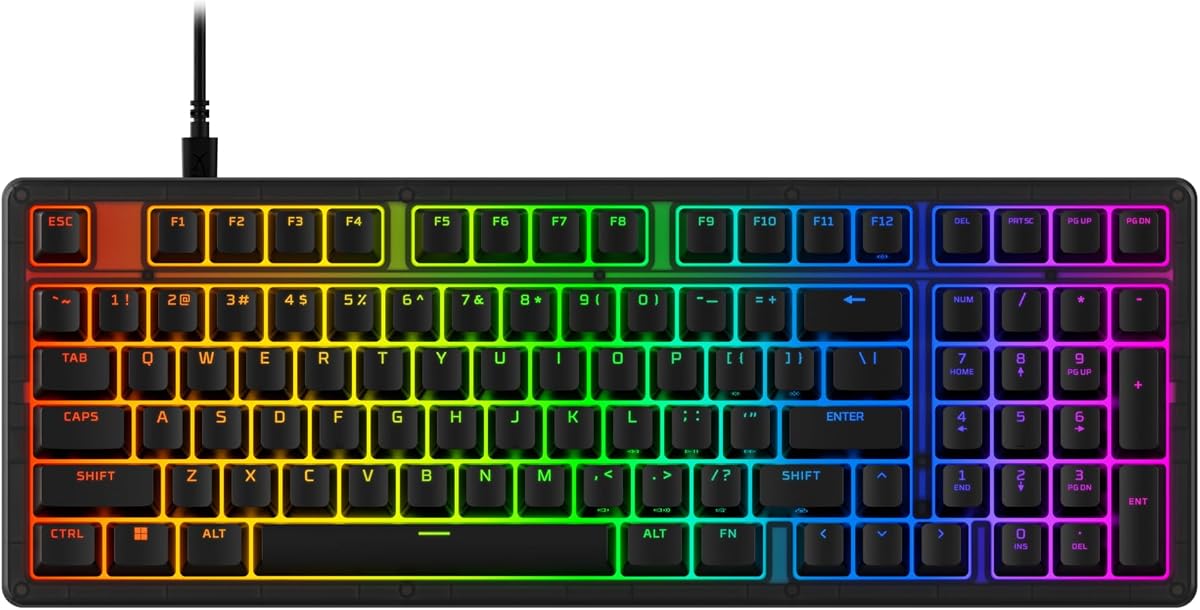




The HyperX Origins 2 1800 stands out as the best overall compact keyboard with its hotswap mechanical design and high polling rate. Its 4.6 rating reflects strong user satisfaction with comfort and customization options.
We may earn a commission when you buy through this link, at no additional cost to you.
This board features O-ring mounts for a deeper keystroke sound and reduced wobble. The 8k polling rate ensures near-instantaneous input, ideal for competitive gaming. Hot-swap sockets mean you can swap switches without soldering.
While it costs more than entry-level options, the build quality and customization justify the investment. The NGENUITY software adds depth for macro creation and lighting control, though it requires setup time.
Buy this if you want a premium, customizable mechanical keyboard that balances gaming performance with typing comfort in a space-saving layout. It is a top pick for enthusiasts who value flexibility.
You can easily change switches to match your preference for tactile, linear, or clicky feedback without any tools or soldering.
The elevated key profile and adjustable flip-down feet help reduce wrist strain during extended sessions for both work and gaming.
We may earn a commission when you buy through this link, at no additional cost to you.
The Logitech Alto Keys K98M delivers a premium typing experience with its gasket mount design and hot-swappable mechanical switches. Rated 4.4, it appeals to users seeking wireless convenience without compromising on feel.
We may earn a commission when you buy through this link, at no additional cost to you.
Its UniCushion gasket mount absorbs vibrations for satisfying keystrokes. The keyboard supports both Bluetooth and Logi Bolt receivers, allowing seamless switching between devices. Battery life lasts up to 12 months on a single charge.
The absence of RGB lighting keeps the design sleek but limits customization for gamers. However, for professionals, the focus on comfort and wireless versatility makes it a strong contender in the premium segment.
Choose this if you need a stylish, wireless mechanical keyboard that balances productivity features with a high-end typing feel. It is ideal for home offices where cable clutter is undesirable.
The gasket mount system isolates the typing surface to reduce noise and increase the tactile satisfaction of every keystroke.
Connect via Bluetooth or USB receiver to pair with multiple devices and switch effortlessly between work and personal setups.
We may earn a commission when you buy through this link, at no additional cost to you.
The Cherry Stream Wired Keyboard is a top budget option that sacrifices no essential functionality for its compact TKL form. With a 4.3 rating, it is praised for quiet operation and durability in daily office environments.
We may earn a commission when you buy through this link, at no additional cost to you.
Its SX scissor technology ensures precise keystrokes with minimal noise. The design eliminates the number pad to bring mouse and keyboard closer for better ergonomics. A metal plate inside adds stability and reduces flex.
While it lacks the tactile feedback of mechanical switches, its affordability and quiet operation make it perfect for shared workspaces. It is a reliable tool for those who type frequently without needing extra features.
Buy this if you need a compact, reliable, and budget-friendly keyboard for daily writing or data entry. It offers great value for users prioritizing silence and ergonomics over gaming features.
The whisper-quiet scissor mechanism minimizes distraction, making it suitable for open offices or shared living spaces.
Removing the numpad allows the mouse to be positioned closer, reducing arm strain during long work sessions.
We may earn a commission when you buy through this link, at no additional cost to you.
The HyperX Eve 1800 brings full-size features into a compact form factor at a budget-friendly price. Its 4.6 rating highlights strong user appreciation for its lighting and functional layout.
We may earn a commission when you buy through this link, at no additional cost to you.
Membrane switches offer a cushioned feel suitable for casual gaming. The dedicated media buttons and anti-ghosting ensure you can manage music and play games without missed inputs. RGB lighting adds a dynamic look.
While not ideal for enthusiasts seeking mechanical precision, this keyboard offers great value for budget gamers. The software allows some customization, though it cannot match the depth of more expensive models.
Choose this if you want an affordable gaming keyboard that saves space without losing essential media controls. It is a solid entry point for users prioritizing style and function.
Dedicated buttons let you control volume and gaming modes instantly without relying on software overlays.
Ten customizable RGB zones let you personalize your desk setup with lighting effects that match your aesthetic.
We may earn a commission when you buy through this link, at no additional cost to you.
The Cherry G80-1800 is built for industrial applications where durability is non-negotiable. With a 4.1 rating, it stands out for its reliability in environments requiring long-term continuous use.
We may earn a commission when you buy through this link, at no additional cost to you.
MX Black switches provide a direct, linear typing feel rated for over 100 million actuations. The PS/2 adapter ensures compatibility with older Unix systems. Gold crosspoint contacts ensure long-lasting performance.
While it lacks modern consumer features like RGB, its robust construction makes it ideal for control panels or servers. It is a workhorse keyboard that prioritizes function over form.
Buy this if you need a reliable mechanical keyboard for industrial or legacy systems. It is designed for those who value durability and consistent performance in demanding environments.
The included PS/2 adapter allows use with older Unix computers and industrial controllers.
MX Black switches are rated for over 100 million keystrokes, ensuring a long operational lifespan.
We may earn a commission when you buy through this link, at no additional cost to you.
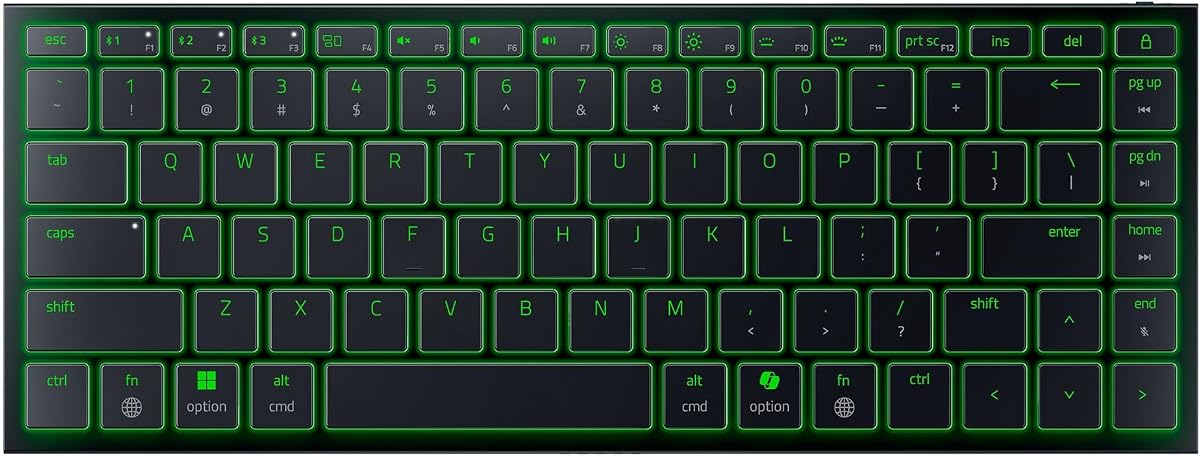
The Razer Joro is designed for portability with an ultra-slim profile that fits easily into a backpack. With a 4.0 rating, it appeals to travelers and gamers who need flexibility without sacrificing RGB style.
We may earn a commission when you buy through this link, at no additional cost to you.
Its low profile keys minimize strain during long gaming or work sessions. Bluetooth 5.0 allows seamless switching between Windows, Mac, and mobile devices. Razer Chroma RGB brings vibrant lighting to a compact frame.
While the low profile design offers unique benefits, some users may find the feel different from standard mechanical switches. Battery life is strong, but heavy RGB use may reduce runtime.
Choose this if you need a wireless gaming keyboard that is easy to carry and connects to multiple devices. It is perfect for digital nomads or mobile gaming setups.
Weighing just 374g, this keyboard is easy to slip into a bag for work or play on the go.
Keys that sit closer to the desk surface help reduce finger travel and improve typing comfort.
We may earn a commission when you buy through this link, at no additional cost to you.
The Cherry – G80-1800LPCEU-0 is designed for industrial settings requiring legacy connectivity. With a 3.7 rating, it is a niche product focused on performance and compliance rather than modern consumer appeal.
We may earn a commission when you buy through this link, at no additional cost to you.
Its gold crosspoint contacts and MX technology ensure consistent performance in harsh environments. The 104-key layout provides full functionality while saving space compared to larger industrial boards.
While it is expensive for a consumer keyboard, its durability and compatibility with older systems make it valuable for specific industries. It is built to last rather than to look sleek.
Buy this if you need a full-featured industrial keyboard that supports legacy Unix systems. It is a specialized tool for professional environments requiring proven reliability.
Retains all 104 keys for full functionality while minimizing desk footprint.
Built to withstand continuous operation and harsh conditions with high-quality internal components.
We may earn a commission when you buy through this link, at no additional cost to you.
The Cherry Electronics G80-1800LPCEU-2 delivers mechanical precision in a compact industrial form. Designed for 19 applications, it offers a balance of size and functionality for tight spaces.
We may earn a commission when you buy through this link, at no additional cost to you.
Mechanical keyswitches provide reliable feedback for continuous typing. The dual USB and PS/2 interfaces ensure compatibility with a wide range of hardware. Its narrow width fits well on crowded control desks.
While specific user ratings are not available, its industrial heritage suggests reliability. It is built for environments where standard keyboards might fail under stress or heavy use.
Choose this if you require a reliable mechanical keyboard for tight spaces with legacy system support. It is ideal for industrial or technical setups where consistency is paramount.
At just 15.9 inches wide, it fits easily into control panels and restricted desk areas.
USB and PS/2 options allow versatile connection to both modern and legacy computers.
We may earn a commission when you buy through this link, at no additional cost to you.
The Logitech Pebble Keys 2 K380s is a portable Bluetooth keyboard ideal for mobile users. With a 4.3 rating, it is praised for its seamless connectivity and comfortable, laptop-like typing feel.
We may earn a commission when you buy through this link, at no additional cost to you.
Easy-Switch buttons let you switch between three devices instantly. The keyboard is lightweight and uses recycled plastic, appealing to eco-conscious users. Battery life lasts up to three years without frequent changes.
While not a full mechanical 1800 layout, its convenience and comfort make it a strong contender for travelers. It lacks backlighting, which limits use in low-light conditions.
Buy this if you need a travel-friendly keyboard that pairs easily with tablets and phones. It is perfect for users who prioritize portability and multi-device connectivity over gaming features.
Switch between Windows, macOS, and mobile devices with a single press of a dedicated button.
Contains at least 49% certified post-consumer recycled plastic for a greener footprint.
We may earn a commission when you buy through this link, at no additional cost to you.
The ProtoArc XK04 Foldable is designed specifically for mobile devices like phones and tablets. With a 4.5 rating, it is highly praised for its portability and practical protection features.
We may earn a commission when you buy through this link, at no additional cost to you.
It folds into a small form with a PU leather cover for scratch protection. Bluetooth 5.1 ensures a stable connection with a 33ft range. The USB-C rechargeable battery offers up to 150 days of standby.
While it is not a full desktop replacement, it offers a solid typing experience for on-the-go messaging. The compact keycaps may take some adjustment for users used to standard sizes.
Choose this if you need a travel keyboard that fits in a pocket and protects your mobile device. It is perfect for travelers who want physical typing without bulk.
The foldable design and lightweight build make it easy to carry anywhere without extra bulk.
A PU leather cover shields the keyboard from scratches and adds a premium look.
We may earn a commission when you buy through this link, at no additional cost to you.
Choosing the right keyboard depends on your specific needs for typing, gaming, or portability. This guide breaks down the key factors to consider before making a purchase.
Mechanical switches provide tactile feedback and durability for typing and gaming. Membrane switches are quieter and budget-friendly but offer less feedback and shorter lifespans. Consider whether you prefer clicky, tactile, or linear feedback when selecting your model.
For productivity and long sessions, tactile or linear mechanical switches often reduce fatigue. Budget users may prefer membrane for their quiet operation in shared spaces.
A 1800 layout retains most keys including the number pad while saving space. Full-size layouts offer maximum functionality but can clutter small desks. Decide if you need the numpad for data entry or prefer the extra desk space from TKL designs.
If you use spreadsheet software, the numpad is essential. For general typing, TKL may be more comfortable due to better mouse positioning.
Wired connections ensure zero latency for competitive gaming. Wireless Bluetooth or dongle options reduce cable clutter and support multiple devices. Consider your tolerance for occasional charging versus consistent wired performance.
Bluetooth is versatile for modern laptops but may have slight latency. USB-C charging is convenient for daily wireless use without constant battery swaps.
Key height and angle affect wrist strain. High-profile or adjustable feet allow you to find a comfortable typing angle. Look for keyboards with stable bases to prevent slipping during intense typing sessions.
Ergonomic layouts often improve long-term comfort. Foldable designs might save space but reduce stability for desktop work.
Metal plates and rubberized feet increase stability and durability. Industrial models often use gold-plated contacts for longevity in harsh environments. For home use, check for scratch-resistant materials and solid keycaps.
Higher durability often correlates with higher price. Balance your budget against how heavy the daily use will be.
Hot-swap sockets allow easy switch replacement without soldering. RGB lighting can be customized via software for aesthetic appeal. Macro recording helps automate repetitive tasks in productivity workflows.
Software customization is great for gamers but might be unnecessary for basic typing. Ensure compatibility with your operating system before buying.
Foldable or slim designs suit travelers who need a physical keyboard for tablets. Compact boards free up desk space for ergonomic mouse placement. Weight matters if you carry the keyboard in a bag daily.
Ultra-light keyboards may feel less stable on a desk. Balance portability with the need for a sturdy typing surface.
Wireless keyboards vary from 3 months to a year per charge. Auto-sleep modes conserve power when the device is idle. Check for USB-C charging for convenience over micro-USB.
If you use wireless frequently, longer battery life means less downtime. Rechargeable models save money over time compared to disposable batteries.
Proper maintenance extends the lifespan of your keyboard. Regularly dust the keys with a soft brush or air blower to prevent debris from affecting key performance. For wireless models, keep firmware updated via official software for best connectivity.
Store foldable keyboards carefully to avoid damage to hinges. Avoid using excessive force when typing to protect the internal switches. For mechanical keyboards, replacing keycaps occasionally can refresh the look and feel.
Clean spills immediately to prevent corrosion or electrical issues. Use compressed air to clear crumbs between keys. Follow manufacturer guidelines for battery care to ensure long-term wireless performance and safety.
A 1800 layout is a compact design that retains the full-size keyboard functionality including the number pad but in a smaller frame. It saves desk space while offering all necessary keys for productivity and data entry. This layout is popular for users who want ergonomics without sacrificing features.
Mechanical switches offer better tactile feedback and durability compared to membrane switches. They last longer and provide more satisfying typing experiences. However, membrane switches are quieter and more budget-friendly, making them suitable for shared workspaces.
Modern wireless keyboards using Bluetooth or proprietary dongles have minimal latency for most tasks. Competitive gamers may still prefer wired options for zero lag. Generally, daily users will not notice a significant difference in performance.
Some compact keyboards feature hot-swap sockets that allow you to change switches without soldering. Others require soldering which is not recommended for casual users. Check product specs before buying if you plan to customize your switches.
Use a soft brush or compressed air to remove dust and crumbs from between keys. Wipe the surface with a slightly damp cloth avoiding excess moisture. Avoid harsh chemicals that could damage the keycaps or finishes.
Yes, a 1800 keyboard is excellent for gaming as it balances key availability with desk space for mouse movement. Look for models with anti-ghosting and high polling rates to ensure responsive inputs during gameplay.
Battery life varies from a few months to over a year depending on usage and features like RGB. Many models include auto-sleep modes to conserve power when not in use. USB-C rechargeable models offer convenience and long-term cost savings.
Most 1800 keyboards work with Windows, Mac, and Linux via standard USB or Bluetooth. Check if manufacturer software supports your operating system for customization. Basic functions like typing and keys work universally across platforms.
We have reviewed ten top options ranging from budget-friendly membrane models to premium mechanical boards. Each offers unique benefits depending on your needs for gaming, work, or portability. The HyperX Origins 2 stands out for customization, while the Cherry Stream offers reliable simplicity.
Prioritize comfort and switch feel based on how much you type daily. Wireless connectivity is ideal for clutter-free desks, while mechanical switches bring durability. Consider your budget but remember that quality hardware can save money in the long run.
Remember that prices change often, so verify current offers before purchasing. We hope this guide helps you find a keyboard that fits your workspace and enhances your typing experience effectively.