
ASRock DeskMini X300 2.5G Series
4.2Editor score
Ultra-compact 1.92L form factor
Supports AM4 socket Ryzen CPUs
Triple display output capability
This guide compares the top barebone PCs with AMD processors for performance, features, and value to help you choose the right mini PC today.
Barebone PCs with AMD processors offer a unique blend of power and flexibility for modern computing needs. These compact systems allow you to customize components like RAM and storage to match your specific workflow and budget constraints.
We evaluated ten leading models based on processor architecture, expansion capabilities, connectivity options, and thermal efficiency. Each product was scrutinized for real-world usability across gaming, professional work, and home server applications.
Every pick highlights key strengths, potential trade-offs, and ideal use cases for different users. Please note that pricing and availability fluctuate regularly, so verify current details before making your final purchase decision.
4.2Editor score

4.0Editor score

3.1Editor score
The following comparison table details the core specifications and unique attributes of each selected model to facilitate direct feature analysis across the entire lineup.





The AOOSTAR MACO stands out as a powerful contender in the AMD barebone PC market, earning its spot with exceptional raw performance and modern connectivity options. Its 8-core, 16-thread Ryzen 7 PRO 8845HS processor delivers robust multitasking capabilities suitable for demanding creative workflows and high-end gaming scenarios.
We may earn a commission when you buy through this link, at no additional cost to you.
A major highlight of this unit is the inclusion of an OCuLink port, which allows users to connect external GPUs with significantly lower latency than traditional Thunderbolt or USB4 solutions. This feature is invaluable for professionals who need workstation-grade graphics power without sacrificing the compact footprint of a mini PC.
While the barebone nature means you must install RAM and storage separately, the unit supports up to 128GB of DDR5 memory and offers dual M.2 slots for massive storage expansion. The advanced cooling system with a VC heat spreader ensures that the system remains stable even under prolonged heavy loads.
If you are looking for a versatile, high-performance desktop that can grow with your needs and handle professional-grade tasks efficiently, this AOOSTAR MACO is an excellent investment. It bridges the gap between consumer mini PCs and enterprise workstations effectively.
The OCuLink port enables seamless connection to high-performance external GPUs with minimal performance loss.
Advanced cooling with a VC heat spreader keeps temperatures in check during intensive usage.
We may earn a commission when you buy through this link, at no additional cost to you.
The AOOSTAR GEM12+ is designed for power users who demand maximum performance from their compact setup. With the same potent Ryzen 7 PRO 8845HS processor found in top-tier models, it delivers smooth performance for gaming, content creation, and heavy multitasking tasks.
We may earn a commission when you buy through this link, at no additional cost to you.
A key differentiator is the OCuLink port which offers 64Gbps bandwidth on an independent channel. This allows for near-native performance when connecting external GPUs like the RTX 4070 or 4080 without competing for M.2 slots or USB bandwidth.
Connectivity is another strong suit, as this model supports up to four 4K displays simultaneously via HDMI, DP, and USB4 ports. This makes it an ideal choice for stock traders, video editors, or anyone requiring a multi-monitor workstation in a small form factor.
While the vapor chamber cooling ensures the system runs cool under load, users must be aware that OCuLink connections require a power cycle rather than hot-swapping. Overall, this unit offers a premium feature set that justifies its higher price point for serious professionals.
Support for four 4K displays allows for complex workflows and multitasking setups.
OCuLink provides dedicated channel bandwidth for external GPU connections.
We may earn a commission when you buy through this link, at no additional cost to you.
The AOOSTAR GEM12+ PRO introduces enhanced security features to the mini PC category with its built-in fingerprint recognition system. This allows users to log in quickly and securely without typing passwords, which is particularly useful for shared workspaces or office environments.
We may earn a commission when you buy through this link, at no additional cost to you.
Under the hood, it shares the high-performance Ryzen 7 PRO 8845HS architecture ensuring it handles demanding tasks with ease. The unit also retains the valuable OCuLink port which provides dedicated bandwidth for external graphics cards without impacting storage or USB speeds.
Connectivity remains top-tier with dual USB4 ports, HDMI 2.1, and DP 1.4 supporting quad 4K outputs. The vapor chamber cooling system ensures thermal stability even when the system is pushed to its limits during intensive rendering or gaming sessions.
While it comes as a barebone kit requiring separate RAM and storage installation, the included VESA mount and accessories make setup straightforward. This model is an excellent choice for those who prioritize security and performance in a compact business or home setup.
Fingerprint recognition simplifies login and enhances data security.
Three BIOS modes allow users to optimize for silence or performance.
We may earn a commission when you buy through this link, at no additional cost to you.
The ASRock DeskMeet X300 offers an incredibly flexible platform for budget-conscious builders who want to leverage existing AM4 CPU investments. With support for Ryzen 5000 and 4000 series processors, it provides a cost-effective entry into building a custom mini PC tailored to specific needs.
We may earn a commission when you buy through this link, at no additional cost to you.
Unlike many competitors that are barebones beyond the motherboard, this unit includes a 500W power supply which simplifies the build process and reduces overall costs. The spacious internal design supports multiple M.2 slots and SATA drives, allowing for substantial storage configurations.
While it relies on DDR4 memory and lacks the latest USB4 standards, it still offers robust connectivity via USB 3.2 Gen2 Type-C and standard Type-A ports. This makes it a practical choice for home offices, media centers, or light gaming setups where cutting-edge ports are not critical.
Its high user rating reflects reliability and solid build quality despite the older technology generation. If you prioritize value and component flexibility over the newest interface standards, this ASRock kit is a strong contender in the budget category.
Support for AM4 socket allows reuse of existing desktop processors.
500W PSU included helps lower total system assembly cost.
We may earn a commission when you buy through this link, at no additional cost to you.
The MINISFORUM X1 Lite-255 brings competitive AMD performance to the barebone market with its Ryzen 7 255 processor. It handles daily computing tasks and light gaming efficiently thanks to the integrated Radeon 780M graphics which rivals dedicated entry-level GPUs.
We may earn a commission when you buy through this link, at no additional cost to you.
A significant advantage is the OCuLink support which enables high-speed external GPU connections for enhanced graphical performance. This port allows for PCIe 4.0 speeds with minimal overhead, making it a great option for users who want gaming capabilities beyond integrated graphics.
Connectivity is extensive with USB4, HDMI 2.1, and DP 1.4 allowing for triple display output. The system also features Wi-Fi 6e and Bluetooth 5.2 ensuring reliable wireless networking for home or office environments without wired constraints.
While the OCuLink implementation requires an included adapter plate, the overall feature set provides excellent value. With support for up to 128GB of DDR5 RAM and multiple M.2 slots, it remains expandable and future-proof for various application scenarios.
Triple display output supports multi-monitor setups for productivity.
Wi-Fi 6e ensures fast and stable wireless network performance.
We may earn a commission when you buy through this link, at no additional cost to you.
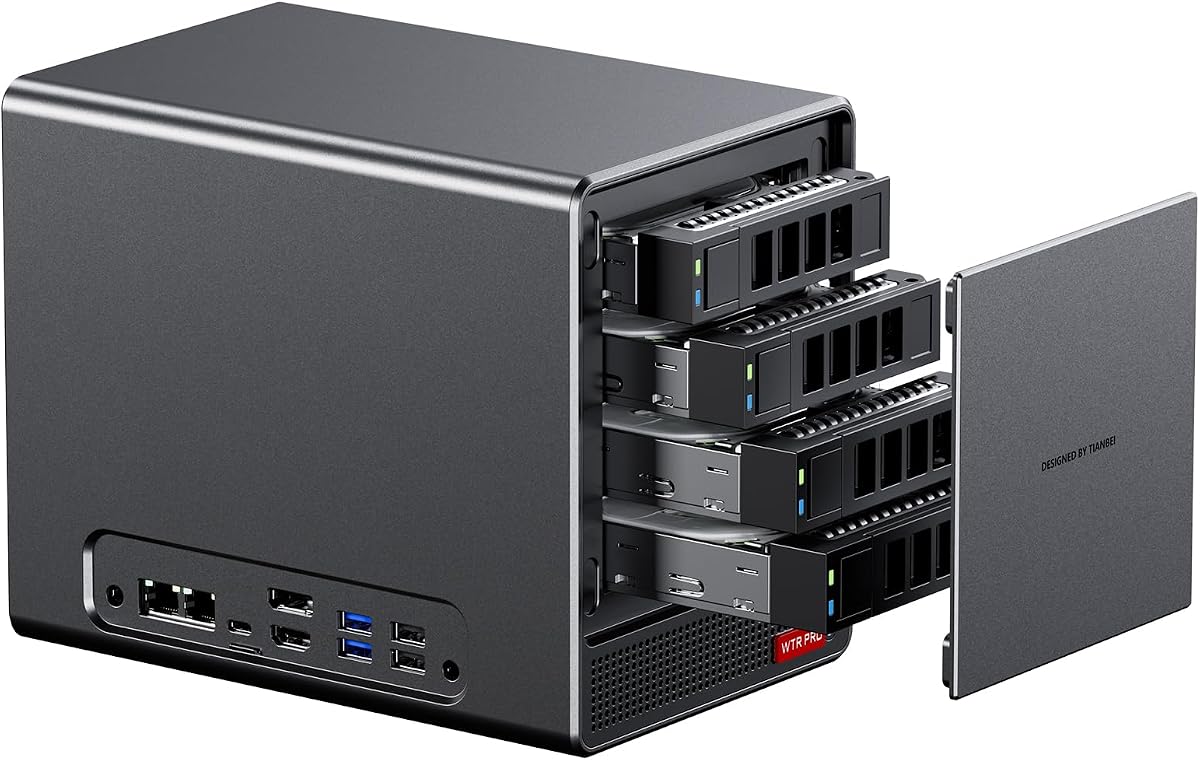
The AOOSTAR WTR PRO is explicitly designed for home server and NAS applications with its four 3.5-inch drive bays and two M.2 NVMe slots. This configuration allows for massive storage capacity up to 88TB making it ideal for media libraries and data backup solutions.
We may earn a commission when you buy through this link, at no additional cost to you.
Powered by the efficient Ryzen 7 5825U processor, it balances performance with low power consumption ranging from 15W to 25W under typical loads. This energy efficiency is crucial for devices that run continuously without significant electricity costs or heat generation.
Cooling is managed through a through-the-wall construction and a large 12CM fan ensuring silent operation even in living spaces. The system supports multiple operating systems including Windows and Linux giving users flexibility in choosing their preferred server environment.
While it lacks the latest USB4 or DDR5 standards its robust storage capabilities make it stand out in the niche home server market. If your primary goal is reliable and expandable storage for home or small office use, this model is a practical solution.
Four 3.5-inch bays allow for terabytes of local storage.
Low wattage operation reduces electricity costs for always-on servers.
We may earn a commission when you buy through this link, at no additional cost to you.
The ASRock DeskMini X300 2.5G Series impresses with its ultra-compact 1.92L form factor which is perfect for environments where space is at a premium. Despite its small size it delivers robust connectivity and performance for general computing tasks and media consumption.
We may earn a commission when you buy through this link, at no additional cost to you.
Networking is handled by a Dragon RTL8125BG 2.5G LAN port which offers faster data transfer speeds compared to standard Gigabit Ethernet. This is beneficial for users working with large media files or requiring high-speed network backups and streaming.
Triple display support via HDMI DP and D-Sub allows for versatile multi-monitor setups suitable for productivity or digital signage. The system supports a wide range of AM4 processors giving users the freedom to choose CPUs based on their performance and budget requirements.
While it uses DDR4 memory and lacks newer USB4 capabilities it remains a solid and reliable choice for budget builds. Its reputation for stability and affordability makes it a recommended option for home offices or school labs.
1.92L volume allows fitting behind monitors or in tight spaces.
2.5G LAN ensures fast wired internet and local transfer speeds.
We may earn a commission when you buy through this link, at no additional cost to you.
The ASUS ExpertCenter PN54 pushes the boundaries of mini PC technology with the latest Ryzen AI 300 Series processors and support for Wi-Fi 7. This positions it as a future-proof choice for users who want the most advanced connectivity and processing capabilities available today.
We may earn a commission when you buy through this link, at no additional cost to you.
Designed with an ultra-thin 0.6L eco-conscious chassis it combines sleek aesthetics with sustainable manufacturing practices. The toolless design allows users to access and upgrade components quickly without requiring technical expertise or specialized tools.
The inclusion of a dedicated NPU provides up to 50 TOPS of AI performance enabling faster dynamic computing and responsive AI tasks. This is particularly beneficial for applications that rely heavily on local machine learning and neural processing workloads.
While the price point is higher than standard models the advanced features and build quality justify the investment for early adopters. It is an excellent option for businesses or power users looking for cutting-edge technology in a compact desktop form.
Wi-Fi 7 support offers ultrafast wireless speeds for modern networks.
XDNA2 NPU accelerates AI workloads and improves system responsiveness.
We may earn a commission when you buy through this link, at no additional cost to you.
The AOOSTAR WTR PRO 4+2 Bay NAS provides exceptional storage flexibility with four 3.5-inch SATA bays and two M.2 NVMe slots. This hybrid configuration allows users to balance capacity and speed effectively for both bulk storage and high-speed caching.
We may earn a commission when you buy through this link, at no additional cost to you.
Equipped with dual 2.5G LAN ports this model supports link aggregation and network redundancy which is vital for critical business data or high-traffic home servers. The metal shell and through-air ventilation ensure stable long-term operation even under sustained workloads.
While it is optimized for low power consumption ranging from 15W to 25W it still delivers strong multitasking capabilities thanks to the Ryzen 7 5825U. It supports virtualization technologies making it suitable for home labs and advanced networking setups.
Potential Linux users should be aware of potential SATA power management quirks which can be resolved with simple configuration rules. Overall, this unit is a versatile and robust solution for anyone needing a highly expandable and reliable home server.
Combines SSD speed with HDD capacity for balanced performance.
Dual LAN ports offer failover and faster aggregated bandwidth.
We may earn a commission when you buy through this link, at no additional cost to you.
The ASUS ExpertCenter PN54-S1 is designed with convenience in mind featuring a tool-free design that allows for quick access and easy component upgrades. This is ideal for environments where maintenance or hardware swaps need to be performed rapidly without specialized tools.
We may earn a commission when you buy through this link, at no additional cost to you.
Its sleek 34mm chassis profile makes it exceptionally thin and portable while maintaining eco-conscious durability. Despite the slim profile it supports quad 4K displays providing robust visual output for professional or entertainment setups.
Connectivity features include Wi-Fi 7 and Bluetooth 5.4 ensuring the device is ready for modern wireless standards. This future-ready connectivity supports high-speed internet and seamless pairing with wireless peripherals and accessories.
While specific component compatibility may vary compared to higher models the ease of use and design efficiency make it a standout choice for general office work. It offers a balanced approach to mini PC design prioritizing user experience and reliability.
Tool-free access simplifies routine upgrades and maintenance tasks.
34mm thickness allows mounting behind displays for clean setups.
We may earn a commission when you buy through this link, at no additional cost to you.
Choosing the right barebone PC requires evaluating several technical factors to ensure the system meets your performance and connectivity needs.
AMD offers various processor generations from Zen 3 to the latest Zen 4. Newer architectures provide better performance per watt and improved graphics capabilities which are critical for gaming or creative workloads.
Prioritize newer chips like the Ryzen 7 PRO 8845HS for modern workflows and older chips like the Ryzen 5825U for budget or server tasks.
Verify the type of memory supported such as DDR4 or DDR5 as this affects overall system speed and future upgradability. DDR5 is faster but more expensive and newer.
Check the number of M.2 slots and SATA ports to ensure you can install enough storage drives for your specific data capacity requirements.
Modern connectivity like USB4 and OCuLink allows for external GPU connections and high-speed data transfer which expands the versatility of the mini PC.
Ensure the unit has enough USB ports and video outputs like HDMI 2.1 or DP 1.4 to support your monitor and peripheral setup.
Ethernet speed is crucial for data transfer. Look for 2.5G LAN ports if you plan on transferring large files regularly over a wired network.
Wireless standards like Wi-Fi 6e or Wi-Fi 7 provide faster speeds and better latency for wireless environments.
Mini PCs often run hot due to limited airflow. Systems with vapor chamber cooling or large fans maintain performance during long sessions better than passive cooling.
Consider the noise level if the PC will be placed in a quiet living room or bedroom environment.
Barebone systems allow you to choose components yourself. Ensure the chassis supports the size of RAM modules and SSDs you intend to install for ease of assembly.
Look for toolless designs if you plan to swap hardware frequently without carrying screwdrivers.
Most barebone PCs ship without an OS. Ensure the hardware supports the operating system you plan to install such as Windows 11 Pro or Linux distributions.
Some units come with specific Linux compatibility notes regarding power management which is important for server users.
If the device will run 24/7 such as for a home server check its power consumption ratings. Lower wattage models save electricity and generate less heat.
Energy saving features like adjustable BIOS power modes allow you to balance performance with battery or power usage.
Install compatible RAM and SSDs carefully following the motherboard manual. Ensure the RAM clicks into place and SSDs are secured with screws to prevent loosening.
Connect your monitor and peripherals to the correct ports. Use high-quality cables for HDMI or USB4 to ensure maximum resolution and data transfer speeds.
Keep the vents clear of dust and debris to prevent overheating. Use compressed air periodically to clean fans and filters for optimal thermal performance.
Most barebone PCs do not include an operating system so you will need to install one yourself. However some models offer a complimentary Windows 11 Pro key upon contacting customer support to claim it.
OCuLink offers lower latency and higher bandwidth for external GPU connections compared to USB4. It uses an independent channel which prevents bottlenecking with storage or USB data transfer.
No DDR4 and DDR5 memory modules are not interchangeable. You must purchase the specific type of RAM supported by the mini PC model you choose to ensure compatibility.
Assembly is generally straightforward if you have basic technical skills. Most units come with manuals and VESA mounts making the process similar to building a standard desktop PC.
Ryzen PRO processors offer enhanced security features and business-grade reliability compared to standard consumer chips. They are optimized for professional workloads and stability.
Most mini PCs have non-modular cooling systems. You can clean the existing fans regularly but adding aftermarket cooling is difficult due to the compact chassis design.
Whether you need a budget-friendly option like the ASRock DeskMini or a high-performance workstation like the AOOSTAR MACO there is an AMD barebone PC for every use case.
Prioritize connectivity and CPU architecture based on your specific workflow needs to ensure the system remains relevant for years to come.
Remember to check current availability and pricing as these dynamic factors change frequently on major retail platforms.