
CMTECK USB Computer Microphone G009
4.5Editor score
Active noise cancelling chip
Flexible gooseneck design
Mute button with LED
This guide compares the top ten affordable USB microphones for desktop use, focusing on audio clarity, build quality, and ease of setup for budget conscious
Finding a reliable microphone for your desk does not have to break the bank. Many affordable options deliver clear audio for calls and recording without expensive gear.
We evaluated ten highly rated USB microphones based on sound quality, build durability, and user feedback. This list highlights the best value picks available right now.
Each pick shows key features and real world performance notes. Please note that product availability and pricing can change frequently on retailer platforms.
4.5Editor score

4.4Editor score

4.4Editor score
The following table provides a side by side overview of all ten microphones. It highlights key specifications and distinct features to help you compare quickly.
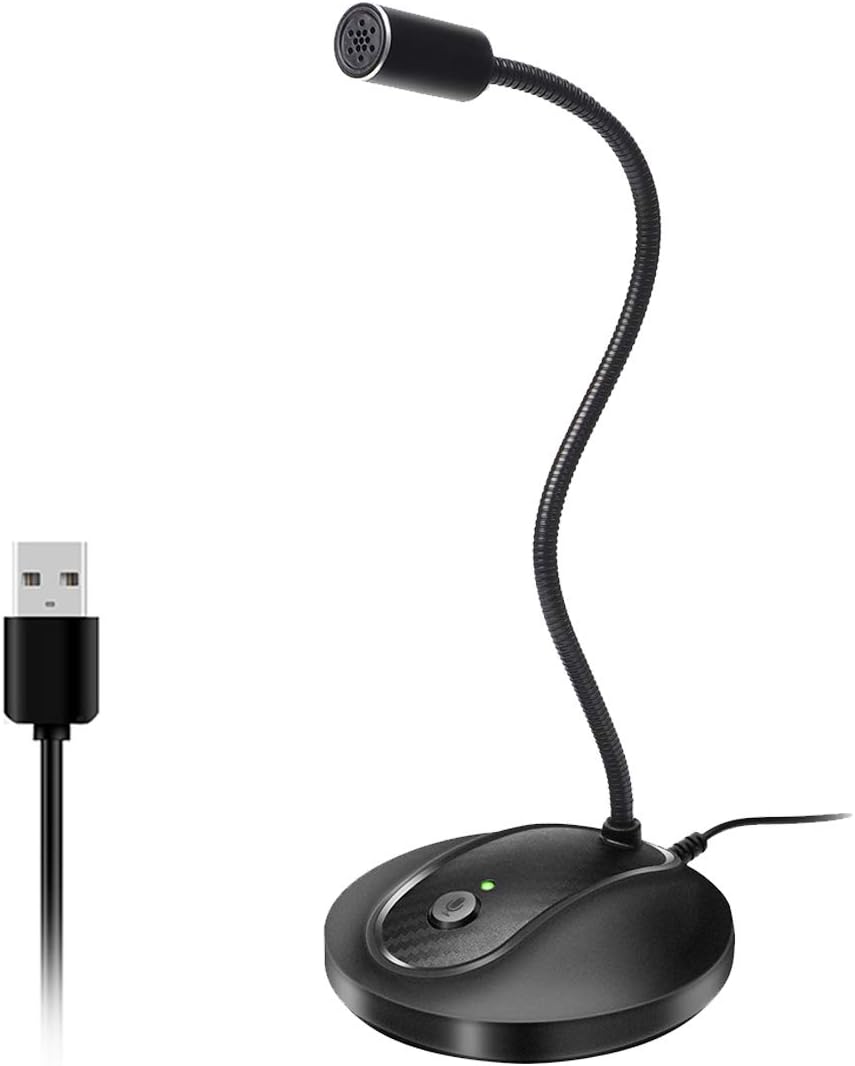


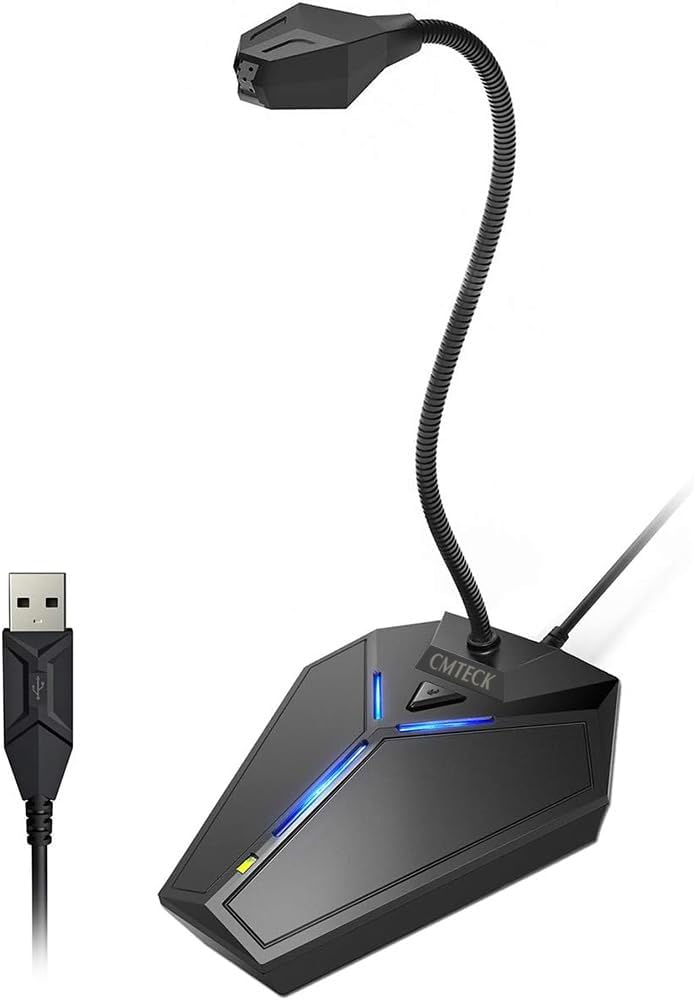

This microphone offers exceptional value for anyone needing a reliable audio input on a tight budget. It holds a strong 4.5 star rating from users who appreciate its straightforward design.
We may earn a commission when you buy through this link, at no additional cost to you.
The active noise cancelling technology helps isolate your voice from background hums and clicks. The flexible gooseneck allows you to position the mic close to your mouth for optimal sound.
While the build feels lightweight, it is sturdy enough for daily desk use. The mute button with LED indicator provides clear visual feedback during calls.
Budget conscious users looking for a no fuss solution will find this an excellent starting point for podcasting or online meetings.
The omnidirectional condenser captures voice accurately while the smart chip filters out distracting background noise.
The compact base and adjustable neck ensure the mic fits well on any workspace without taking up too much room.
We may earn a commission when you buy through this link, at no additional cost to you.
This USB microphone provides a solid foundation for home recording and virtual meetings. Its 4.4 star rating reflects consistent performance in various environments.
We may earn a commission when you buy through this link, at no additional cost to you.
The intelligent noise canceling tech effectively reduces ambient sounds like keyboard typing. The heavy duty ABS stand ensures the mic stays put during use.
The flexible gooseneck allows for precise positioning which is key for clear audio. It is plug and play so no drivers are needed.
It is a practical choice for users who need a stable mic for streaming or dictation without spending much.
The metal pipe and heavy duty base prevent wobbling which helps maintain consistent audio distance during long sessions.
Compatible with Windows and macOS this mic is recognized instantly allowing you to start recording right away.
We may earn a commission when you buy through this link, at no additional cost to you.
This microphone stands out for its high 4.6 star rating and inclusion of windproof fluffy caps. It is designed for streaming and gaming on a budget.
We may earn a commission when you buy through this link, at no additional cost to you.
The touch sensitive mute button is responsive and the LED indicator keeps you informed of the status. The compact design makes it easy to move between desks.
Audio quality is clear and natural within the optimal range. The non slip base ensures stability even during intense gaming moments.
Gamers and streamers looking for a lightweight and effective mic will appreciate the simple setup and reliable performance.
The included fluffy caps reduce breaking noise from breath spray or fans ensuring cleaner recordings without software tweaks.
The touch sensitive button allows for quick muting which prevents accidental audio leaks during conversations.
We may earn a commission when you buy through this link, at no additional cost to you.
This microphone brings professional features to a consumer price point with its 14mm diaphragm and cardioid pattern. It scores a 4.4 star rating for its build quality.
We may earn a commission when you buy through this link, at no additional cost to you.
The cardioid pickup isolates your voice better than omnidirectional mics reducing background noise naturally. The built in shock absorber protects against vibration bumps.
It includes a standard thread for tripod mounting which adds versatility. The mute button is convenient and syncs with your computer system.
Anyone wanting a more serious recording tool without investing in a mixer will find this a worthy upgrade.
The cardioid pattern focuses on sound from the front effectively filtering out side and rear noise.
The detachable base allows you to mount the mic on a boom arm or tripod for better positioning flexibility.
We may earn a commission when you buy through this link, at no additional cost to you.
This podcast microphone earns the Editor's Choice badge for its extensive control features. It holds a 4.4 star rating and offers zero latency monitoring for serious creators.
We may earn a commission when you buy through this link, at no additional cost to you.
Physical knobs for echo and volume let you shape sound in real time without software. The included USB C adapters make it versatile for mobile devices too.
The wide frequency response ensures rich vocals while the cardioid pattern reduces noise. Real time feedback helps you catch distortion before it gets recorded.
Podcasters and streamers who need hands on control will appreciate the flexibility this unit provides out of the box.
Adjustable knobs allow you to manage echo and gain physically which speeds up workflow during live streams.
With included adapters this mic works seamlessly with iPhones and iPads making it great for mobile recording.
We may earn a commission when you buy through this link, at no additional cost to you.
This microphone is designed for small group meetings with a wide 11.5 ft pickup distance. It scores a 4.3 star rating for its reliability in conference calls.
We may earn a commission when you buy through this link, at no additional cost to you.
The omnidirectional pattern captures everyone in the room without needing multiple devices. The nylon shielded wire minimizes interference for stable audio transmission.
Setup is plug and play with Windows and macOS. The blue indicator light clearly shows when the mic is active.
Small teams or educators hosting online classes will find this a practical tool for clear group communication.
The wide pickup range ensures all voices are heard clearly without participants needing to lean in.
The nylon shielded wire reduces signal noise which helps maintain audio clarity in environments with many cables.
We may earn a commission when you buy through this link, at no additional cost to you.
This microphone combines practical audio features with a touch of style for gaming setups. It holds a 4.5 star rating and features customizable breathing lights.
We may earn a commission when you buy through this link, at no additional cost to you.
Intelligent noise reduction filters out fan hum and clicks so your voice stays clear. The gooseneck allows you to position it perfectly for your desk layout.
The weighted base ensures it stays stable during intense sessions. It is compatible with all major streaming apps and works well right out of the box.
Streamers who value both aesthetics and audio clarity will enjoy this versatile microphone.
The breathing lights enhance your workstation look without distracting from the audio quality.
The flexible metal neck allows exact placement which is crucial for avoiding mouth noises and echo.
We may earn a commission when you buy through this link, at no additional cost to you.
This microphone offers a convenient physical volume knob and mute button for quick adjustments. It holds a 4.4 star rating for its consistent performance.
We may earn a commission when you buy through this link, at no additional cost to you.
The CCS3.0 smart chip ensures your voice is captured clearly without background noise. It works well for YouTube and podcasting needs.
Setup is simple with no drivers required. The omnidirectional pattern makes it easy to use from any angle.
Users wanting a mix of analog control and digital convenience will find this a solid choice.
The physical volume knob allows you to adjust input levels quickly without digging into software settings.
The intelligent reduction ensures smooth and clear recordings even in moderately noisy environments.
We may earn a commission when you buy through this link, at no additional cost to you.
This microphone provides crisp audio quality with a unique blue LED light for visual flair. It maintains a 4.4 star rating across various user feedback.
We may earn a commission when you buy through this link, at no additional cost to you.
The smart chip effectively suppresses background noise ensuring your voice is clear. The shockproof base keeps the mic stable during use.
It is fully compatible with Windows and macOS making setup very easy. The mute button with indicator helps prevent accidental audio transmission.
Users looking for a classic and reliable desk mic will appreciate its straightforward design.
The blue LED light adds a sleek effect that helps you identify the mic status at a glance.
The shockproof ABS base ensures the mic stays put without sliding around during typing or movement.
We may earn a commission when you buy through this link, at no additional cost to you.
This microphone offers a professional look backed by a five year assurance for reliability. It has a 4.3 star rating for its consistent audio capture.
We may earn a commission when you buy through this link, at no additional cost to you.
The patented audio filter isolates your voice ensuring colleagues hear you clearly. The aerodynamic design complements any office desk nicely.
It works with Linux as well as Windows and macOS. The lightweight but stable construction prevents accidental tipping.
Remote workers who value design and warranty security will find this a strong option for daily calls.
The stylish curves and balanced stand add a professional touch to any workspace setup.
The five year assurance provides peace of mind that the product is built to last.
We may earn a commission when you buy through this link, at no additional cost to you.
Selecting the right microphone requires balancing audio needs with budget constraints. These factors help you narrow down the options effectively.
Omnidirectional mics capture sound from all angles making them ideal for meetings. Cardioid patterns focus on the front and reduce background noise better for solo recording.
Choose cardioid for focused voice work and omnidirectional for group conversations.
Active noise cancellation helps remove fan noise and keyboard clicks physically. Software based filtering also works but relies on digital processing.
Look for mics with smart chips or dedicated filters if you record in noisy rooms.
Metal goosenecks and weighted bases provide stability and durability. Plastic units are lighter but may tip over easily.
Prioritize metal construction if your desk gets bumped frequently.
Mute buttons and LED indicators are essential for privacy. Physical knobs for volume allow quick adjustments without software.
Ensure the mic has at least a mute button for easy management.
Most USB mics work with Windows and Mac but check for mobile support if needed. Some require specific ports or adapters.
Verify compatibility with your operating system before purchasing.
Cable length affects desk placement flexibility. Longer cables allow you to move further from the PC.
Aim for at least six feet to avoid cable clutter.
Zero latency monitoring lets you hear your voice in real time which helps detect issues early. Not all cheap mics include a headphone jack.
Check for a monitoring port if accurate real time feedback is important.
A good warranty protects your investment against defects. Longer coverage periods indicate manufacturer confidence.
Look for at least a one year warranty for safety.
Place the microphone on a stable surface about six to eight inches from your mouth. Adjust the angle so the top faces you directly for clear capture.
Use the mute button when you are not speaking to prevent background noise from being recorded. Check the LED status to confirm the mic is active.
Keep the mic clean by wiping it with a dry cloth occasionally. Avoid exposing it to moisture or extreme heat to maintain its electronics.
Most USB microphones in this list are compatible with macOS. They follow standard USB protocols so no drivers are needed.
Yes all these mics are designed for Zoom Skype and similar apps. They provide clear voice pickup for remote meetings.
Some include a windscreen or cap but not a traditional foam pop filter. You may need to purchase one separately if needed.
No these microphones have built in sound cards for plug and play operation. They connect directly to USB ports without extras.
Cable lengths generally range from 6 feet to 70 inches. This provides enough reach for most desk setups.
Some models have a dedicated volume knob while others rely on software controls. Check the specs for physical controls.
They are suitable for casual vocals but professional recording may require higher end gear. These deliver clear quality for home use.
Many do work with Linux as they use standard USB audio drivers. However compatibility varies so check specific models.
The top picks offer a mix of features and performance for budget conscious buyers. The CMTECK model excels in value while the ZealSound provides advanced control.
Prioritize noise cancellation and build stability to ensure long term satisfaction. A reliable mic improves your audio quality significantly for meetings.
Remember that prices fluctuate so check current offers before finalizing your purchase. The right mic is an investment in your communication clarity.