
Redragon K585 Wired One-Handed RGB Gaming Keypad
4.4Editor score
42-Key Layout
Swap Switches Without Soldering
USB Pass-Through Port
16.8 Million RGB Colors
Discover the top 10 gaming keypads for 2026. This guide compares features, switches, and ergonomics to help you choose the perfect one-handed control solution.
Gaming keypads offer specialized control for players seeking efficiency and comfort. These compact devices free up desk space while providing dedicated keys for complex macros and movements during intense sessions.
We evaluated ten top models based on switch quality, programmability, and ergonomic design. Our analysis covers wired and wireless options across various price points to ensure you find the right fit for your setup.
Each pick highlights unique strengths like hall effect technology or RGB customization. Note that prices and availability change frequently so check current listings before making your final decision today.
4.4Editor score

4.3Editor score

4.3Editor score
This table provides a side-by-side overview of the top ten gaming keypads available this month. Compare key counts, switch types, connectivity options, and special features to quickly identify the best match for your gaming needs.




The Razer Tartarus V2 leads our list as the top choice for gamers seeking premium feel and control. Its 32 programmable keys provide ample room for complex commands without cluttering your main keyboard.
We may earn a commission when you buy through this link, at no additional cost to you.
High-performance mecha-membrane switches offer the tactile feedback of mechanical keys with the comfort of a membrane design. The 8-way directional thumbpad allows for more natural movement controls suited for console-oriented players.
While it requires software for full macro customization and costs more than budget options, the durability and feature set justify the investment for serious players who need reliability during long gaming sessions.
If you value ergonomics and deep customization for MMO or MOBA games this keypad is the definitive choice. Its seamless integration with Razer hardware ensures a unified battlestation experience.
The thumbpad replaces traditional D-pads allowing for smoother directional inputs in games that benefit from analog-style movement on a single device.
Razer Hypershift enables you to remap all keys and combinations letting you execute complex commands with a single press during intense gameplay.
We may earn a commission when you buy through this link, at no additional cost to you.
The Redragon K585 offers exceptional value with 42 keys and hot-swap capabilities at a fraction of the cost of premium models. It stands out for users wanting to customize switch feel without soldering.
We may earn a commission when you buy through this link, at no additional cost to you.
Onboard macro keys let you bind commands instantly which is vital for MOBA and MMO players. The USB pass-through port keeps your desk organized by allowing a mouse or headset to plug directly into the keypad.
The magnetic wrist rest is detachable offering flexibility for smaller desks. While the RGB lighting is vibrant it requires some learning to master the software for deep customization compared to plug-and-play options.
This model is perfect for budget-conscious gamers or modders who want a tactile experience. Its versatility and low entry price make it a strong contender in the one-handed category.
The socket accepts almost any 3-pin or 5-pin switch allowing you to tune the feel of your off-hand keypad to match your main board perfectly.
The USB pass-through port reduces cable clutter by letting you connect peripherals directly to the keypad rather than reaching back to your PC.
We may earn a commission when you buy through this link, at no additional cost to you.
The AZERON Cyborg ll redefines one-handed gaming with an analog thumbstick that eliminates drift and supports WASD or 360-degree movement. It is designed for right-handed users who want maximum precision.
We may earn a commission when you buy through this link, at no additional cost to you.
Exclusive software allows for advanced customization including RGB profiles and analog smoothing. The keypad stores up to six control layouts directly on the device ensuring your setup travels with you without needing a PC connection.
While the price is significantly higher than standard options the modular design and hall effect technology offer benefits that justify the cost for competitive players. The 3D printed build ensures a perfect fit for various hand sizes.
If you demand elite ergonomics and unique analog control this keypad is unmatched. It is a serious investment for those who view their gaming setup as a precision instrument.
The hall effect thumbstick eliminates drift and supports analog movement in compatible games offering control superior to standard digital D-pads.
Adjustable parts ensure a perfect fit for your hand size allowing you to tailor the device to your specific ergonomic needs over time.
We may earn a commission when you buy through this link, at no additional cost to you.
The Redragon K585 PRO brings the popular 42-key layout to a wireless format. Its BT and 2.4GHz connectivity lets you set the keypad anywhere on your desk without being tethered to a computer.
We may earn a commission when you buy through this link, at no additional cost to you.
With up to 15 to 20 hours of continuous play on a single charge you can game for days before recharging. The hot-swap feature remains intact allowing you to change switch feel easily.
A detachable magnetic wrist rest adds to the convenience of this portable device. While wireless is great for flexibility it might not be ideal for ultra competitive shooters where latency is critical.
This model is ideal for casual gamers or those who want a clean desk setup. It balances performance and freedom effectively for most gaming scenarios.
Bluetooth and 2.4GHz connectivity give you the freedom to place the keypad exactly where it fits best on your desk.
The battery supports up to 20 hours of continuous play ensuring you stay in the game without frequent interruptions.
We may earn a commission when you buy through this link, at no additional cost to you.
The RedThunder One Handed is a portable mini gaming keypad with 35 keys designed for enthusiasts seeking efficiency. Its built-in game chip ensures a 3ms response speed for fluent gameplay.
We may earn a commission when you buy through this link, at no additional cost to you.
All keys are anti-ghosting which is essential for simultaneous inputs during intense matches. The macro recording function allows you to bind complex commands quickly without needing additional software installation.
It features a large wrist rest to provide ergonomic support and reduce fatigue during long sessions. The RGB backlit modes add visual flair without adding significant complexity to the device.
This is a great choice for gamers who need a travel-friendly or space-saving option. Its simple plug and play nature makes it accessible for users of all skill levels.
The built-in game chip delivers a 3ms response speed ensuring that your inputs are registered instantly during competitive play.
Recording macros is done directly on the device using function keys making setup quick and easy for immediate use.
We may earn a commission when you buy through this link, at no additional cost to you.
The Keychron C0 HE is built for competitive FPS players with an 8K polling rate and Hall Effect magnetic switches. It supports Rapid Trigger technology for ultra-low latency and instant key reset.
We may earn a commission when you buy through this link, at no additional cost to you.
Inputs are detected based on real-time key travel rather than fixed points enabling finer control. This is particularly useful for rapid movement in titles like Valorant and CS2 where precision is key.
Customization happens through a web-based configurator requiring no software installation. This makes it compatible with Windows and macOS and ensures your settings travel with the device on the keypad.
For streamers and power users this keypad offers efficient one-handed control for macros and shortcuts. It is a strong technical choice for those prioritizing performance and latency.
Rapid Trigger allows for instant key reset upon lift-off providing faster and smoother inputs for high-level FPS gameplay.
The browser-based configurator means you can map keys and adjust settings without installing heavy drivers on your computer.
We may earn a commission when you buy through this link, at no additional cost to you.
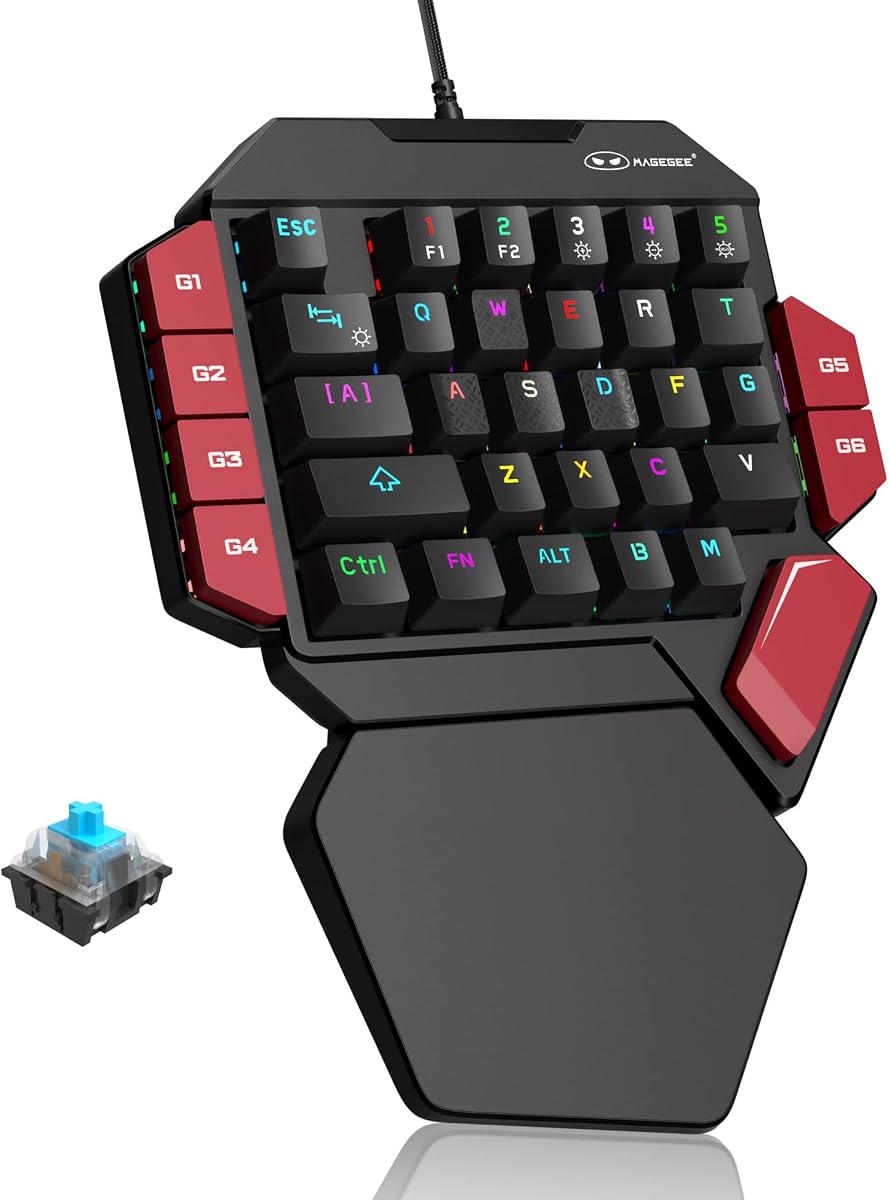
The MageGee One Handed provides a classic mechanical experience with blue switches that offer a loud click sound and strong tactile feedback. All 35 keys are non-conflict keys ensuring reliable performance.
We may earn a commission when you buy through this link, at no additional cost to you.
Customizing light effects is straightforward with static and dynamic modes controlled by function keys. The six macro recording keys allow you to save commands without needing to install complex software.
A large palm rest helps reduce hand fatigue during extended use. The design is fully compatible with most systems and connects via USB for plug and play functionality.
This is a great option for users who prefer loud mechanical feedback and a simple setup. It is cost-effective for those who want a traditional mechanical feel in a compact form.
The blue switches provide a strong mechanical feeling and crisp paragraph feedback preferred by many mechanical keyboard enthusiasts.
Six dedicated macro keys let you bind commands easily making it simple to perform combos without software interference.
We may earn a commission when you buy through this link, at no additional cost to you.
The AJAZZ AK029 features an ultra-compact 29-key design that saves significant desk space. Its Hall Effect magnetic switches allow for adjustable actuation from 0.1mm to 3.5mm with high precision.
We may earn a commission when you buy through this link, at no additional cost to you.
Rapid Trigger enables instant reset on lift-off ensuring tournament-grade performance. The web driver offers zero-install setup allowing you to remap keys and adjust settings directly in your browser.
Aluminum reinforcement ensures a stable yet cushioned feel without compromising responsiveness. It pairs well with mice for low-sensitivity FPS play by freeing up space for movement.
This model is ideal for gamers with smaller setups or those who prefer a minimalist layout. Its high rating suggests strong reliability for its price point.
Zero dead zone ensures every tap registers instantly providing consistent performance without physical contact delays.
Profiles live on the keypad allowing you to switch computers without losing your setup making it highly portable.
We may earn a commission when you buy through this link, at no additional cost to you.
The standard Razer Tartarus V2 offers the classic experience with 32 programmable keys and mecha-membrane switches. It is a reliable entry into the Razer ecosystem for those seeking a proven design.
We may earn a commission when you buy through this link, at no additional cost to you.
It supports extensive personalization and gaming immersion with Chroma RGB sync. The tactile feedback makes it suitable for gaming or integrating into creative workflows with remappable keys.
While newer models offer advanced features this version remains a solid choice for traditionalists who value brand reliability. It fits well with other Razer gear for a unified look.
If you prefer a straightforward setup without extra analog thumbpads this is a strong option. It balances comfort and functionality for daily gaming sessions.
The device fully syncs with popular games and other hardware allowing for an immersive lighting experience.
This standard model provides a trusted design with durable switches and a proven layout for everyday use.
We may earn a commission when you buy through this link, at no additional cost to you.
The Redragon RM104 features a multifunction smart control knob to adjust volume and RGB modes instantly. It offers seamless switching between Bluetooth, 2.4GHz wireless, and USB-C for versatility.
We may earn a commission when you buy through this link, at no additional cost to you.
Customizable software allows you to assign macros and remap commands similar to a full keyboard. The 4000mAh battery ensures you can go weeks between charges depending on usage.
Its refined internal structure gives the knob a buttery-smooth rotation for long-lasting reliability. This model is great for users wanting a compact wireless keyboard with specific media control features.
If you value media controls and clean desk setups this device provides a solid mix of features. It is a versatile addition to any multi-device workspace.
The knob offers smoother and faster control for volume and lighting than standard PC keyboard shortcuts.
Switching between Bluetooth and 2.4GHz wireless keeps your desk clean and ensures compatibility with multiple systems.
We may earn a commission when you buy through this link, at no additional cost to you.
Choosing the right gaming keypad involves considering switch type, layout, and connectivity to match your specific gaming style.
Switches determine the feel and sound of your inputs. Mechanical switches offer tactile feedback while membrane switches are quieter. Hall Effect switches provide magnetic precision with adjustable actuation for competitive gaming.
Select a switch type that matches your preference for sound and feedback intensity to ensure comfort during long sessions.
Key count ranges from 29 to 42 keys. More keys offer more macros but take up space. Layouts should prioritize ergonomics and thumb accessibility for movement controls.
Look for a layout that allows your thumb to rest naturally without strain during extended use.
Wired connections offer stable latency while wireless provides freedom of movement. If you choose wireless check battery life and latency specs to ensure it suits competitive play.
Prioritize wired for competitive FPS games and wireless for casual setups or to reduce cable clutter.
Software allows you to map macros and customize lighting. Look for onboard memory to store profiles directly on the device for portability without needing software on every PC.
Ensure the software is user-friendly and supports cross-platform compatibility if you switch devices often.
Ergonomics prevent wrist strain and fatigue. Wrist rests and adjustable parts help tailor the device to your hand size and posture requirements.
Choose a model with adequate padding and adjustability to support healthy posture during gaming.
RGB lighting enhances immersion and allows you to match your battlestation aesthetic. Modes should be easy to customize or sync with other peripherals for a unified look.
Check if the lighting syncs with your other hardware to create a cohesive visual environment.
Durable materials like aluminum ensure longevity. Plastic builds are lighter but may flex during intense input. A solid chassis improves typing feel and device stability.
Opt for reinforced builds if you plan to use the device frequently for several years.
Prices vary from budget-friendly to premium. Higher cost often means better switches or build quality. Determine your budget and prioritize features you will actually use.
Balance cost against necessary features to avoid overspending on capabilities you will not utilize.
Start by connecting the device via USB or wireless mode and installing necessary drivers. Use the provided software to map macros to keys that are hard to reach on your main keyboard.
Regularly clean the keys with compressed air to remove dust and debris. If the keypad allows hot-swapping switches you can replace them if they wear out or if you want a different feel.
Store the keypad in a protective case when traveling to prevent damage. Adjust the angle using the wrist rest to ensure your hand remains in a neutral position during use.
No they are useful for FPS and strategy games too. They help centralize commands and free up your mouse for movement. Any game with complex keybinds benefits from a dedicated keypad.
Basic plug and play often works but full customization requires software. Most top models come with companion apps for macro recording and RGB control. Check if onboard memory is supported for portability.
Many models are compatible with macOS especially if they support USB or Bluetooth. Always verify system requirements before buying to ensure driver availability on Apple systems.
Hall Effect switches use magnets to detect key presses instead of physical contacts. This allows for adjustable actuation and longer life without debounce delay. They are popular in competitive gaming.
Consider how many keys you need for your specific game. Larger layouts offer more macros but take space. Choose one that fits comfortably within your reach without stretching your wrist.
While not mandatory a wrist rest helps reduce fatigue over long sessions. It keeps your hand at a stable height and prevents strain. Many models include detachable rests for flexibility.
Most are designed for PC but some support consoles if they emulate keyboard input. Check the compatibility list carefully if you plan to use it with a console setup.
Quality keys are rated for millions of presses often between 20 to 50 million. Hot-swap models allow you to replace switches individually if they wear out without replacing the whole unit.
The Razer Tartarus V2 Redragon K585 and AZERON Cyborg ll lead the market with unique strengths in ergonomics and customization.
Prioritize switch type and connectivity based on your primary games to ensure the device fits your workflow seamlessly.
Prices fluctuate so verify current listings before purchasing to get the best deal on your new gaming equipment.