
OWC ThunderBay Flex 8 0TB Storage/Dock/PCIe Expansion Enclosure
3.7Editor score
PCIe x16 expansion slot
Up to 2750MB/s speeds
Front USB-C and card readers
Selecting the right storage solution is critical for professionals and enthusiasts alike. An 8 Bay Hardware RAID Enclosure offers substantial capacity and redundancy, ensuring your data remains safe and accessible during demanding workflows or daily operations.
We compared ten top-rated models based on interface speed, build quality, cooling efficiency, and compatibility. Our analysis focuses on real-world performance metrics and user feedback to highlight the most reliable options available in the current market landscape.
Each pick below showcases specific strengths, from budget-friendly DAS units to high-performance Thunderbolt arrays. Please note that prices and availability fluctuate frequently, so verify current listings before making your final purchasing decision for your storage setup.
3.7Editor score

5.0Editor score

3.8Editor score
As an Amazon Associate we earn from qualifying purchases.
This side-by-side comparison highlights key specifications across all ten models to help you quickly identify the best fit for your specific storage, speed, and budget requirements.



The SanDisk Professional G-RAID Shuttle 8-Bay stands out as a top-tier solution for professionals requiring massive capacity and high-speed access. Its Thunderbolt 3 interface ensures rapid data transfers suitable for 4K and 8K video workflows.
We may earn a commission when you buy through this link, at no additional cost to you.
This enclosure features removable Ultrastar hard drives which simplify maintenance and replacement without needing to disassemble the entire unit. The hardware RAID supports various configurations ensuring data redundancy and performance based on specific project needs.
While the price point is significantly higher than average units, the performance and reliability justify the investment for mission-critical environments. Users should ensure their computer supports Thunderbolt 3 to maximize the potential of this enclosure.
Ideal for video editors and studios, this enclosure delivers the speed and reliability needed for demanding creative tasks. It remains a strong recommendation for those prioritizing performance over initial cost constraints.
Achieve read speeds up to 1900MB/s and write speeds up to 2000MB/s with Thunderbolt 3 ensuring smooth editing of large files.
Powered by eight removable Ultrastar hard drives for enhanced reliability making it perfect for demanding and mission-critical footage storage.
We may earn a commission when you buy through this link, at no additional cost to you.
The OWC ThunderBay Flex 8 offers a unique combination of storage and expansion capabilities. It supports both SATA drives and NVMe SSDs while including a PCIe slot for additional hardware cards.
We may earn a commission when you buy through this link, at no additional cost to you.
With front-mounted USB-C and USB-A ports this unit acts as a central hub for peripherals and mobile devices. The top four bays accommodate high-speed U.2 SSDs providing exceptional performance for specific workloads.
While the feature set is impressive the complexity of managing PCIe expansion and RAID configurations may deter casual users. It requires a specific workflow to fully utilize all its potential benefits effectively.
This enclosure is best suited for advanced users needing both massive storage and expandability. It provides a powerful all-in-one solution for creative professionals with diverse hardware requirements.
The PCIe x16 connector allows audio video capture networking or hardware RAID cards making it highly versatile for advanced setups.
Convenient front mounted USB-C and USB-A ports provide quick access for peripherals without needing to reach the back of the unit.
We may earn a commission when you buy through this link, at no additional cost to you.
The CENMATE Aluminum 8 Bay Hard Drive RAID Enclosure provides a cost-effective solution for users needing significant storage capacity. It supports both 2.5 and 3.5 inch drives allowing for flexible configuration options.
We may earn a commission when you buy through this link, at no additional cost to you.
With eight distinct RAID modes this unit offers various levels of performance and redundancy. The aluminum alloy construction helps dissipate heat while two cooling fans maintain safe operating temperatures during heavy use.
While fan noise can be noticeable during operation the aluminum build ensures durability without excessive heat buildup. Users should note that switching RAID modes requires a specific reset procedure detailed in the manual.
This enclosure is ideal for home users or small businesses needing large storage without high costs. It balances functionality and affordability making it a strong entry point into RAID enclosures.
This external raid enclosure supports CLONE LARGE NORMAL RAID0 RAID5 and other modes offering flexibility for different data protection needs.
Built in Aluminum-Alloy materials and two 2.9 inch Fans to maximize the security of your data while keeping heat levels low.
We may earn a commission when you buy through this link, at no additional cost to you.
The CENMATE Aluminum 8 Bay Hard Drive Enclosure offers direct attached storage without RAID complexity. This makes it simple to manage large amounts of data without worrying about array configuration.
We may earn a commission when you buy through this link, at no additional cost to you.
Its hot swappable design allows users to replace drives without powering off the system. Daisy chain expansion enables connecting up to three devices providing massive storage capacity up to 480TB total.
Although it lacks RAID features the USB 3.0 speed is sufficient for many file transfer tasks. The aluminum build keeps heat in check although fan noise may be a consideration for quiet environments.
This unit is perfect for users who need simple storage expansion without advanced redundancy. It offers reliable performance and scalability for personal or enterprise storage needs.
The HDD enclosure supports hot swapping allowing users to replace hard drives without powering off the device enhancing convenience.
Add a USB HOST port for external hard drive enclosure and daisy chain to expand capacity up to 480TB storage.
We may earn a commission when you buy through this link, at no additional cost to you.
The OWC ThunderBay 8 provides substantial storage capacity with Thunderbolt 3 speed. Its universal drive bays support both 2.5 and 3.5 inch SSDs and HDDs for flexible configuration options.
We may earn a commission when you buy through this link, at no additional cost to you.
Users can daisy-chain six units together for up to 1152TB of storage capacity. This scalability is useful for professionals needing massive archives without sacrificing transfer speed.
The thumb screw release trays allow for quick drive swaps without tools. However the unit requires Thunderbolt 3 ports which may not be available on all older systems.
Ideal for studios requiring high throughput and capacity this enclosure delivers reliable performance. It is a solid choice for high-end Mac and Windows setups.
Daisy-chain six units together for up to 1152TB of storage capacity offering immense space for media and data archiving.
Quick drive swaps are enabled with thumb screw release trays making drive replacement simple and tool-free.
We may earn a commission when you buy through this link, at no additional cost to you.
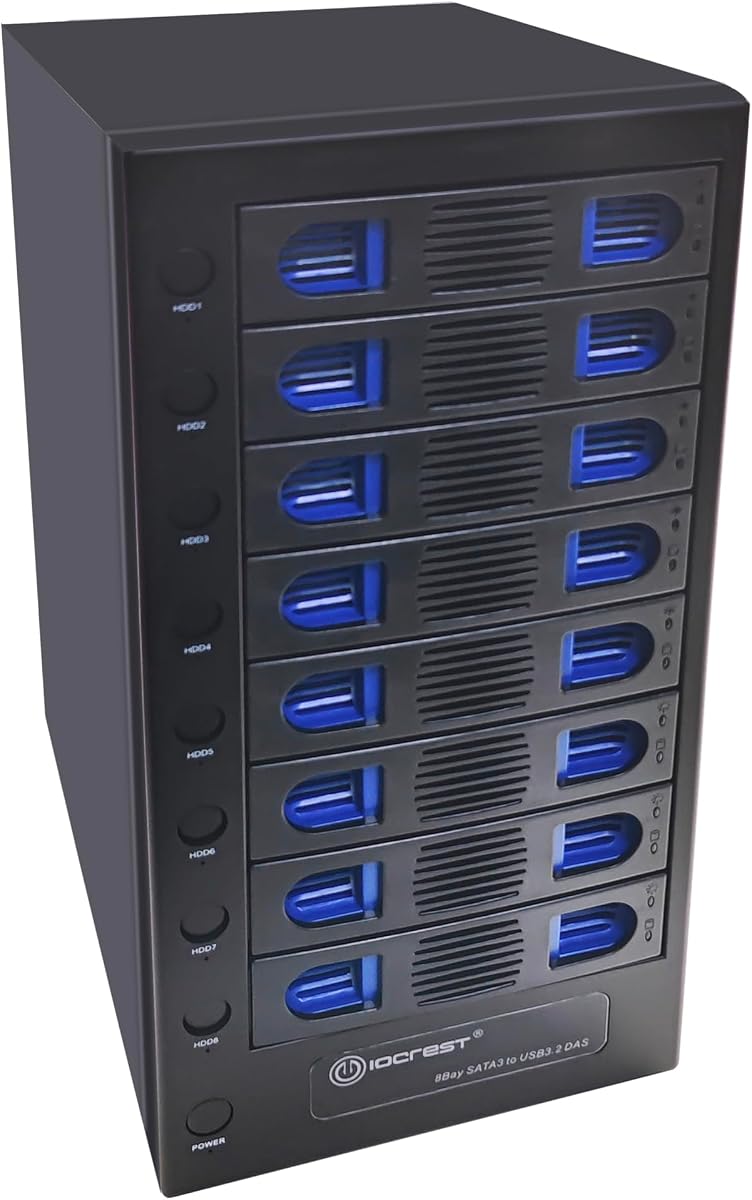
This CENMATE enclosure offers faster data transfer speeds with USB 3.2 Gen 2. It allows for rapid file movement which is beneficial for large media files and backups.
We may earn a commission when you buy through this link, at no additional cost to you.
The 10Gbps speed is twice as fast as standard USB 3.0 providing better performance for direct storage tasks. Hot swapping support allows drive replacements without interrupting system operations.
Like other CENMATE models the aluminum alloy build keeps it cool but fan noise may be present. It lacks RAID functionality making it suitable for simple DAS expansion needs.
For users needing speed and simplicity this model delivers. It provides excellent value for those requiring high throughput without complex array management.
This 8 bay enclosure equips with advanced chip and USB C 3.2 output interface for Max 10Gbps under UASP control.
The HDD enclosure supports hot swapping allowing users to replace hard drives without powering off the device enhancing convenience.
We may earn a commission when you buy through this link, at no additional cost to you.
This enclosure supports large drives up to 22TB each providing ample storage space. The independent control switch allows users to power off specific drives without affecting others.
We may earn a commission when you buy through this link, at no additional cost to you.
The smart fan function includes a thermal sensor that automatically adjusts fan speed based on temperature. This helps maintain stability and efficiency without unnecessary noise when cooling is not needed.
Supporting USB 3.2 with 10Gbps speed ensures decent transfer rates for various tasks. While it lacks RAID it is a reliable choice for straightforward storage expansion.
Ideal for users needing independent drive management and large capacity this unit is robust. It supports multiple operating systems making it compatible with diverse workflows.
Independent control switch for each drive allows drives to be powered off individually providing flexibility for power management.
Smart Fan Function with built-in thermal sensor support Auto and Manual mode with 3 level of fan speed for efficiency.
We may earn a commission when you buy through this link, at no additional cost to you.
The QNAP TL-D810TC4-US is designed for direct attached storage expansion. It provides plug-and-play connectivity for QNAP NAS systems and Windows or Linux workstations.
We may earn a commission when you buy through this link, at no additional cost to you.
Features include a USB 3.2 Gen 2 Type-C port for rapid file access. You can manage JBOD configurations using the free QNAP JBOD Manager utility to monitor drive health.
This solution is a straightforward hardware expansion for media libraries or backup repositories. It avoids the expense of purchasing an entirely new NAS system while scaling existing capacity.
Perfect for QNAP NAS users needing extra space this enclosure integrates well with existing storage. It is a reliable way to increase capacity for backups and media archives.
Provides plug-and-play Direct Attached Storage expansion for QNAP NAS Windows MacOS and Ubuntu Linux workstations.
Monitor drive health view system information and manage JBOD configurations using the free QNAP JBOD Manager utility.
We may earn a commission when you buy through this link, at no additional cost to you.
This NAS case is perfect for DIY enthusiasts building custom media servers. It supports Mini ITX and Micro ATX motherboards allowing flexible configuration for personal cloud or surveillance use.
We may earn a commission when you buy through this link, at no additional cost to you.
The dual independent air channel design separates heat dissipation for drives and mainboard. This prevents mutual interference and keeps temperatures low even under non-stop running.
Made of full thick steel chassis it ensures solid shockproof performance. Indicator lights on each drive bay help monitor disk working status in real time.
Ideal for photographers and small businesses needing custom setups this case offers flexibility. It includes accessories for installation but requires separate components for full assembly.
Adopting an upper and lower separated independent air duct design dissipates heat efficiently without mutual interference.
Made of full thick steel chassis for solid shockproof performance to protect your precious stored data and includes indicator lights.
We may earn a commission when you buy through this link, at no additional cost to you.
The ICY DOCK MB998SK-B is designed for internal installation in 5.25 inch drive bays. It converts a single external bay into eight internal drive slots for 2.5 inch drives.
We may earn a commission when you buy through this link, at no additional cost to you.
With full metal construction and locking trays it offers a secure and sturdy upgrade for server or workstation builds. It supports both SATA and single channel SAS drive types.
This product does not include USB ports as it is purely internal. It is ideal for users looking to expand internal storage without external connectivity needs.
For system builders needing compact internal expansion this cage is robust. It provides reliable support for multiple small form factor drives within a single chassis slot.
This unit is designed for internal installation in 5.25 drive drive bay offering a secure upgrade option for workstations.
Full metal construction with locking trays ensures security and durability for internal 2.5 inch drives.
We may earn a commission when you buy through this link, at no additional cost to you.
When selecting an 8 Bay Hardware RAID Enclosure consider several factors to ensure the device meets your performance and reliability requirements.
Interface type determines your maximum data transfer speed. USB 3.0 offers up to 5Gbps while USB 3.2 Gen 2 and Thunderbolt 3 can reach 10Gbps or 40Gbps respectively. Choosing the right interface depends on the speed required for your workflow and the available ports on your computer.
Ensure your host computer supports the chosen interface to avoid bottlenecks in data transfer speeds.
Some enclosures offer hardware RAID support which provides data redundancy and improved performance. Others function as DAS or JBOD allowing simple storage expansion without RAID capabilities. Determine if you need data protection through mirroring or striping.
Select a model with hardware RAID if data redundancy is critical for your work. Otherwise DAS may suffice for non-critical backups.
Check drive size compatibility to ensure the enclosure supports 2.5 inch SSDs or 3.5 inch HDDs. Some models support both sizes but others are limited to one form factor. Verify capacity limits per drive as enclosures may limit total supported capacity.
Confirm the enclosure supports the maximum drive size you plan to use to avoid installation issues.
Effective cooling is essential to maintain drive health in multi-bay enclosures. Look for built-in fans or aluminum alloy chassis that aid in heat dissipation. Some models include smart thermal sensors that adjust fan speeds based on temperature.
Prioritize enclosures with efficient cooling systems to prevent overheating during prolonged use.
Hot swap capability allows you to replace drives without powering down the enclosure. This feature is convenient for maintenance and troubleshooting in high availability setups. Check if the product supports hot swapping before purchasing.
Choose a hot swappable model if you need to replace drives without interrupting system operations.
Build quality impacts durability and thermal performance. Aluminum or steel chassis materials provide better heat dissipation and protection compared to plastic. Locking trays and sturdy construction help protect drives from physical damage.
Select a unit with robust materials like aluminum to ensure longevity and stability.
Some enclosures support daisy chaining allowing you to connect multiple units for increased capacity. This is useful if you anticipate needing more storage than a single unit provides. Check if the model supports multiple external connections.
Look for units with daisy-chain ports if future scalability is a priority for your storage needs.
Verify that the enclosure is compatible with your operating system such as Windows Mac or Linux. Some units offer plug and play functionality while others may require drivers. Ensure the software or firmware supports your specific OS version.
Confirm OS compatibility to ensure smooth installation and drive recognition without additional software hurdles.
Begin by inserting compatible drives into the bays following manufacturer guidelines for orientation. Ensure drives are seated properly to maintain secure electrical connections and proper airflow.
Connect the enclosure to your computer using the appropriate cable and power adapter. Wait for the system to recognize the drives before attempting any configuration or data transfers.
Regularly check drive health using manufacturer software to detect potential failures early. Keep the unit in a well-ventilated area to allow fans to dissipate heat effectively.
RAID enclosures use hardware RAID controllers to combine drives for performance or redundancy while DAS enclosures connect drives directly without RAID features. DAS is simpler and often cheaper but lacks data protection benefits.
Most 8 Bay enclosures support both 2.5 and 3.5 inch drives but you should verify compatibility with specific models. Mixing sizes is possible but performance may be limited by the slowest drive in the array.
Yes most 8 Bay enclosures require external power adapters to supply sufficient power for multiple hard drives. Some models also include high-amperage adapters to ensure stable operation under load.
Switching RAID modes often requires resetting the enclosure using a physical reset button and toggling mode switches. Always back up data before switching modes as it can format the drives.
Thunderbolt enclosures often include USB-C ports but speeds will be limited by USB standards. Ensure your host port matches the required interface to achieve maximum transfer speeds.
Enclosure fans typically last several years depending on usage and environmental conditions. Regular cleaning of dust from vents helps extend fan life and maintain effective cooling performance.
Yes many 8 Bay enclosures support both SSDs and HDDs. SSDs generate less heat so cooling requirements may be reduced but ensure the enclosure supports the drive interface type.
Most hot swappable enclosures allow replacing one drive at a time to maintain system stability. Refer to the manual for specific limits on simultaneous hot swap operations during use.
Choosing the right 8 Bay Hardware RAID Enclosure depends on your specific needs for speed capacity and redundancy. The SanDisk Professional G-RAID Shuttle leads in performance while budget options like CENMATE offer great value.
Prioritize interface speed and cooling systems to ensure stable performance over time. Consider whether you require RAID functionality or simple DAS expansion based on your data protection needs.
Remember that prices fluctuate so check current listings before purchasing. By evaluating each factor carefully you can select an enclosure that best supports your storage workflow.