
CyberPower CP1000PFCLCD
4.2Editor score
1000VA Pure Sine Wave Output
10 Outlets for Peripherals
Compact Design with USB Ports
This guide compares the top 10 Battery Backup for Workstation PC options to help you choose reliable power protection for your critical computing equipment and
Finding the right Battery Backup for Workstation PC ensures your critical systems stay online during power outages. A quality uninterruptible power supply protects hardware from surges and provides safe shutdown time.
We compared ten highly rated UPS models based on output capacity, waveform quality, outlet count, and software features. Each selection meets specific needs for workstations, networking gear, and essential peripherals.
Every pick highlights key specs, pros, cons, and real-world benefits. Remember that prices change frequently, so verify current offers before purchasing to ensure you get the best value for your setup.
4.2Editor score

4.5Editor score

4.4Editor score
The table below outlines key specifications for every reviewed model. Compare wattage, outlets, warranty, and unique features to find the perfect Battery Backup for Workstation PC.




The CyberPower CP1500PFCLCD stands out as a top choice for workstations needing pure sine wave power. With a 4.5 rating, it offers robust protection against surges and brownouts while ensuring compatibility with active PFC power supplies.
We may earn a commission when you buy through this link, at no additional cost to you.
Its 1500VA capacity supports demanding hardware, and the 12 outlets provide ample room for monitors, routers, and speakers. The color LCD panel gives clear visibility into battery health and load capacity, allowing proactive management of power situations.
While it costs more than basic models, the investment ensures critical data remains safe. The included PowerPanel software enhances control, and the 3-year warranty covering the battery adds long-term value to the unit.
Buy this if you need reliable pure sine wave output for high-end PCs. It balances power capacity with monitoring tools effectively, making it ideal for professional environments where downtime is not an option.
Pure sine wave output ensures sensitive electronics like active PFC power supplies operate without noise or inefficiency issues common with simulated waveforms.
With six battery-backed outlets and six surge-only outlets, you can connect critical systems alongside non-critical peripherals like printers and lamps.
We may earn a commission when you buy through this link, at no additional cost to you.
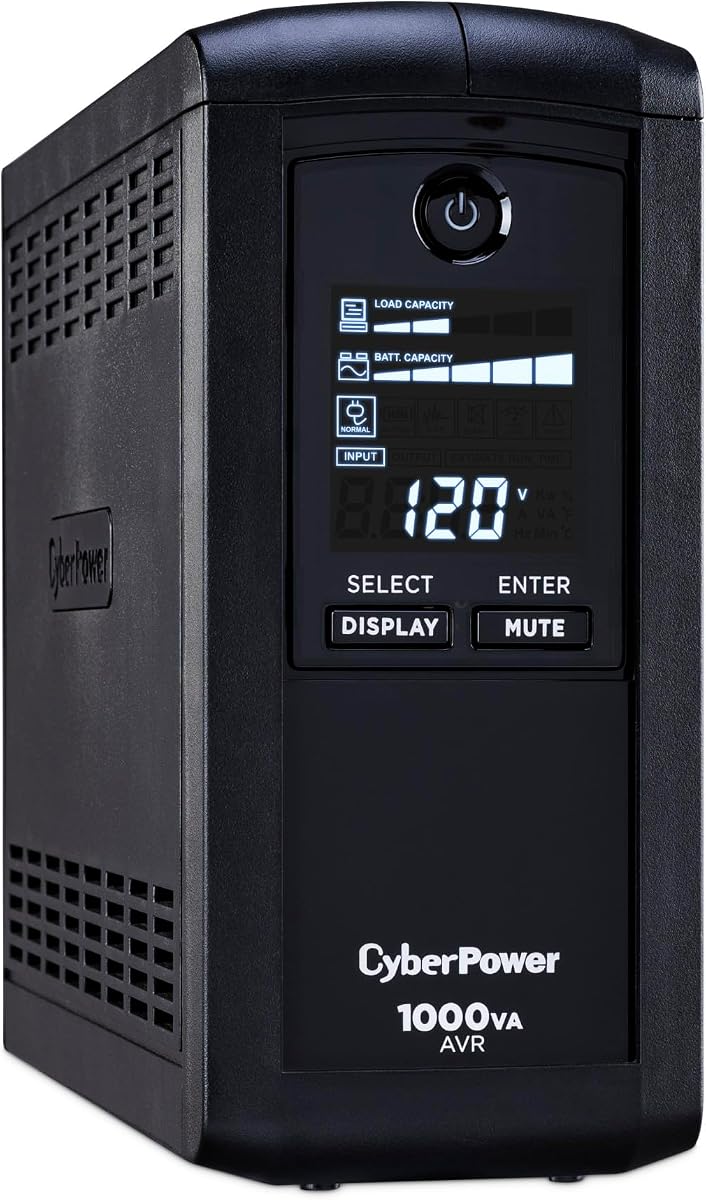
For budget-conscious buyers seeking pure sine wave protection, the CP1000PFCLCD delivers solid performance. Its 4.2 rating reflects reliable operation for standard workstations without the high cost of larger units.
We may earn a commission when you buy through this link, at no additional cost to you.
It provides 1000VA power with ten outlets and a user-friendly LCD. Automatic Voltage Regulation helps extend battery life by stabilizing input power before switching to battery mode during outages.
Trade-offs include slightly less capacity for power-hungry setups. However, for typical office PCs, it offers the best balance of waveform quality and price in its class.
Choose this unit if you prioritize waveform quality over raw power. It keeps essential gear safe during storms and is perfect for home offices or small business stations.
This model brings pure sine wave technology to a lower price point, making high-quality protection accessible for smaller budgets.
Automatic Voltage Regulation corrects minor power fluctuations without using battery power, preserving charge for actual outages.
We may earn a commission when you buy through this link, at no additional cost to you.
The GOLDENMATE 2000VA uses advanced LiFePO4 technology for a decade-long lifespan. Rated 4.4, it offers massive power capacity and reduced maintenance compared to traditional UPS units.
We may earn a commission when you buy through this link, at no additional cost to you.
Its 1600W output handles heavy loads, and the 10-year battery life minimizes replacement costs. The built-in management system ensures safety and efficiency without requiring manual battery swaps.
Although it is heavier and costs more initially, the long-term savings on replacements justify the price. It suits users looking for set-and-forget reliability.
Invest in this model if you value longevity. The lithium chemistry ensures consistent performance over years, making it ideal for critical infrastructure or demanding workstations.
Lithium batteries last significantly longer and require no maintenance compared to conventional lead-acid batteries found in most UPS units.
With 1600W output, this unit supports high-performance gaming PCs or render workstations that draw substantial power.
We may earn a commission when you buy through this link, at no additional cost to you.
The CP1500AVRLCD3 offers 1500VA capacity suitable for mid-range workstations. With a 4.5 rating, it delivers solid surge protection and convenient USB charging ports for mobile devices.
We may earn a commission when you buy through this link, at no additional cost to you.
Its simulated sine wave output works well for standard PCs but may not suit active PFC supplies. The color LCD provides clear status updates to help users manage power usage effectively.
While lacking pure sine wave benefits, the extra outlets and high capacity make it versatile. It is a strong pick for setups with multiple monitors and peripherals.
Opt for this if your PC does not require pure sine wave. It provides ample protection and connectivity for general office or home entertainment workstations.
The inclusion of USB-C and USB-A ports ensures you can charge phones or tablets directly from the UPS during an outage.
At 1500VA, this unit supports systems with multiple hard drives and displays without straining the battery during normal operation.
We may earn a commission when you buy through this link, at no additional cost to you.
The EC850LCD focuses on efficiency with its ECO mode feature. Rated 4.4, it automatically cuts power to peripherals when your PC sleeps, reducing waste and saving money on electricity bills.
We may earn a commission when you buy through this link, at no additional cost to you.
It offers 850VA capacity with 12 outlets. This is ideal for compact workstations with one monitor and essential peripherals like a keyboard and mouse.
The main trade-off is lower power output compared to 1000VA models. However, for light users, this eco-friendly approach offers excellent value and convenience.
Select this unit for green computing needs. It helps lower energy costs while providing essential backup for small home office workstations.
ECO mode outlets cut power to peripherals when the main device sleeps, helping reduce overall power consumption and monthly bills.
With 850VA capacity, it fits well in limited spaces while still protecting core components from sudden power interruptions.
We may earn a commission when you buy through this link, at no additional cost to you.
The AVRG900LCD distinguishes itself with data line protection for modems and phones. With a 4.6 rating, it offers peace of mind for networks and voice lines during storms.
We may earn a commission when you buy through this link, at no additional cost to you.
It supports 900VA with 12 outlets. This ensures your router and modem stay online even if the PC is not running, maintaining connectivity during outages.
The lack of USB ports might be a downside for mobile charging. However, the focus on communication lines makes it unique for small business environments.
Choose this if network continuity is vital. It protects your connection infrastructure alongside your computer hardware effectively.
Data line protection prevents surges from traveling through phone cables to damage modems or connected devices.
Keeping your router powered ensures internet access remains available even during local power failures.
We may earn a commission when you buy through this link, at no additional cost to you.
The CP1000AVRLCD is a classic UPS for general workstations. Rated 4.5, it provides solid 1000VA backup with clear LCD information about remaining battery runtime.
We may earn a commission when you buy through this link, at no additional cost to you.
With nine outlets, it handles standard setups well. Automatic Voltage Regulation protects your equipment from unstable grid power, reducing stress on internal power supplies.
It lacks modern USB charging, which might be a concern for some users. However, its core reliability makes it a trusted choice for many.
Buy this for straightforward protection without extra bells and whistles. It gets the job done for typical computer hardware efficiently.
The LCD panel shows estimated runtime based on current load, helping you plan your shutdown or save work before time runs out.
Automatic Voltage Regulation stabilizes input voltage to extend battery life and protect sensitive electronic components from fluctuations.
We may earn a commission when you buy through this link, at no additional cost to you.
The ST900U stands out with its slim profile for tight spaces. Rated 4.5, it suits home offices where a full tower UPS might not fit.
We may earn a commission when you buy through this link, at no additional cost to you.
It provides 900VA power with 12 widely spaced outlets. This allows for larger power bricks to fit alongside standard plugs, improving usability.
While power capacity is modest, the design convenience is high. It is an excellent match for compact setups prioritizing space over high wattage.
Opt for this if desk space is limited. It offers essential protection without cluttering your workspace.
The slim design allows the unit to tuck away easily under desks or behind monitors where bulky units cannot fit.
Widely spaced outlets accommodate bulky power adapters without blocking neighboring sockets, improving cable management.
We may earn a commission when you buy through this link, at no additional cost to you.
The CP850AVRLCD is an entry-level model for light computing tasks. Rated 4.5, it provides basic surge protection and runtime monitoring for small workstations.
We may earn a commission when you buy through this link, at no additional cost to you.
It supports 850VA with nine outlets. For systems with low power consumption, such as small form factor PCs, it offers sufficient backup time to save data.
It lacks high capacity and modern ports. However, for those on a tight budget needing just enough backup, it serves well.
Buy this for minimal setups where cost is the primary factor. It keeps basic hardware safe during short interruptions.
This unit offers essential protection features at a lower price point, making it accessible for those with limited budgets.
Ideal for low-power systems like Mini PCs or basic laptops connected to external monitors.
We may earn a commission when you buy through this link, at no additional cost to you.
The BRG1500AVRLCD2 earns high marks for its five-year warranty. Rated 4.7, it offers 1500VA power with modern USB charging and clear visual feedback.
We may earn a commission when you buy through this link, at no additional cost to you.
It provides ample power for multiple devices and includes USB ports for convenience. The longer warranty period suggests manufacturer confidence in durability and reliability.
While it uses simulated waveform, the robust build and warranty make it attractive for long-term users. It balances power and support effectively.
Choose this if warranty length matters most. It provides solid performance with extended coverage for your investment.
A five-year warranty covers both the unit and battery, reducing repair or replacement risks over several years of use.
With 1500VA capacity, this unit supports demanding setups like dual monitor workstations and high-performance PCs.
We may earn a commission when you buy through this link, at no additional cost to you.
Selecting the right Battery Backup for Workstation PC depends on your specific hardware needs and budget. Understanding key factors helps ensure optimal protection and longevity.
VA (Volt-Amps) and wattage determine how much load your UPS can support. Calculate your system's total power draw to pick a unit that exceeds it significantly for sufficient runtime.
Choose a capacity that matches your hardware demands without being overly large.
Pure sine wave output ensures compatibility with active PFC power supplies found in modern PCs. Simulated sine wave is cheaper but may cause issues with sensitive electronics.
Invest in pure sine wave for workstations to guarantee stability.
Consider how many devices you need to connect simultaneously. Units with 10+ outlets provide flexibility for monitors, routers, and speakers. Spacing helps accommodate bulky adapters.
Ensure the unit offers enough outlets for all essential gear.
AVR stabilizes incoming voltage without switching to battery power. This feature extends battery life and protects equipment from brownouts or over-voltage conditions.
Look for AVR to reduce unnecessary battery usage.
Traditional lead-acid batteries last three to five years before needing replacement. Lithium-ion options like LiFePO4 offer longer lifespans and less maintenance but cost more upfront.
Consider long-term costs when choosing battery chemistry.
USB ports allow you to charge mobile devices during an outage. Software connectivity lets your PC shut down automatically when battery runs low.
Check for USB-C support and software compatibility with your OS.
Warranties range from three to five years. Some units include connected equipment protection, insuring devices against surge damage beyond the hardware warranty.
Review warranty terms to understand coverage limits.
UPS units vary in size and fan noise. Ensure the unit fits your space and operates quietly enough for office environments.
Measure your workspace to confirm the unit fits comfortably.
Plug your PC and essential peripherals into battery-backed outlets. Connect non-critical devices like printers to surge-only outlets to conserve backup power during outages.
Perform self-tests monthly to ensure the battery is functioning correctly. Listen for unusual alarms or check the LCD for maintenance alerts.
Replace the battery every three to five years for lead-acid models. Lithium batteries last longer and often do not require user replacement.
Pure sine wave matches utility power, ensuring active PFC power supplies run efficiently without overheating or shutting down unexpectedly.
Runtime depends on load and capacity. A 1000VA unit might support a PC for 10 to 20 minutes depending on usage intensity.
Yes, many units include USB ports designed for charging phones and tablets. For laptops, connect the power brick to an outlet.
No, AVR adjusts input voltage using internal transformers, preserving battery charge for actual power outages or severe fluctuations.
The UPS will switch to battery mode. Once depleted, it shuts down outlets to protect connected devices. You should save data immediately.
Lead-acid is cheaper upfront but needs replacement sooner. Lithium offers longevity and stability, ideal for long-term or critical use.
We reviewed ten top models offering protection for various workstation needs. Pure sine wave and high capacity units like the CP1500PFCLCD deliver premium results.
Prioritize waveform quality and battery chemistry based on your hardware requirements. Budget options still provide essential surge protection for lighter loads.
Always check current prices and warranty details before buying. Protect your workstation and data with the right Battery Backup today.