
Samsung T7 Portable SSD 1TB Titan Gray USB 3.2 Gen 2 Up to 1050MB/s
4.7Editor score
1050MB/s read speeds
Shock resistant aluminum body
Wide device compatibility
This guide compares the best external SSD for Mac Mini M4 including speed durability and compatibility to help you choose the right storage solution today.
Choosing the right external SSD for Mac Mini M4 ensures your workflow remains smooth and efficient. With high-performance needs demanding reliable storage expanding your capacity without sacrificing speed is essential for creative professionals and developers alike.
We evaluated top models based on transfer speeds, build quality, and compatibility with Apple silicon chips. Our analysis focuses on real-world performance to help you find a drive that integrates seamlessly into your existing Mac ecosystem.
Each pick highlights specific strengths tailored to different use cases from budget-friendly options to premium rugged drives. Prices and availability change frequently so verify current details before making your final purchasing decision.
4.7Editor score
4.8Editor score

3.9Editor score
This table provides a side-by-side comparison of all ten selected external SSDs focusing on key specifications and features relevant to Mac Mini M4 users.






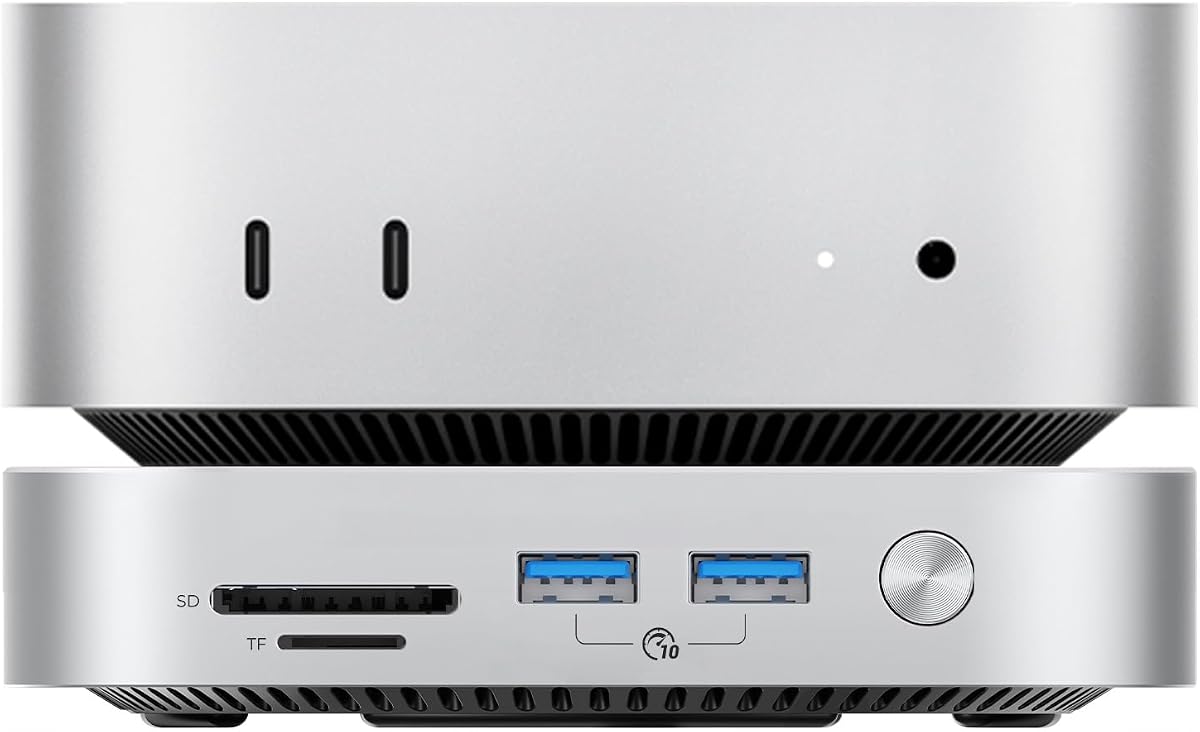
The ORICO 2TB External SSD stands out as a top choice for Mac Mini M4 users needing significant storage expansion. With a rating of 4.8 it delivers on performance promises with 3200MB/s speeds ideal for heavy workflows.
We may earn a commission when you buy through this link, at no additional cost to you.
Its unique dual SSD support allows you to double your storage capacity while maintaining desktop elegance. The integrated multipliers expand connectivity for peripherals and card readers making it a hub rather than just a drive.
While the price is higher than standard portable drives the included features justify the cost for professionals. The aluminum body ensures cooling efficiency which is critical for sustained high-speed transfers without throttling.
This drive is perfect for creators needing reliable time Machine backups and fast access to large media files. It combines elegance with raw power ensuring your Mac Mini remains capable of handling demanding tasks.
Multiple USB ports and card readers eliminate the need for additional dongles keeping your workspace tidy.
The aerospace grade aluminum design actively dissipates heat allowing peak performance during long rendering sessions.
We may earn a commission when you buy through this link, at no additional cost to you.
The Samsung T7 Portable SSD offers a balance of affordability and performance that fits most Mac Mini M4 setups. Rated at 4.7 it is a trusted choice for storing large media files and project backups securely.
We may earn a commission when you buy through this link, at no additional cost to you.
Its sturdy unibody construction provides shock resistance up to 6 feet ensuring your data stays safe during transit. The compact design makes it easy to carry in a pocket without adding bulk to your tech gear.
While it lacks the extreme speeds of Thunderbolt drives it handles 4K video recording and playback effortlessly. The included cables and simple plug-and-play setup mean you can start using it immediately upon arrival.
This drive is an excellent choice for students or hobbyists who need reliable storage without breaking the bank. It delivers consistent performance that meets the daily needs of most Mac users effectively.
Built-in protection keeps your personal files safe from unauthorized access with robust encryption features.
Whether you move between Mac and PC the T7 ensures seamless file access across different systems.
We may earn a commission when you buy through this link, at no additional cost to you.
The Lexar 2TB ES3 External SSD provides substantial storage space in a sleek package designed for modern workflows. With a 4.5 rating it offers fast read speeds that keep your Mac Mini M4 responsive during file transfers.
We may earn a commission when you buy through this link, at no additional cost to you.
Its double layer graphite sheets ensure efficient heat dissipation keeping the drive cool even during heavy usage. The 2 meter drop resistance adds peace of mind when using it in office or field environments.
While not the fastest on the market it delivers consistent performance that handles large datasets well. The USB-C connectivity aligns perfectly with the ports found on the latest Mac Mini models.
This drive is ideal for users needing more space without compromising on speed or durability. It serves as a reliable expansion option for photo libraries and video projects alike.
Advanced cooling features prevent thermal throttling ensuring sustained speeds during long backup sessions.
The rugged design protects internal components from accidental drops extending the drive lifespan significantly.
We may earn a commission when you buy through this link, at no additional cost to you.
The SanDisk 1TB Extreme Portable SSD delivers near double the speed of previous generations making it a powerhouse for creative work. With a 4.6 rating it is designed for those who need to move large files quickly.
We may earn a commission when you buy through this link, at no additional cost to you.
Its IP65 rating ensures resistance against spills and dust while drop protection handles accidental bumps during travel. This durability makes it a great companion for field work or active environments.
Encryption features help keep private files secure with password protection adding a layer of safety to your data. The small form factor ensures it fits easily in pockets without slowing down your workflow.
This drive is perfect for professionals who need high-speed reliable storage that can withstand the rigors of daily use. It balances performance and protection to meet demanding creative requirements effectively.
Sealed design keeps out dust and water ensuring reliable operation in various conditions.
High bandwidth speeds reduce wait times allowing you to focus on work rather than loading.
We may earn a commission when you buy through this link, at no additional cost to you.
The Lexar ES3 1TB Portable SSD emphasizes portability without sacrificing essential performance for your Mac Mini M4. Rated at 4.4 it offers a sleek solution for users who prioritize carrying convenience above all else.
We may earn a commission when you buy through this link, at no additional cost to you.
At just 42 grams and 10.5mm thick it is lighter than many card holders making it easy to toss in a bag. The high speed USB 3.2 connection ensures files move quickly despite the small physical footprint.
Data safety features include built-in encryption software to protect sensitive files from unauthorized access effectively. This adds a layer of security often missing in budget options without compromising the slim design.
Ideal for travelers and minimalists this drive provides reliable storage that fits in the smallest of pockets. It meets the needs of users who need quick access to files on the go.
The ultra thin and light design makes it perfect for pocket carry on travel essentials.
USB 3.2 Gen 2 support ensures quick data access compatible with most modern Mac ports.
We may earn a commission when you buy through this link, at no additional cost to you.
The SSK Portable SSD 1TB offers a versatile solution for Mac Mini M4 users needing cross-platform connectivity. Rated at 4.5 it provides stable performance thanks to SLC caching which optimizes transfer speeds consistently.
We may earn a commission when you buy through this link, at no additional cost to you.
Its aluminum alloy case ensures superior heat dissipation keeping the drive cool during extended usage sessions. The LED light indicates activity at a glance providing visual feedback during file transfers.
Both USB-C and USB-A cables are included enabling seamless connectivity across computers and mobile devices. This makes it a highly practical choice for teams using mixed operating systems or devices.
This drive is a solid choice for users who need reliable performance and broad compatibility at a fair price. It handles daily tasks efficiently making it a reliable addition to your tech setup.
Inclusion of multiple cable types ensures you can connect to any port without extra purchases.
Caching technology maintains steady speeds preventing slowdowns during large file operations.
We may earn a commission when you buy through this link, at no additional cost to you.
The Crucial X10 2TB Portable SSD combines high speeds with rugged durability making it ideal for diverse applications. Rated at 4.5 it supports gaming and creative work with speeds reaching up to 2100MB/s.
We may earn a commission when you buy through this link, at no additional cost to you.
Built to withstand weather and drops up to 9.8 feet it ensures your data remains safe during travel or gaming. The IP65 rating adds another layer of protection against environmental hazards.
It includes bonus software for photo management and backup adding extra value to the hardware purchase. The matte blue finish offers a distinctive look that resists fingerprints during use.
This drive is perfect for gamers and students who need reliable high-capacity storage that can handle tough conditions. It serves as a universal solution for both entertainment and professional data needs.
High drop and dust resistance ensures reliability in demanding travel or field environments.
Support for major gaming consoles allows you to expand storage for play and library.
We may earn a commission when you buy through this link, at no additional cost to you.
The Samsung T9 Portable SSD delivers sustained high speeds with advanced thermal management for consistent performance. Rated at 4.6 it features a Dynamic Thermal Guard that controls heat during heavy use ensuring reliability.
We may earn a commission when you buy through this link, at no additional cost to you.
Its support for USB 3.2 Gen 2×2 allows for faster data transfers when connected to compatible hosts. The robust build quality ensures longevity even during prolonged periods of heavy data writing.
Magician software keeps the drive updated and monitored offering encryption and health checks to maintain performance. This software adds value by helping you optimize your drive settings for specific needs.
This drive is an excellent choice for professionals who need consistent speed without thermal throttling. It balances high performance with smart features to ensure your workflow remains uninterrupted.
Advanced heat control keeps the drive cool maintaining peak speeds during long editing sessions.
Included software provides tools for health monitoring and encryption to secure your data.
We may earn a commission when you buy through this link, at no additional cost to you.
The SABRENT Rocket Nano XTRM 2TB External SSD offers Thunderbolt 3 speeds in a compact aluminum chassis. Rated at 4.4 it delivers 2700 MB/s performance ideal for professional video editing workflows.
We may earn a commission when you buy through this link, at no additional cost to you.
Its small 2.95-inch size makes it one of the most compact Thunderbolt drives available without sacrificing capacity. The included silicone sleeve protects against drops and scratches adding extra security for your drive.
Both Thunderbolt and USB cables are included ensuring compatibility across various devices without extra purchases. The bus-powered design means no external power adapter is needed for operation.
This drive is perfect for professionals needing fast transfer speeds in a small form factor. It bridges the gap between high performance and portability effectively.
Despite its small size the drive delivers professional grade speeds for demanding tasks.
Inclusion of multiple cables means you are ready to use immediately upon purchase.
We may earn a commission when you buy through this link, at no additional cost to you.
The SanDisk Professional 4TB PRO-G40 SSD represents the pinnacle of rugged high-speed storage solutions. With a 3.9 rating it offers massive capacity and speeds up to 3000MB/s for the most demanding workflows.
We may earn a commission when you buy through this link, at no additional cost to you.
Its IP68 rating provides dust and water resistance making it suitable for extreme field environments. The crush resistant aluminum core ensures the drive can survive conditions that would break standard portable SSDs.
Dual mode compatibility allows connection via Thunderbolt 3 or USB-C ensuring versatility across different ports. The professional grade enclosure feels solid and built to last for years of heavy use.
This drive is ideal for enterprise users or filmmakers needing reliable high-capacity storage for mission critical data. It delivers unmatched performance and durability for those who cannot afford downtime.
Rugged construction withstands water dust and heavy weight ensuring safety in harsh conditions.
Thunderbolt 3 speeds reduce transfer times for massive data sets efficiently.
We may earn a commission when you buy through this link, at no additional cost to you.
Selecting the right external SSD requires evaluating several technical factors to ensure compatibility and performance.
Transfer speed determines how fast files move between your Mac and the drive. Look for drives with speeds of 1000MB/s or higher to ensure smooth 4K video editing and quick backups.
Choose models with USB 3.2 Gen 2 or Thunderbolt interfaces to maximize data throughput for professional workflows.
Capacity should match your needs for storing media files and archives. A 1TB drive may suffice for basic use while 2TB or 4TB options offer room for growth.
Evaluate your current file size and future growth to select a capacity that balances cost and utility.
Build quality ensures the physical protection of your data during travel or accidental drops. Look for metal enclosures and shock resistance ratings to safeguard your investments.
A durable casing also helps with heat dissipation which is crucial for maintaining consistent performance.
Compatibility with macOS is essential to ensure plug-and-play functionality without driver issues. Ensure the drive supports APFS format and is certified for Apple silicon chips.
Cross-platform support can be useful if you share files between Mac and Windows systems.
Port selection determines how easily you can connect the drive to your devices. USB-C ports are standard on modern Macs but some drives include USB-A adapters for older peripherals.
Having both options allows for greater flexibility when connecting different devices or accessories.
Security features like encryption protect sensitive files from unauthorized access. Hardware encryption adds a layer of safety without relying on software solutions.
Prioritize drives with robust encryption options to secure personal or business data effectively.
Warranty coverage offers peace of mind against manufacturing defects or failures. A longer warranty period often indicates confidence in the product quality.
Check the terms of the warranty to understand what repairs or replacements are covered.
Price value compares the cost against the features and performance offered. Budget options may lack advanced features but still meet basic storage needs.
Invest in higher priced drives only if specific performance or durability features are necessary for your work.
Begin by connecting the SSD to your Mac Mini M4 using the provided cable. Ensure the drive is securely attached to prevent connection interruptions during file transfers.
Format the drive to APFS if you plan to use it exclusively with macOS. This format optimizes performance and compatibility for Time Machine backups and general storage tasks.
Regularly eject the drive properly via the Finder before unplugging it. This prevents data corruption and ensures that all write operations have completed successfully before disconnecting.
The fastest drives typically utilize Thunderbolt 3 technology such as the SanDisk PRO-G40. These offer speeds up to 3000MB/s ideal for heavy professional workloads.
Yes formatting to APFS ensures optimal performance with macOS. Most drives come pre-formatted but checking the settings is recommended for compatibility.
All listed drives support Time Machine backups on Mac Mini M4. Ensure you format the drive to APFS to enable this feature correctly.
Many premium drives like the SABRENT include Thunderbolt cables. Always check the product specifications to confirm included accessories before purchasing.
For 4K editing a 2TB or larger drive is recommended. This allows sufficient space for project files and cache without frequent cleanup.
Yes modern drives have power management features to reduce heat. However it is best to eject when not in use to save energy.
Choosing the right external SSD enhances your Mac Mini M4 capabilities significantly. Whether you need speed durability or capacity there is a model to suit every workflow.
Prioritize performance features like transfer speed and thermal management for demanding creative tasks. Budget options remain viable for standard storage needs and backups.
Always check current prices and stock availability before finalizing your purchase. Technology markets shift quickly ensuring you get the best value possible.