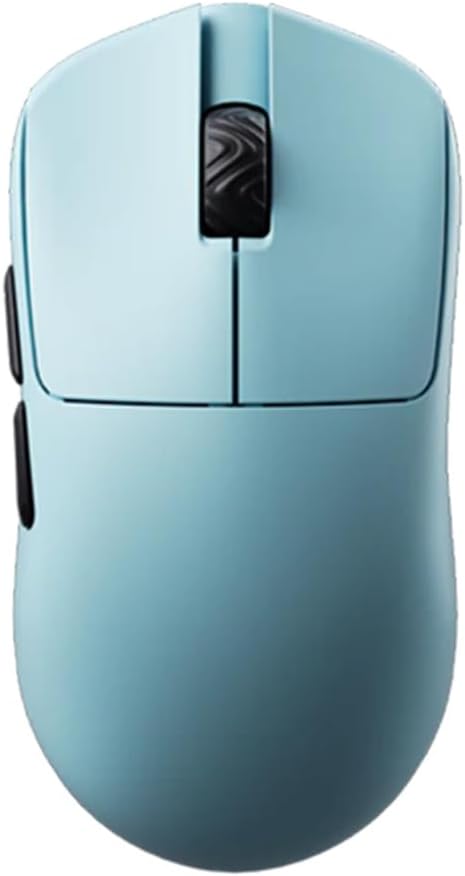
10 Best Claw Grip Gaming Mouse For Small Hands in 2026
This guide compares the best claw grip gaming mouse for small hands, evaluating sensor performance, weight, and ergonomics for competitive players seeking
As an Amazon Associate we earn from qualifying purchases. We may earn a commission when you buy through links on this page, at no additional cost to you. Read our affiliate disclosure.As an Amazon Associate we earn from qualifying purchases.Purchases through our links may earn us a commission, at no extra cost to you. Read our affiliate disclosure.
Finding the right gaming mouse is crucial for small-handed players who prefer claw grips. These devices require specific ergonomics to support finger placement while maintaining control during intense sessions.
We evaluated ten top models based on sensor accuracy, weight distribution, and build quality. Each entry offers unique features tailored to enhance responsiveness and comfort for competitive gamers.
Each pick highlights standout traits like lightweight designs or optical switches. Note that availability and pricing may shift, so verify current details before making a final purchase decision.
Top 3 Picks for Best Claw Grip Gaming Mouse for Small Hands
Best Budget
Gwolves Skoll Mini SK-S Black 50g Ultralight Weight Honeycomb Design Ergonomic Gaming Mouse with 3389 Sensor – PTFE Skates – 16,000DPI – Detachable Cable (Black) (Small)
Top 10 Best Claw Grip Gaming Mouse for Small Hands in 2026 Compared
This side-by-side comparison highlights key specifications across all ten models to help you identify the best fit for your specific hand size and grip style preferences.
The Lamzu Atlantis Mini Champion is a top tier wireless mouse designed for competitive gaming. With a 4.6 rating, it stands out for its precision engineering and ergonomic fit.
Pros
Exceptional build quality
Top tier sensor
Long battery life
Perfect shape
Cons
Premium price point
No RGB lighting
We may earn a commission when you buy through this link, at no additional cost to you.
It features the Pixart PAW3950 sensor which delivers 30000 DPI and 750 IPS tracking. The optical switches ensure quick response times with over 70 million cycles for durability.
While the price is higher than many competitors, the performance justifies the cost for serious players. The symmetry design prevents finger cramps during long sessions effectively.
Gamers seeking the best wireless experience should choose this model. It offers seamless connectivity and accurate motion detection that enhances overall gameplay significantly.
Superior Sensor Technology
The PAW3950 sensor ensures no spin outs or acceleration issues during rapid movements.
Ergonomic Symmetry
The hourglass shape supports natural finger positioning for claw grip users.
The Gwolves Skoll Mini SK-S offers a budget friendly entry into high performance gaming peripherals. It holds a 4.4 rating for balancing cost and functionality well.
Pros
Very affordable price
Lightweight design
Reliable sensor
Good ergonomics
Cons
Wired only
Basic features
We may earn a commission when you buy through this link, at no additional cost to you.
Weighing only 50g, this mouse reduces wrist strain and fatigue. The 3389 sensor provides smooth tracking suitable for most gaming scenarios without lag.
It lacks wireless connectivity which may be a downside for some. However, the detachable cable adds convenience and allows for easy storage or travel.
Budget conscious gamers will find this an excellent choice. It delivers solid performance without breaking the bank for those needing a reliable claw grip mouse.
Lightweight Efficiency
The honeycomb design cuts weight while maintaining structural integrity for durability.
Comfortable Shape
Ergonomic contours ensure a secure fit for smaller hands during intense use.
The Pulsar X3 LHD Crazylight is a masterpiece of minimalist design for left handed users. With a 4.3 rating, it excels in weight and precision metrics.
Pros
Incredibly light
Excellent sensor
Unique hybrid shape
Dust proof
Cons
Expensive
Left handed only
We may earn a commission when you buy through this link, at no additional cost to you.
It weighs only 43g, making it nearly weightless during gameplay. The XS-1 sensor offers 32000 DPI and exceptional speed for competitive environments.
The hybrid ergonomic shape blends palm and claw comfort perfectly. Optical switches reduce double click issues significantly for a smoother experience.
Left handed gamers looking for premium quality should consider this. It delivers heavyweight results with minimal physical effort during extended sessions.
Unmatched Lightness
At 43g it is lighter than an egg for reduced hand fatigue.
Precision Switching
Optical switches provide swift responses with zero mechanical debounce delay.
The Pulsar X2H mini Wireless offers a renewed option for wireless gaming with strong specs. A 4.1 rating indicates consistent performance for daily use.
Pros
Wireless convenience
Good battery
Sturdy structure
Symmetrical shape
Cons
Renewed status
Weight balance
We may earn a commission when you buy through this link, at no additional cost to you.
It features a higher hump for aggressive claw grips. The PAW3395 sensor delivers reliable tracking with 26000 DPI precision across various surfaces.
The internal structure ensures consistent clicks without rattling. However, as a renewed product, buyers should check packaging details carefully before use.
Gamers wanting wireless flexibility at a lower cost will appreciate this. It provides stable 1ms response times for responsive gameplay in any setup.
Enhanced Support
The elevated hump supports the palm while keeping fingers free for agility.
Battery Life
Up to 100 hours of usage ensures long sessions without frequent charging.
The Bloody V7 Ergonomic focuses on utility with multiple buttons and macro support. It holds a 4.4 rating for its practical design and robust construction.
Pros
Many programmable buttons
Durable coating
Easy to clean
Macro capabilities
Cons
Older model
Lower DPI
We may earn a commission when you buy through this link, at no additional cost to you.
Eight programmable buttons allow for custom setups. The rubberized coating provides a secure grip that resists slipping during intense gaming moments.
While the DPI is lower than modern standards it remains adequate for general use. It is a solid choice for those needing automation features.
Users who prioritize customization over ultra high precision should look here. It serves as a reliable tool for both gaming and productivity tasks.
Programmable Control
Eight buttons allow mapping complex macros for efficient gameplay management.
Tactile Comfort
The coating ensures fingers stay in place for consistent click accuracy.
The Corsair IRONCLAW Wireless SE is a powerful option for extended gaming. With a 3.9 rating, it balances features like RGB and battery life well.
Pros
High battery life
Many buttons
Good RGB
Wireless
Cons
Heavier build
Larger shape
We may earn a commission when you buy through this link, at no additional cost to you.
It supports up to 285 hours on 2.4GHz. The MARKSMAN sensor adapts to surfaces for consistent tracking across different mousepads.
Ten programmable buttons offer extensive customization via software. However, the shape may be too large for very small hands compared to others.
Gamers needing a feature rich wireless mouse with long battery life will find it useful. It delivers robust performance for varied gaming environments.
Extended Usage
The massive battery ensures uninterrupted play for days on a single charge.
Customizable RGB
Unique shape provides more places for lighting customization and aesthetics.
The V8 Gaming Mouse is an ultra lightweight choice for fast paced action. A 4.5 rating highlights its precision and ease of use effectively.
Pros
Very light weight
High DPI sensor
Web driver easy
8K dongle
Cons
Limited availability
Symmetrical only
We may earn a commission when you buy through this link, at no additional cost to you.
Weighing only 36g it minimizes hand fatigue significantly. The PAW3950 sensor provides stable tracking ideal for esports level gameplay scenarios.
Optical switches offer instant actuation with near zero delay. Web based driver simplifies settings adjustments without complex software installations.
Competitive players seeking agility should consider this model. It supports claw and fingertip styles with excellent wireless stability and response.
Optical Precision
Switches reduce debounce delays for consistent click actuation every time.
Driver Simplicity
Web based tools make customization accessible without installing extra programs.
We may earn a commission when you buy through this link, at no additional cost to you.
Buying Guide – How to Choose the Best Claw Grip Gaming Mouse for Small Hands
Selecting the ideal mouse involves balancing weight, shape, and sensor quality. Here are the critical factors to evaluate for optimal performance.
Hand Size and Shape
Small hands require compact mice with narrower waists to prevent strain. Look for models explicitly designed for small or mini sizing.
Verify the ergonomic fit matches your claw grip to ensure finger reach and control.
Weight Distribution
Lighter mice reduce fatigue during long sessions. Aim for 40g to 60g for fast movements and precision.
Check if the weight feels balanced across the body to avoid wrist tilt.
Sensor Quality
High DPI sensors ensure accurate tracking without spin outs. Look for sensors like PAW3950 or 3395 for top performance.
Higher IPS tracking speeds allow for rapid flicks without losing cursor fidelity.
Switch Durability
Optical switches often last longer than mechanical ones. They reduce double click issues significantly.
Consider the click feel and response time to match your gameplay needs.
Connection Type
Wireless models offer freedom but check battery life. Wired options provide zero latency and no charging.
Ensure the wireless frequency is low latency to avoid input lag.
Software and Drivers
Web based or driverless options simplify setup. However, full software suites allow deeper customization.
Check if the software supports your operating system before buying.
Surface Compatibility
Ensure the sensor works on your mousepad material. Some sensors require cloth while others work on glass.
Testing on your actual surface can prevent tracking issues.
Build Quality
A rigid shell ensures consistent clicks. Avoid models with hollow or flimsy cases.
Durability matters for long term use and warranty coverage.
How to Use and Care for Your Claw Grip Gaming Mouse for Small Hands
Start by adjusting the DPI settings to match your play style. Use a comfortable resting position for your fingers on the buttons.
Clean the mouse feet regularly to maintain smooth gliding. Use a soft cloth to wipe dust from the sensor lens.
For wireless models, ensure the battery is charged before play. Store the dongle safely when not in use.
Frequently Asked Questions
What defines a claw grip gaming mouse for small hands?
A claw grip gaming mouse for small hands is characterized by a compact shape with a narrower waist to support finger placement. It often features a raised rear to cradle the palm while allowing fingers to curl naturally.
Are optical switches better than mechanical ones?
Optical switches provide faster response times and longer durability. They eliminate mechanical contact which reduces wear and potential double clicking issues.
Is wireless latency a concern for gaming?
Modern wireless technology has minimized latency significantly. High polling rates ensure that wireless mice perform as well as wired ones.
How do I know which DPI is best for me?
Lower DPI suits slow precise aim while higher DPI allows quick movement. Find a setting that feels natural without needing hand strain.
Can small hands use larger gaming mice?
Larger mice can cause wrist strain or poor grip for small hands. It is best to choose a model designed for your hand size.
What surface works best with these mice?
Most sensors work well on standard cloth pads. Some advanced sensors support glass but always check compatibility before purchasing.
How often should I clean my gaming mouse?
Clean it every few weeks to remove dust and grime. Regular maintenance prevents tracking issues and extends the device life.
Are there specific benefits for claw grip?
Claw grip offers faster reaction times and precision. A mouse designed for this style supports these movements with better ergonomics.
Final Thoughts on Choosing the Best Claw Grip Gaming Mouse for Small Hands
The top picks offer exceptional performance for various needs and budgets. Each model balances weight, ergonomics, and sensor quality effectively.
Prioritize the sensor and shape to ensure comfort during play. Wireless options are convenient but wired may offer slight edge.
Prices and availability can change frequently so check current listings. Investing in the right mouse improves your gameplay experience significantly.
Discover the top 10 best entry level laptop options for students and professionals. We compare performance, battery life, and value to help you choose…