
Womier DK75 75% Wireless Gaming Keyboard
4.5Editor score
Affordable PBT keycaps
Rotary knob control
Dual RGB effects
This guide compares the top green backlit gaming keyboards for 2026, analyzing features like connectivity, switch types, and customization to help you choose
Finding the right green backlit gaming keyboard can transform your setup. You need reliable performance, comfortable typing, and stylish lighting that matches your theme. These keyboards offer unique blends of wireless connectivity, mechanical feel, and vibrant green illumination for immersive play.
We evaluated ten standout models based on build quality, switch types, connectivity options, and user feedback. Our comparison covers everything from budget-friendly membrane options to premium mechanical keyboards with hot-swappable switches and advanced software support for deep customization.
Each pick highlights specific strengths like battery life, programmable keys, or ergonomic design. Prices and availability change frequently, so verify current details before purchasing. Read on to discover which green backlit keyboard fits your gaming and work needs best.
4.5Editor score
4.6Editor score
4.8Editor score
This side-by-side comparison breaks down the key specifications and features of all ten green backlit gaming keyboards to help you make an informed decision based on your specific needs.


The AULA F75 stands out as the top pick for its perfect balance of features. It boasts a 4.6 rating and offers versatile connectivity options including Bluetooth 5.0, 2.4GHz wireless, and USB-C wired modes.
We may earn a commission when you buy through this link, at no additional cost to you.
Its hot-swappable base supports 3-pin or 5-pin switches, allowing easy customization. Pre-lubed stabilizers and LEOBOG reaper switches deliver a smooth typing experience with a creamy sound. The keyboard includes a 4000mAh battery for extended use and advanced RGB lighting with 16.8 million colors.
While the software is limited to Windows, the hardware quality is top-tier. The gasket mount structure enhances typing feel and reduces noise. This keyboard is ideal for enthusiasts seeking a premium wireless mechanical option.
Buy this if you want a versatile, feature-rich keyboard with strong battery life and the flexibility to swap switches without soldering.
Connect up to five devices simultaneously and switch effortlessly with shortcut keys or side buttons for seamless workflow across systems.
Choose from 16 million colors and dynamic effects adjustable via a knob or FN combinations to match your gaming vibe.
We may earn a commission when you buy through this link, at no additional cost to you.
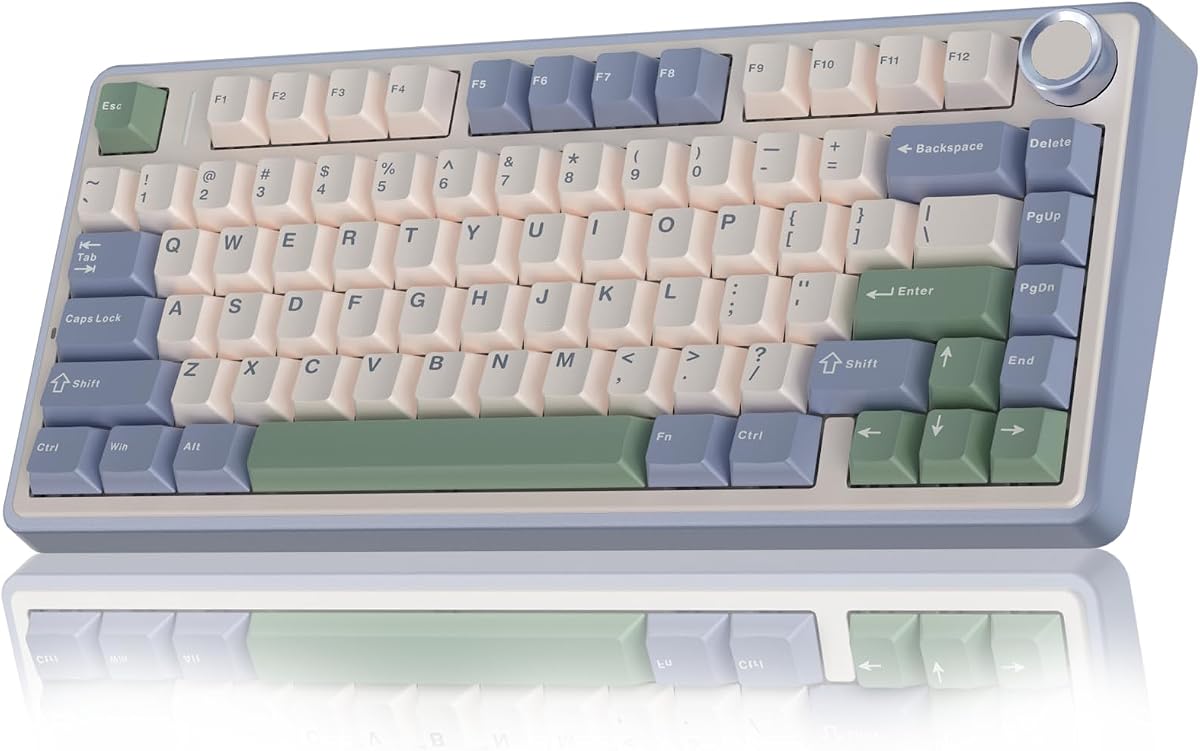
The Womier DK75 offers impressive value for budget-conscious gamers. With a 4.5 rating, it delivers reliable performance without breaking the bank. It features triple-mode connectivity and durable PBT keycaps that resist wear over time.
We may earn a commission when you buy through this link, at no additional cost to you.
Its silent membrane switches ensure a quiet environment suitable for shared spaces. The rotary knob provides quick volume control and lighting adjustments. A small screen displays battery and connection status, adding convenience to the setup.
While it lacks hot-swap capability, the build quality remains solid. The keyboard includes a massive 4000mAh battery ensuring days of use per charge. RGB effects are customizable via simple key combinations without software.
Choose this if you need an affordable wireless keyboard with strong battery life and a quiet typing feel that fits any budget.
High-quality PBT material prevents shine and fading, maintaining texture and appearance even after long-term daily use.
Stay informed with a screen showing battery levels and connection status for effortless management of your setup.
We may earn a commission when you buy through this link, at no additional cost to you.
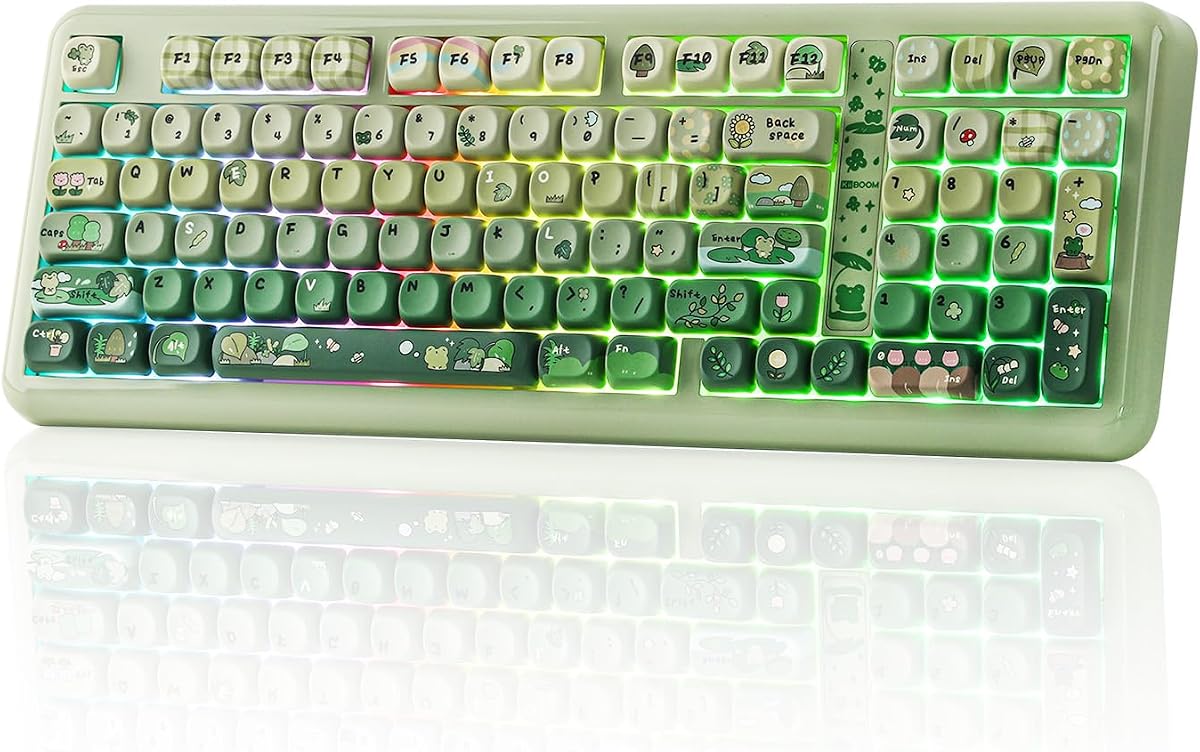
The KiiBoom Phantom98 Lite is the top premium choice with a 4.8 rating. It combines a compact 96% layout with full functionality and a massive 8000mAh battery for weeks of use. VIA compatibility enables deep customization for advanced users.
We may earn a commission when you buy through this link, at no additional cost to you.
Its gasket-mounted structure with multiple dampening layers produces a creamy, thocky sound. Hot-swappable PCB supports 3-pin and 5-pin switches easily. The south-facing RGB backlighting offers 16.8 million colors and dynamic lighting modes for aesthetic appeal.
While the price is higher, the build quality and battery life justify the investment. It connects via Bluetooth, 2.4GHz, or USB-C to multiple devices. This keyboard excels in both gaming and productivity scenarios.
Buy this if you demand the best battery life, advanced customization, and a premium typing experience without compromise.
The 8000mAh battery provides extended usage for days on a single charge, perfect for users who forget to charge often.
Unlock endless possibilities with VIA support for remapping keys, editing macros, and creating custom layers easily.
We may earn a commission when you buy through this link, at no additional cost to you.
The AULA S99 is a versatile keyboard combining vintage aesthetics with modern functionality. Rated 4.2, it supports Bluetooth, 2.4GHz, and USB-C connectivity. The dual-mode rotary knob simplifies volume and lighting adjustments seamlessly.
We may earn a commission when you buy through this link, at no additional cost to you.
All keys support macro customization allowing you to record complex actions for gaming. The 96% layout retains the numeric keypad while saving space. A foldable two-stage stand improves ergonomics for comfortable typing sessions.
While it uses membrane switches, the full-key programmable feature adds value. It works across Windows, Mac, and mobile devices. The compact design frees up desk space without sacrificing the essential keys.
Choose this if you need a stylish keyboard that transitions easily between office work and gaming with robust macro support.
Record and edit macros to program complex actions into single keys for faster response in real-time games.
Adjustable folding stand reduces wrist pressure creating a comfortable typing experience for long daily use.
We may earn a commission when you buy through this link, at no additional cost to you.
The Womier SK80 features a vibrant color multimedia display for customizable GIFs and system status. With a 4.6 rating, it offers a gasket mount design that enhances typing stability and reduces noise. Hot-swap sockets allow easy switch changes.
We may earn a commission when you buy through this link, at no additional cost to you.
The DIY multimedia screen is angled for optimal viewing habits. It includes 19 lighting effects and adjustable brightness levels. The Frog Green theme adds a unique touch to your setup. Compatible with Windows and Mac systems via detachable Type-C cable.
While software customization is Windows-only, the hardware features are impressive. The hot-swap PCB supports 3-pin and 5-pin switches freely. RGB backlight modes can be fully adjusted through the provided driver.
Buy this if you want a keyboard with a built-in screen for personalization and solid mechanical performance.
Visualize custom GIF images and system status directly on the screen in the upper right corner.
Customize RGB modes macros and screen settings fully through the keyboard driver for a personalized experience.
We may earn a commission when you buy through this link, at no additional cost to you.
The Keymatic Gaming Keyboard features a space-saving 98-key layout with a full number pad. Rated 4.4, it offers tri-mode connectivity and a multifunctional control knob plus a status display screen. It is designed for durability with a 10 million keystroke rating.
We may earn a commission when you buy through this link, at no additional cost to you.
Engineered with ABS plastic and a built-in iron plate, it provides a stable typing feel. The silver paste membrane technology ensures responsive and quiet keystrokes. It supports 19-key anti-ghosting for accurate gaming commands without conflicts.
While it uses membrane switches, the typing feel mimics mechanical keyboards. The 4000mAh battery ensures long-lasting use. RGB backlighting modes are dynamic and customizable to match your mood or gaming setup.
Choose this if you need a compact keyboard with a number pad and screen functionality in a portable form factor.
The 98-key layout saves desk space while keeping all essential keys including the full numeric pad.
Rated for 10 million keystrokes and built with sturdy materials to withstand daily heavy use reliably.
We may earn a commission when you buy through this link, at no additional cost to you.
The Owpkeenthy Full Size keyboard is designed for productivity and gaming. Rated 4.5, it features 104 keys with a number pad for efficient data entry. Linear red switches offer smooth keystrokes with minimal resistance for fast action.
We may earn a commission when you buy through this link, at no additional cost to you.
Its N-key rollover technology ensures all keys work simultaneously without ghosting. XDA profile keycaps have uniform height reducing fatigue over long use. Ergonomic kickstands provide a comfortable angle reducing wrist burden effectively.
While it lacks wireless options, the wired connection guarantees stable performance. The RGB lighting offers 18 modes to enhance game atmosphere. The build focuses on reliability and comfort for professional and casual users alike.
Buy this if you prefer a full-size layout with a number pad and reliable wired performance for office tasks.
All keys function simultaneously with anti-ghosting technology for reliable connection in intense gaming sessions.
Uniform keycaps offer a great look and larger touch area reducing fatigue during long typing sessions.
We may earn a commission when you buy through this link, at no additional cost to you.
The Aula Nova75 boasts an impressive 8000mAh battery for extended wireless use. Rated 4.7, it supports Bluetooth 5.0, 2.4GHz, and USB-C connections. The TFT smart display enhances customization with GIFs and system status info.
We may earn a commission when you buy through this link, at no additional cost to you.
It includes 80 programmable keys with a multi-function knob for volume and lighting. Hot-swap PCB supports 3-pin and 5-pin switches easily. White and green PBT keycaps provide durability and stylish design for any setup.
While software is Windows-only, the hardware features are robust. It offers low latency for gaming with instant responsiveness. The battery management includes auto-sleep to conserve power when idle.
Choose this if you want a mechanical keyboard with exceptional battery life and a built-in screen for customization.
Intuitively display custom GIFs and system info on a TFT smart display tilted for optimal viewing.
Gasket-mounted keyboard with pre-lubed switches for a premium out-of-the-box typing sound experience.
We may earn a commission when you buy through this link, at no additional cost to you.
The Aula F75 Gaming Keyboard combines gasket structure with premium features. Rated 4.8, it features 5 sound-absorbing layers for a creamy sound. Cherry-profile double-shot PBT manga keycaps ensure durability and style.
We may earn a commission when you buy through this link, at no additional cost to you.
It supports tri-mode connectivity for up to five devices. Macro programmable keys boost productivity via the driver software. The 4000mAh battery includes smart power management with auto-sleep to save energy efficiently.
While macros are Windows-only, the hardware performance is top-notch. It offers 16.8 million RGB options and instant responsiveness. This keyboard is ideal for gamers seeking a compact layout with mechanical precision.
Buy this if you need a reliable hot-swappable keyboard with strong macro support and a great tactile feel.
Five layers of sound and shock-absorbing padding create a signature creamy sound loved by enthusiasts.
Customize keys through the driver to improve efficiency and increase your probability of winning games.
We may earn a commission when you buy through this link, at no additional cost to you.
The Redragon K742 offers advanced programmability with QMK/VIA support. Rated 4.6, it features a gasket structure filled with 5 sound-absorbing paddings for a satisfying typing feel. It supports up to 50 million keystrokes for extreme durability.
We may earn a commission when you buy through this link, at no additional cost to you.
Seamless multi-device control allows switching between three devices effortlessly. A dedicated volume knob helps media control without distractions. The 98% layout saves space while retaining essential functionality. Hot-swap sockets support 3-pin and 5-pin switches.
While setting up JSON files requires some technical knowledge, the customization is unmatched. The battery lasts 53 hours without backlight. It includes a 2-in-1 keycap switch puller for easy maintenance.
Choose this if you need a highly customizable keyboard with solid build quality and QMK/VIA programmability.
Elevate experience with VIA for remapping keys editing macros and customizing layers for maximum control.
The 98% compact layout saves desk space and includes a multimedia knob for volume and media control.
We may earn a commission when you buy through this link, at no additional cost to you.
Choosing the right keyboard requires considering connectivity, switch type, layout, and customization features to match your workflow.
Mechanical switches provide durability and tactile feedback preferred by gamers. Membrane switches offer quieter operation and affordability but may lack consistency over time.
Select mechanical switches for gaming precision and membrane for shared office spaces where noise matters.
Tri-mode keyboards support Bluetooth 5.0, 2.4GHz wireless, and USB-C wired connections. This flexibility lets you switch between devices quickly without physical cable swapping.
Prioritize tri-mode connectivity if you use multiple devices like PCs tablets and phones.
Wireless keyboards range from 1000mAh to 8000mAh capacities. Higher mAh values mean longer intervals between charging which is vital for uninterrupted gaming sessions.
Look for at least 4000mAh for standard usage or 8000mAh for extended battery life.
Full-size keyboards include a number pad useful for data entry but take up desk space. Compact 75% or 65% layouts save room while retaining essential arrow keys.
Choose layout based on your desk size and need for a number pad.
Hot-swappable sockets allow changing switches without soldering. This future-proofs your keyboard if you want to experiment with different switch types later.
Opt for hot-swap if you plan to customize your typing feel over time.
Features like RGB lighting, programmable macros, and multimedia knobs enhance user experience. Some models include displays for GIFs or system status.
Check for software support if you need deep customization layers or macros.
Materials like PBT keycaps resist wear better than ABS. Gasket mounts improve typing comfort and reduce noise during typing sessions.
Prioritize PBT and gasket designs for longevity and comfort.
Start by connecting the keyboard via USB-C, Bluetooth, or 2.4GHz receiver. Ensure the correct driver is installed on Windows if you plan to use advanced features like macros or custom RGB layouts.
Clean your keyboard regularly using compressed air to remove dust. Use a soft brush to clean around keycaps and avoid using liquid cleaners directly on the electronics.
Store the keyboard in a cool dry place if not in use. For wireless models, turn them off when idle to preserve battery life and prevent accidental drain.
Green backlit keyboards offer a consistent color that matches specific setups. RGB provides more versatility to change colors anytime. Choose green for aesthetic consistency or RGB for flexibility.
Yes, mechanical keyboards typically last 50 million keystrokes compared to membrane options. They offer better durability and tactile feedback. Ideal for heavy daily use.
Most keyboards support Mac via Bluetooth. Some software features may require Windows. Check product descriptions for Mac compatibility before purchasing.
Hot-swap allows changing switches without soldering. This lets you customize your keyboard feel easily. It is a valuable feature for enthusiasts.
Battery life varies from 20 to 100 hours depending on brightness and usage. Higher capacity models last longer. Use sleep modes to extend battery.
Modern wireless keyboards use 2.4GHz with low latency. For most users, latency is negligible. Wired USB-C ensures zero lag for competitive gaming.
Use a soft brush or compressed air to clean debris around keys. Avoid touching LED elements directly. Gently wipe with a dry cloth to maintain brightness.
Most keyboards come with software for macro programming. Follow the manual to download drivers. Assign complex key sequences to single keys for efficiency.
The AULA F75 leads as the top choice for its perfect blend of hot-swap flexibility, wireless connectivity, and battery life. The Womier DK75 offers exceptional value for budget buyers, while the KiiBoom Phantom98 Lite delivers premium features for enthusiasts.
Consider your primary use case before choosing. If you need a number pad, full-size options are best. For portability, compact 75% models save space. Ensure the switch type matches your preference for noise and feedback.
Prices and availability change frequently, so verify current details before purchasing. These keyboards combine vibrant green lighting with practical features to enhance your gaming and work experience. Select the model that fits your budget and workflow needs.