
HUION Keydial Mini
4.2Editor score
18 programmable keys
Bluetooth 5.0
70-hour battery life
This guide compares the top iPad drawing Bluetooth controllers for 2026, evaluating features like programmable keys, dials, and compatibility to help digital
Digital artists seeking greater efficiency on their tablets often turn to Bluetooth controllers designed for drawing. These devices offer shortcut keys and dials that streamline workflows in popular apps like Procreate and Photoshop. Choosing the right controller depends on your specific software needs and ergonomic preferences.
We analyzed ten leading products to find the best options for iPad drawing. Our comparison focuses on connectivity stability, battery life, button customization, and overall build quality. We looked for devices that integrate seamlessly with iOS and major creative software suites.
Each pick highlights unique strengths, from budget-friendly keypads to premium controllers with dual dials. You will find detailed reviews, comparison tables, and buying advice to guide your decision. Please note that product availability and pricing may change over time.
4.2Editor score

5.0Editor score

4.4Editor score
This table provides a side-by-side overview of the ten controllers reviewed in this guide, highlighting key specifications to help you compare features at a glance.


The DIGIDRAW K30 stands out as a top choice for iPad artists seeking a wireless Bluetooth controller with dual dials. Its perfect rating reflects high user satisfaction with its build quality and responsive controls for digital drawing tasks.
We may earn a commission when you buy through this link, at no additional cost to you.
This controller features two precision dials alongside 11 programmable keys, allowing instant access to functions like zoom and brush size adjustments. The tactile markers on keys enable blind operation, keeping your focus on the canvas rather than the device.
While the price is higher than some basic keypads, the dual dial setup offers significant workflow advantages for complex edits. The 40-hour battery life ensures you can work through long sessions without frequent recharging interruptions.
Digital artists using Photoshop or Clip Studio Paint will find this controller highly effective. Its ergonomic one-hand design makes it ideal for extended drawing sessions, and the broad software compatibility covers most major creative applications.
Two dials allow simultaneous control of brush size and canvas zoom, speeding up your editing process significantly.
Raised markers on keys let you find functions by touch, reducing eye strain during intensive creative work.
We may earn a commission when you buy through this link, at no additional cost to you.
The HUION Keydial Mini offers an affordable entry point for artists wanting a Bluetooth controller with programmable shortcuts. Its strong rating indicates reliable performance for everyday drawing and editing tasks on iPad.
We may earn a commission when you buy through this link, at no additional cost to you.
This keypad includes 18 customizable keys and a rotary dial for functions like brush size changes. The anti-ghosting technology ensures that multiple key presses register accurately, which is useful for complex shortcut combinations.
While it requires driver installation for full customization, the setting preview function helps users memorize layouts easily. The 70-hour battery life provides excellent value, allowing days of use between charges.
Budget-conscious artists or students will appreciate this device. It works well with popular software like Photoshop and Lightroom, making it a versatile tool for digital painting and image editing without breaking the bank.
Eighteen programmable keys give you plenty of shortcuts to map, reducing reliance on keyboard navigation.
With a 70-hour battery life, you can work on large projects without worrying about running out of power.
We may earn a commission when you buy through this link, at no additional cost to you.
The TourBox Lite is a premium wireless creative controller designed for digital artists who value ergonomics and software integration. Its high rating reflects user appreciation for its seamless workflow enhancements in creative apps.
We may earn a commission when you buy through this link, at no additional cost to you.
This device features a refined 8-key layout with a knob and wheel, offering a simpler alternative to traditional keyboards. The built-in presets automatically detect your active application, adjusting controls instantly for a smooth experience.
While the key count is lower than some competitors, the intuitive design reduces the learning curve significantly. The ergonomic shape supports long sessions, and the stylish color options add a personal touch to your workspace.
Professional creators using Photoshop or Final Cut Pro will benefit from its advanced features. Although pricier, the convenience of automatic app switching and reliable wireless connectivity justifies the investment for serious digital work.
The controller automatically detects your active app and adjusts controls, streamlining your creative workflow.
Designed based on ergonomic data, it fits comfortably in hand for long editing sessions without fatigue.
We may earn a commission when you buy through this link, at no additional cost to you.
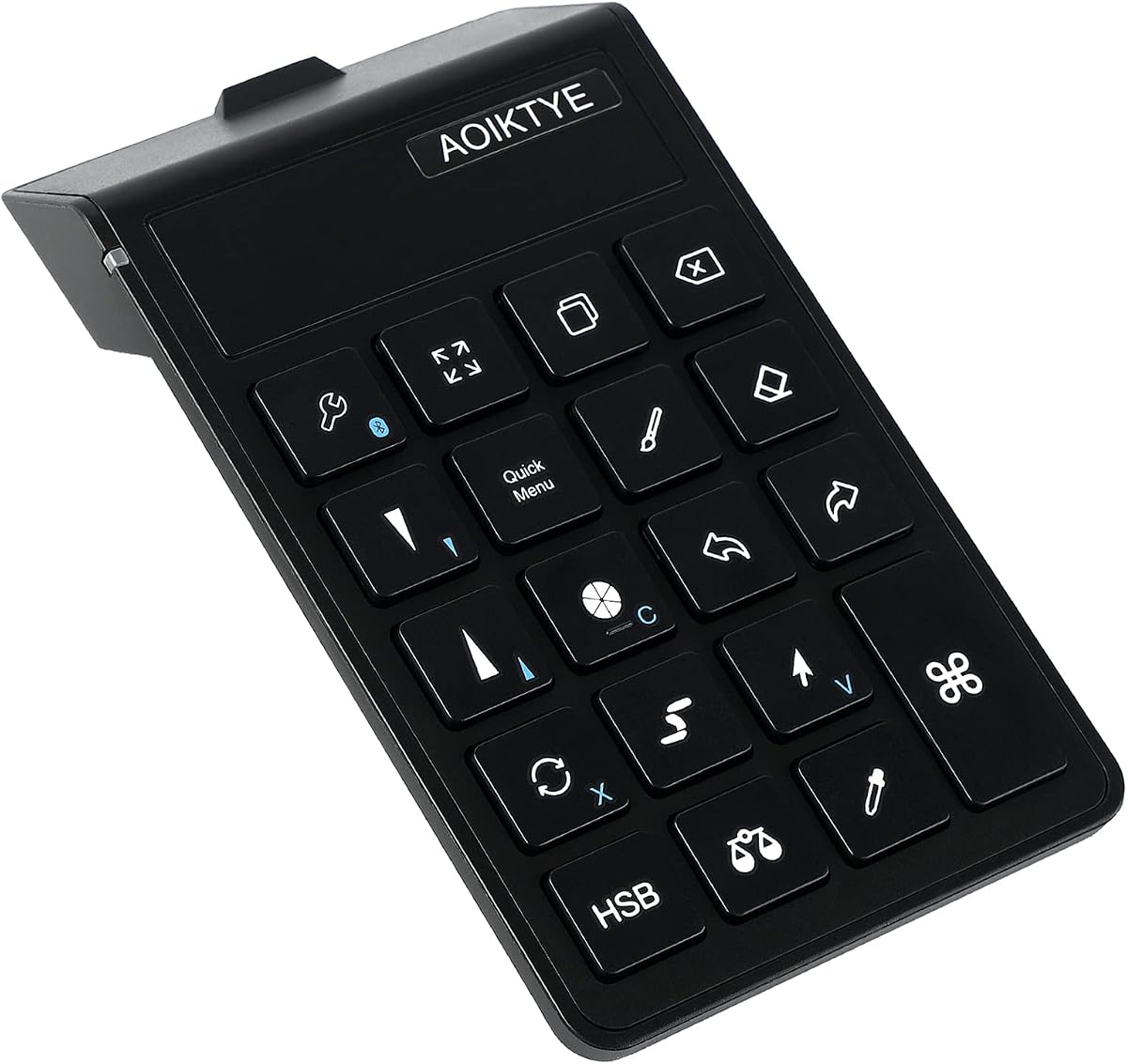
The AOIKTYE Keyboard is specifically designed to enhance the Procreate experience on iPad. Its strong rating highlights its effectiveness in streamlining digital drawing workflows for artists who primarily use this popular app.
We may earn a commission when you buy through this link, at no additional cost to you.
Featuring 22 shortcut keys, it provides functions like color picking and brush size adjustments tailored to Procreate. The keyboard includes OTA upgrade support, ensuring it stays current with software updates and user preferences.
The ergonomic height improvement makes it comfortable to use alongside drawing tasks. With an 84-hour battery life, you can rely on it for extended creative sessions without interruption from charging needs.
Procreate enthusiasts will find this keyboard an essential tool. While it supports other apps like Photoshop, its layout is most effective for iPad artists focused on Procreate, offering a dedicated solution for efficiency.
Keys are mapped to common Procreate functions, making actions like layer switching and undo faster to perform.
An 84-hour battery ensures you can work for weeks between charges, ideal for travel or long projects.
We may earn a commission when you buy through this link, at no additional cost to you.
The XPPen Mini Keydial is a compact wireless shortcut keyboard ideal for artists needing efficient controls. Its solid rating reflects reliable performance across various creative tasks on tablet and desktop devices.
We may earn a commission when you buy through this link, at no additional cost to you.
This device features 10 customizable keys and a dial for zooming or rotating the canvas. You can configure four sets of shortcuts, allowing flexibility for different projects or software applications without needing to swap devices.
Battery life is exceptional at 300 hours, ensuring long-term use without frequent charging. The ergonomic dot on the middle key helps identify position quickly, which is useful when working without looking at the device.
Digital artists using Mac or Windows tablets will appreciate its versatility. While iPad users need to install a specific app for setup, the tool offers a powerful way to manage creative shortcuts in various programs.
With 300 hours of battery life, you can work on multiple projects before needing to recharge the device.
Its thin profile and light weight make it easy to carry, perfect for artists on the move.
We may earn a commission when you buy through this link, at no additional cost to you.
The ShanWan Controller is a versatile Bluetooth device that supports keyboard and mouse functions for drawing control. Its rating reflects a mixed experience, suitable for those needing basic input options across multiple platforms.
We may earn a commission when you buy through this link, at no additional cost to you.
Designed for compatibility with various devices, it allows custom button mapping for creative tasks. The ergonomic design ensures comfort during extended use, and the rechargeable battery minimizes the need for constant battery replacements.
While it may lack the specialized features of dedicated drawing controllers, it offers flexibility for users who game and create. The wireless connectivity helps reduce cable clutter on your desk, improving overall workspace organization.
Users seeking an affordable all-in-one input solution might consider this option. It is best suited for casual drawing tasks rather than professional workflows requiring high precision or specific software integration.
Supports keyboard and mouse modes, providing flexibility for various tasks beyond just drawing.
Ergonomic contours allow for comfortable use during longer creative sessions or gameplay.
We may earn a commission when you buy through this link, at no additional cost to you.
The TNP iPad Remote features a trackpad that offers basic navigation for creative apps on iPad. Its rating suggests it is more suited for general media control than advanced drawing tasks.
We may earn a commission when you buy through this link, at no additional cost to you.
This remote allows cursor movement via the trackpad, mimicking a mouse for precise navigation. It includes media controls for music and video, along with a Home button for app switching on iOS devices.
While useful for presentations or general use, it lacks dedicated drawing shortcuts or dials. The Bluetooth 5.0 ensures stable connectivity, but users need to rely on touch for most specific artistic functions.
Artists who need basic navigation controls might find this helpful. However, for specialized drawing workflows, dedicated controllers with more programmable keys are likely to offer better support and efficiency.
The built-in trackpad allows cursor control, similar to using a mouse on a desktop computer.
Manage music and video playback directly from the remote, adding convenience to your workflow.
We may earn a commission when you buy through this link, at no additional cost to you.
The Clip Studio Tabmate 2 is a handheld shortcut device optimized for Clip Studio Paint users. Its rating reflects solid performance for those dedicated to this specific drawing software across multiple platforms.
We may earn a commission when you buy through this link, at no additional cost to you.
This device lets you assign frequent operations to buttons to speed up production. It supports iOS and Android, and includes a one-year license for Clip Studio Paint, adding value to the package.
Users must be aware that it is primarily designed for Clip Studio Paint, limiting its usefulness in other apps. Additionally, it requires AA batteries rather than a rechargeable option, which might be inconvenient for some.
Artists using Clip Studio Paint will find this controller highly efficient. For general digital art workflows outside of this app, however, a more versatile controller might be better suited to your needs.
Designed specifically for Clip Studio Paint, it maps commands directly to your most-used tools and menus.
Includes a one-year license for Clip Studio Paint, making it an attractive deal for new users.
We may earn a commission when you buy through this link, at no additional cost to you.
The Wacom Intuos Small is a dedicated graphics tablet that connects via Bluetooth for wireless creative work. Its rating highlights trust in Wacom's technology and performance for digital drawing tasks.
We may earn a commission when you buy through this link, at no additional cost to you.
It comes with a battery-free pen that offers natural feel and precise control. You can use it with various software for drawing and photo editing, and it includes access to creative software tools.
While it functions as a main drawing surface rather than a controller, it complements iPad workflows for artists needing more pressure sensitivity. The wireless option helps reduce cable clutter and allows flexible placement.
Digital artists wanting a high-quality pen experience will appreciate this device. If you need a controller for iPad specifically, consider pairing this with keyboard shortcuts for a complete creative setup.
The pen uses EMR technology for battery-free operation, offering a natural feel like pen on paper.
Bluetooth connectivity lets you use the tablet anywhere, from desk to sofa, without cables.
We may earn a commission when you buy through this link, at no additional cost to you.
The Modded Tablet Controller offers advanced hardware features like Hall Effect sticks for precise input. Its perfect rating suggests high quality in build and performance for users seeking a customizable control solution.
We may earn a commission when you buy through this link, at no additional cost to you.
This controller includes motion sensing and customizable magnetic parts for personalization. It supports long battery life and dual motors for vibration feedback, making it versatile for both creative and gaming tasks.
While it is optimized for gaming and specific device holders, it may require extra setup for creative app shortcuts. The Hall Effect technology ensures smooth, drift-free control, which is beneficial for precise adjustments.
Users looking for a premium, durable controller for tablets will find this promising. If mapping to drawing apps is a priority, check compatibility details before purchase to ensure it meets your creative workflow needs.
Hall Effect sticks prevent drift and ensure precise input, enhancing accuracy for detailed creative work.
Magnetic parts allow you to personalize the controller's look and function to fit your preferences.
We may earn a commission when you buy through this link, at no additional cost to you.
Selecting the right Bluetooth controller for iPad drawing involves evaluating several key factors to ensure compatibility with your workflow and software needs.
Ensure the controller supports the apps you use most, such as Procreate, Photoshop, or Clip Studio Paint. Check if specific drivers or companion apps are required for full functionality on iOS.
Prioritize devices with clear support lists for your preferred software to avoid workflow interruptions.
Look for Bluetooth 5.0 or higher for stable connections and longer range. Battery life should be sufficient for your typical drawing sessions to avoid frequent charging interruptions.
Choose models with USB-C charging and decent standby time for convenience and reliability.
More programmable keys allow for greater customization of your workflow. Evaluate how many shortcuts you need to access quickly while drawing to select an appropriate size.
Balance key count with portability to ensure the device fits your workspace comfortably.
The controller should fit comfortably in your hand for extended use without causing strain. Consider the weight and shape to ensure it supports natural hand positions during creative sessions.
Ergonomic designs with tactile feedback help reduce fatigue and improve precision.
Controllers with dials offer intuitive control for brush size, zoom, or layer selection. Assess whether these features align with your specific editing needs.
Dual dials can enhance workflow efficiency for complex tasks requiring simultaneous adjustments.
Set a budget based on the features you need most. Premium controllers offer more capabilities but may cost significantly more than basic keypads.
Consider the long-term value and software support when comparing different price points.
Check reviews for durability and button responsiveness. A solid build ensures the device withstands daily use without losing functionality.
Materials and design quality influence the longevity and comfort of the controller.
If you work on the go, a lightweight and compact design is essential. Ensure it can be easily stored in a bag or carried alongside your iPad.
Smaller devices help maintain a minimal setup for travel or mobile creativity.
To start, pair the controller with your iPad via Bluetooth settings. Ensure the device is charged and in pairing mode before connecting.
Install any necessary drivers or companion apps required for full customization. Map your most-used shortcuts to keys for efficient drawing workflows.
Store the controller in a safe place when not in use to avoid damage. Keep firmware updated for the best performance and bug fixes.
Some controllers require companion apps or drivers to customize keys on iPad. Others work instantly via keyboard commands. Check product details for specific setup needs.
Many support multiple creative apps like Photoshop and Clip Studio Paint. Compatibility varies by model, so verify software support before purchasing.
Battery life ranges from 40 hours to over 300 hours depending on the model. Higher capacity batteries mean fewer charges for continuous use.
Ergonomic designs with tactile keys help reduce hand fatigue. Choosing a lightweight, one-hand controller improves comfort during extended work.
Some models support media control, presentation, or general navigation. Features vary, but many offer broader utility beyond just creative tasks.
Several models support Android alongside iPadOS and macOS. Check compatibility lists for your specific device before buying.
Most provide a stable connection up to 10 meters. Wireless range depends on the Bluetooth version and environmental interference.
Yes, most allow programming keys for shortcuts like undo or brush size. Use the app or driver to map functions to your preferences.
The DIGIDRAW K30, HUION Keydial Mini, and TourBox Lite offer top-tier solutions for different needs. Each brings unique strengths in customization and workflow integration for digital artists.
Prioritize features like dual dials or specific app support based on your software use. Ergonomics and battery life are also critical factors for daily creative work.
Remember to check current availability and compatibility before purchasing. Selecting the right tool can significantly enhance your digital drawing experience on iPad.