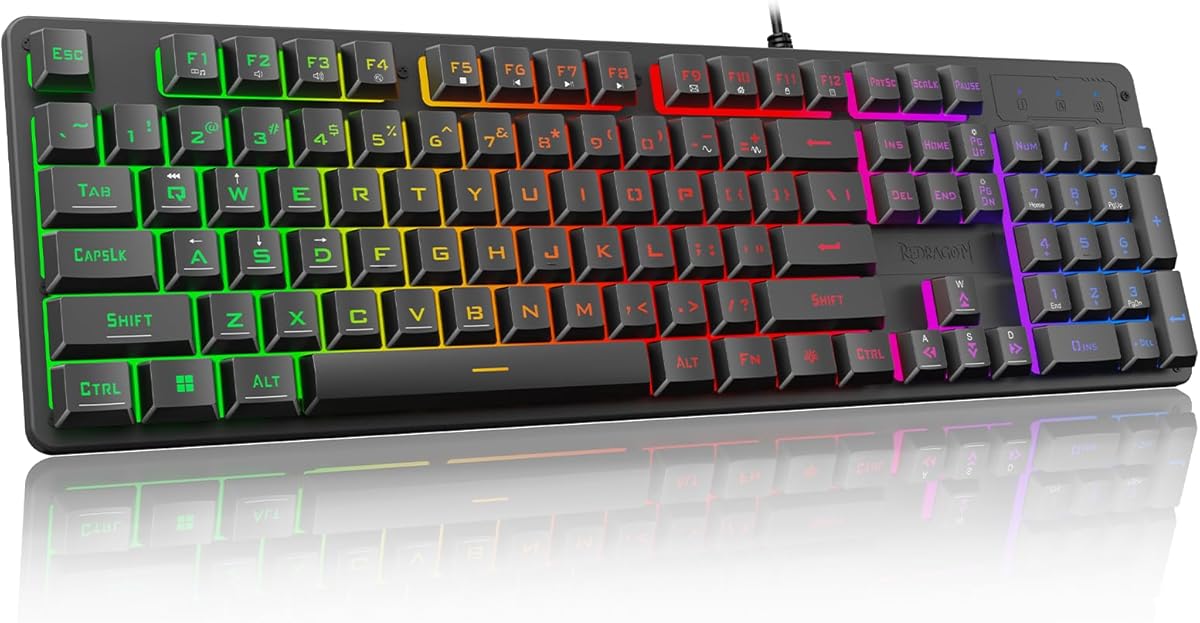
Redragon K521 Upgrade Rainbow LED Gaming Keyboard
4.4Editor score
Mechanical feeling keys for fast tapping
19 keys anti-ghosting support
Rainbow LED backlight with one-touch control
This guide compares the top ten keyboards for Rainbow Six Siege, evaluating response times, durability, and ergonomics to help you find the perfect setup for
Finding the right keyboard for Rainbow Six Siege is crucial for competitive players who need precision and speed. A good gaming keyboard offers fast actuation, reliable anti-ghosting, and comfortable ergonomics for long sessions.
We compared ten top-rated models based on switch type, build quality, and specialized gaming features. Each product was evaluated for its ability to handle rapid inputs and complex key combinations required in tactical shooters.
Each pick highlights unique strengths and trade-offs to help you choose the best fit for your budget and play style. Note that product prices and availability may change over time, so check current listings before purchasing.
4.4Editor score

4.6Editor score

4.6Editor score
This side-by-side comparison highlights the key specifications and unique features of each keyboard to help you make an informed decision for your Rainbow Six Siege setup.



The Logitech G413 TKL SE stands out as a top choice for Rainbow Six Siege players seeking reliable mechanical performance. With a 4.6 star rating, it delivers consistent tactile feedback essential for precise aiming and movement.
We may earn a commission when you buy through this link, at no additional cost to you.
Its PBT keycaps offer superior heat and wear resistance compared to standard ABS plastics. The tenkeyless design frees up desk space for mouse movement, while the 6-key rollover anti-ghosting ensures every input registers during intense firefights.
While it lacks advanced software customization, the physical layout includes convenient FN media controls. The brushed aluminum top case provides a sturdy feel, though some users might prefer additional lighting options beyond white LEDs.
This keyboard is ideal for gamers who prioritize build quality and responsiveness over complex software features. Its balance of durability and performance makes it a strong contender for competitive tactical shooter gameplay.
The PBT keycaps are heat and wear resistant, ensuring legends stay crisp even after extensive gaming sessions.
The tenkeyless design removes the number pad to maximize mouse space for low-sensitivity aiming strategies.
We may earn a commission when you buy through this link, at no additional cost to you.
The ASUS ROG Strix Scope II 96 combines wireless convenience with full functionality, earning it a top premium spot. Its tri-mode connectivity supports Bluetooth, 2.4GHz wireless, and wired USB for versatile setup options.
We may earn a commission when you buy through this link, at no additional cost to you.
With hot-swappable pre-lubed ROG switches, you can customize the feel without soldering. The 96% layout keeps the number pad while saving space, and the integrated sound-dampening foam reduces noise during late-night sessions.
While expensive, the 1,500-hour battery life justifies the investment for wireless purists. Some users may find the weight significant, but the sturdy build ensures stability during rapid key presses in high-stakes matches.
This keyboard suits players wanting premium features without sacrificing layout utility. It excels in both gaming and daily tasks, making it a versatile choice for multi-purpose setups.
Tri-mode connectivity allows seamless switching between devices and connection types for optimal performance.
Hot-swappable switches let you experiment with different tactile feels to match your playstyle preferences.
We may earn a commission when you buy through this link, at no additional cost to you.
The Redragon K521 Upgrade offers exceptional value for budget-conscious gamers entering the competitive scene. With mechanical feeling keys and rainbow LED backlighting, it delivers a premium feel at a fraction of the cost.
We may earn a commission when you buy through this link, at no additional cost to you.
Its 19-key anti-ghosting ensures accurate input during complex ability combos. The one-touch backlight control and multimedia keys add convenience, while compatibility with multiple consoles makes it a versatile choice for mixed setups.
Although not true mechanical switches, the feedback is satisfying enough for most players. The plastic construction lacks the rigidity of higher-end models, but for the price, it performs reliably in extended gaming sessions.
This keyboard is perfect for students or casual gamers who need functional performance without breaking the bank. It proves that you don't need to spend a lot to get a solid competitive gaming peripheral.
Delivers mechanical-like feedback and anti-ghosting at a price point accessible to all gamers.
Rainbow LED backlight with adjustable breathing modes adds visual flair to your gaming environment.
We may earn a commission when you buy through this link, at no additional cost to you.
The ASUS ROG Strix Scope II X provides a robust wired experience for players who prioritize layout completeness. Its 100% full-size design ensures you never miss the number pad or function keys during gameplay.
We may earn a commission when you buy through this link, at no additional cost to you.
The hot-swappable ROG NX V2 switches allow easy customization while maintaining smooth linear actuation. Integrated sound-dampening foam ensures quiet operation, and the durable aluminum top plate keeps the board stable under pressure.
While it lacks wireless capability, the USB-C connection guarantees zero latency interference. Some users may find the footprint large, but the ergonomics and tilt adjustments accommodate long sessions comfortably.
Ideal for desktop setups where desk space is plentiful, this keyboard excels in reliability and customization. It suits gamers who want full control over their hardware without worrying about battery life.
The 100% layout preserves all keys for comprehensive control without sacrificing essential function keys.
Aluminum top plate and doubleshot PBT keycaps ensure resistance to wear and daily usage.
We may earn a commission when you buy through this link, at no additional cost to you.
The Aula WIN60 HE pushes boundaries with magnetic Hall effect switches offering rapid trigger functionality. This tech enables ultra-low reset points, giving you a speed advantage in peeking and shooting scenarios.
We may earn a commission when you buy through this link, at no additional cost to you.
The 60% compact layout frees maximum mouse space, while the 8000Hz polling rate ensures every input is registered instantly. Customization is easy via a web-based driver, allowing you to tailor actuation points easily.
The main trade-off is the lack of dedicated arrow keys, requiring function layers for navigation. Users must adapt to the dense layout, but competitive FPS players often welcome the ergonomic benefits of a smaller footprint.
This keyboard is tailored for performance enthusiasts seeking the absolute fastest response times. It represents the cutting edge of gaming tech, offering features previously seen only in high-end peripherals.
Adjustable actuation distance allows instant reset for complex movement mechanics and rapid direction changes.
No bulky software required; customize keys and lighting directly through a browser interface for convenience.
We may earn a commission when you buy through this link, at no additional cost to you.
The Corsair K55 RGB PRO offers a reliable entry point for gamers needing macro functionality. Its dedicated six macro keys allow instant access to complex commands, while iCUE software lets you assign custom functions easily.
We may earn a commission when you buy through this link, at no additional cost to you.
IP42 spill resistance provides peace of mind against accidental accidents during intense sessions. The detachable palm rest reduces wrist strain, and the volume dial lets you manage audio levels without alt-tabbing from the game.
While membrane switches feel less tactile than mechanical ones, they are quiet and smooth. The RGB lighting across five zones adds visual flair, though customization requires installing Corsair software on your system.
Best suited for casual players or those transitioning from office keyboards, it balances comfort and utility. It delivers essential gaming features without overwhelming complexity or cost.
Six dedicated macro keys provide quick access to essential commands without complex key combinations.
IP42 rating guards against spills while the rubber palm rest ensures comfort during extended play.
We may earn a commission when you buy through this link, at no additional cost to you.
The Razer BlackWidow V4 X emphasizes speed and silence with its Yellow linear switches. The zero reset distance enables rapid key tapping, crucial for fast-paced shooting sequences in competitive matches.
We may earn a commission when you buy through this link, at no additional cost to you.
Six dedicated macro keys expand your command arsenal, allowing for streamlined execution of complex strategies. The doubleshot ABS keycaps ensure legends never wear off, while the internal foam reduces noise to a minimum.
Chroma RGB per-key lighting offers extensive customization, syncing with hundreds of games. Although it lacks a physical volume knob, the media keys provide convenient control without relying on software overlays.
This keyboard is ideal for gamers who value speed and sound dampening. Its build quality and linear feedback make it a strong candidate for those preferring smooth keystrokes over tactile bumps.
Yellow linear switches offer rapid-fire inputs with minimal sound due to built-in internal dampeners.
Chroma RGB lighting provides dynamic effects that sync with your gameplay for enhanced immersion.
We may earn a commission when you buy through this link, at no additional cost to you.
The AULA F75 Pro Wireless combines compact design with versatile connectivity options. Its 75% layout retains arrow keys while saving significant desk space, making it ideal for gamers who need room for mouse movement.
We may earn a commission when you buy through this link, at no additional cost to you.
Tri-mode connectivity lets you connect up to five devices simultaneously. The multi-function knob allows quick volume or lighting adjustments, and the side-printed PBT keycaps offer a unique aesthetic with improved durability.
Internal filling layers reduce noise, resulting in a thocky sound that enthusiasts appreciate. While it requires a driver for advanced macro programming, the 4000mAh battery ensures long sessions without interruption.
This keyboard appeals to users seeking a balance between portability and functionality. It suits both gaming and productivity, adapting easily to different devices and usage scenarios.
Supports five devices simultaneously allowing seamless transitions between gaming PC and work laptop.
Side-printed keycaps create a distinctive look while maintaining durability against wear and fade.
We may earn a commission when you buy through this link, at no additional cost to you.
The SteelSeries Apex 3 delivers reliable performance with a focus on quiet operation. Its whisper-quiet switches ensure minimal disturbance during late-night sessions, while the 10-zone RGB offers visually pleasing effects.
We may earn a commission when you buy through this link, at no additional cost to you.
IP32 water resistance protects against accidental spills, extending the keyboard's lifespan. The included magnetic wrist rest provides full palm support, reducing strain during long gaming marathons or work sessions.
While not mechanical, the switches provide a soft tactile feel that many find comfortable. It supports multiple platforms including Xbox and PlayStation, making it a versatile option for console gamers needing keyboard input.
Best for noise-sensitive environments or budget setups, it offers essential gaming features without bulk. Its durability and comfort make it a strong recommendation for casual competitive gaming.
Whisper quiet switches ensure minimal noise disruption during intense gaming or work sessions.
IP32 water resistance coating guards against accidental spills and extends product longevity.
We may earn a commission when you buy through this link, at no additional cost to you.
The Razer Ornata V3 combines the familiarity of a membrane keyboard with the feedback of mechanical switches. Its low-profile design reduces hand strain, allowing for comfortable use during extended tactical shooter sessions.
We may earn a commission when you buy through this link, at no additional cost to you.
Mecha-membrane switches deliver a precise and satisfying actuation. The UV-coated keycaps resist wear and fading, ensuring a clean look over time. Dedicated media keys allow quick adjustments without interrupting your gameplay.
While the low profile might feel different initially, many users find it reduces fatigue. The magnetic wrist rest snaps securely into place, providing essential support for wrists that tend to tire quickly.
This keyboard suits gamers transitioning from laptops who want a desktop upgrade. It balances comfort and performance, making it ideal for those who value ergonomics and clean aesthetics.
Slimmer keycaps allow natural hand positioning to reduce strain during long gaming sessions.
UV-coated keycaps resist wear and fading ensuring legends remain clear after heavy usage.
We may earn a commission when you buy through this link, at no additional cost to you.
Selecting the right keyboard involves balancing response speed, durability, and layout preference. Consider these factors to find a model that matches your play style and desk setup.
Mechanical switches generally offer faster actuation than membrane alternatives. Linear switches allow rapid firing without a tactile bump, while tactile switches provide feedback confirming actuation. For Rainbow Six Siege, a switch with low actuation force and short travel distance can improve reaction speed.
Prioritize switches that feel comfortable for extended use to maintain consistency during ranked matches.
The layout determines how much desk space your keyboard occupies. Full-size boards include a number pad, which some players use for chat shortcuts, while tenkeyless models save space for mouse movement. Compact 60% boards offer maximum space but require learning key combinations for navigation.
Choose a layout that aligns with your mouse sensitivity and available desk surface area.
Anti-ghosting ensures multiple key presses register simultaneously, which is vital for complex movement or ability combos. N-Rollover allows every key to act independently. Look for at least 6-key rollover to avoid input dropouts during intense firefights.
Full N-rollover is ideal for competitive players executing rapid sequences without missed commands.
Durable keyboards use metal plates and robust plastics to prevent flexing under pressure. PBT keycaps are more resistant to shine and wear compared to ABS. A solid frame ensures the board stays stable during aggressive typing or movement inputs.
Invest in a build that can withstand years of daily use without key wobble or frame damage.
Dedicated macro keys or software support let you bind complex commands to single presses. This can streamline utility usage or communication. Ensure the software is intuitive and reliable to avoid conflicts during gameplay.
Select a model with robust macro capabilities if you rely on frequent ability rotations.
Wrist rests and adjustable angles help maintain a neutral hand position. Comfort is critical for long sessions where fatigue can affect performance. Soft-touch materials and padding prevent strain on wrists and fingers over time.
Prioritize keyboards with ergonomic accessories if you experience wrist discomfort after extended play.
Wired connections offer zero latency, while wireless models provide cable-free convenience. If choosing wireless, ensure it supports low-latency 2.4GHz modes. Battery life should be sufficient for marathon sessions without frequent charging.
Opt for a connection type that fits your setup style and performance requirements.
RGB lighting helps identify keys in dark rooms and can sync with in-game events for immersion. While not essential for performance, it enhances the gaming experience. Customizable per-key lighting allows you to highlight frequently used keys.
Choose RGB features that complement your desk setup and provide functional visibility.
Regularly clean the keys to prevent dust buildup that can cause sticking. Use a soft brush or compressed air to remove debris from the keycaps and gaps between switches.
Adjust software settings to optimize response times and macros. Customize keybinds to match your favorite operators and strategies for faster in-game reactions.
Keep the keyboard dry and away from liquids to maintain electronics integrity. Store it in a dry environment when not in use to prevent corrosion or wear on key switches.
A good keyboard for Rainbow Six Siege offers fast actuation switches, reliable anti-ghosting, and a comfortable layout. These features help you execute precise movements and rapid commands without input delays or missed keystrokes during tactical operations.
Mechanical keyboards generally provide better durability and faster actuation compared to membrane models. The consistent tactile feedback helps you gauge when a key registers, which is crucial for timing abilities and movements in competitive scenarios.
While not mandatory, a tenkeyless layout frees up desk space for mouse movement. This can improve aiming precision and comfort, especially if you use low sensitivity settings or large mouse pads during gameplay.
Macro keys can streamline utility usage or quick chat commands. While not essential for core gameplay, they are valuable for players who rely on complex operator abilities or frequent voice communication during matches.
Yes, modern wireless keyboards with 2.4GHz connections offer low latency comparable to wired models. However, ensure the battery life is sufficient to avoid disconnections during ranked matches.
Linear switches are often preferred for their smooth and fast actuation, allowing rapid key presses without resistance. Tactile switches can also work well if you prefer feedback confirming each keystroke.
The Logitech G413 TKL SE and ASUS ROG Strix Scope II 96 lead this guide due to their reliability and advanced features. Budget options like the Redragon K521 provide accessible entry points for those seeking mechanical feedback.
Prioritize response time, build quality, and layout comfort when making your decision. A well-matched keyboard can significantly enhance your performance and enjoyment during competitive matches.
Remember to check current pricing and availability before purchasing as these details change frequently. Investing in the right peripheral ensures you have the tools needed to excel in tactical shooter environments.