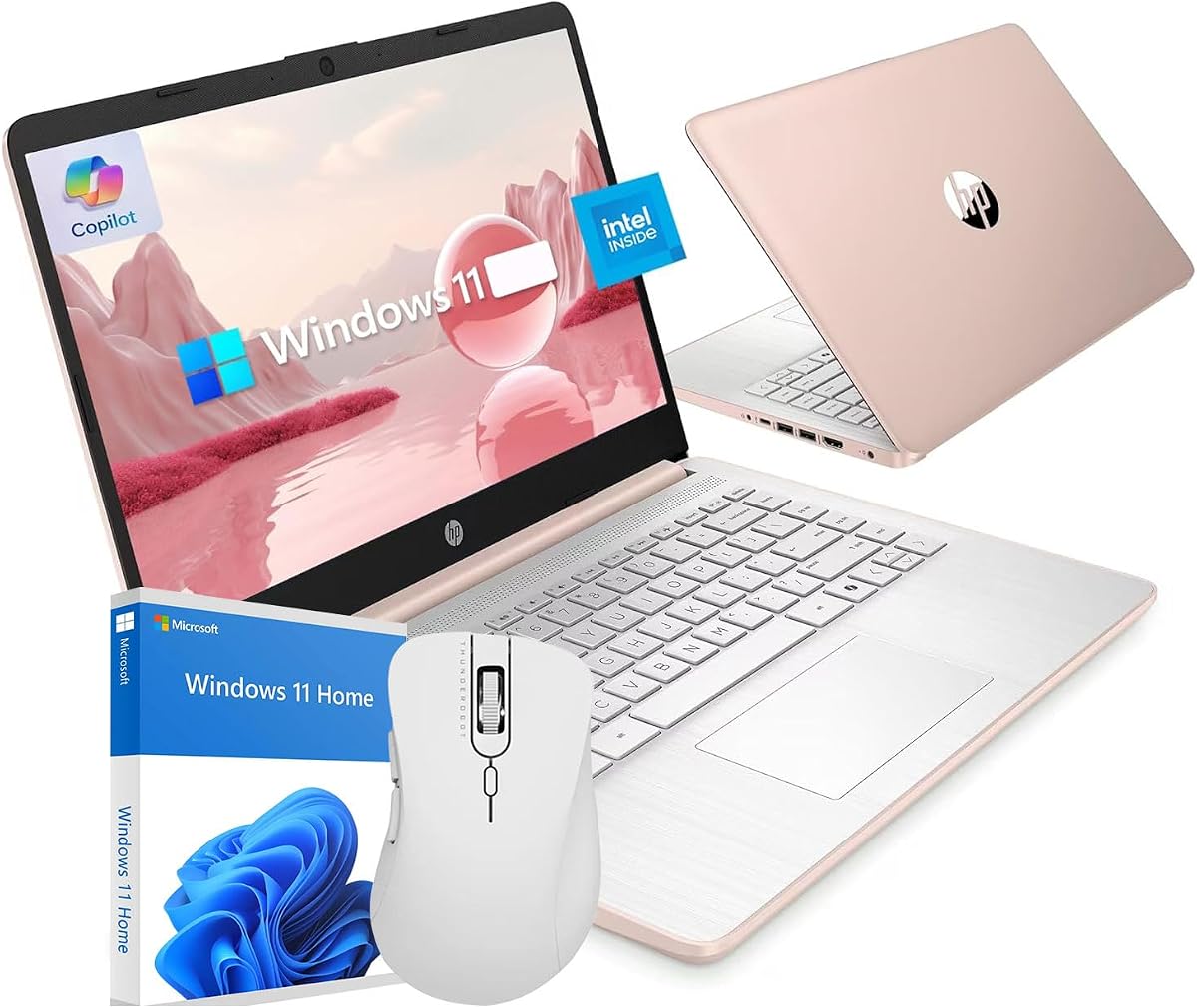
HP Ultrabook 14
4.0Editor score
Quad-Core Intel CPU
128GB SSD storage
WiFi 6 connectivity
Nursing students face unique challenges that require a reliable computing device capable of handling dense textbooks, research papers, and clinical documentation software. Choosing the right machine means balancing portability for long shifts with enough power to run multiple applications simultaneously without lagging during critical study sessions.
We evaluated ten top-rated laptops based on real-world usage scenarios common in healthcare education. Our analysis focuses on battery endurance, screen clarity for late-night studying, and the ability to connect to hospital networks or presentation projectors during rotations without technical interruptions or compatibility issues.
Each pick highlights specific strengths like lightweight designs for carrying between classrooms or enhanced security features for protecting patient data. Note that pricing fluctuates based on promotions and availability so verify current deals before purchasing to ensure you get the best value for your educational investment needs.
4.0Editor score

4.3Editor score

4.6Editor score
As an Amazon Associate we earn from qualifying purchases.
This side-by-side comparison outlines the core specifications and unique features of each selected laptop to help you quickly identify the model that aligns with your specific academic and clinical requirements during your nursing program journey.





This laptop stands out as a top contender for nursing students due to its balanced feature set that includes essential productivity tools right out of the box. With a high rating and robust storage capabilities, it handles the daily demands of coursework and clinical documentation effectively.
We may earn a commission when you buy through this link, at no additional cost to you.
The inclusion of lifetime Microsoft Office is a significant advantage for students who need reliable access to Word and Excel for care plans and research papers. The processor provides sufficient power for web-based learning platforms while the DDR5 RAM ensures smooth switching between tabs.
While the RAM is fixed at 4GB, which may limit heavy multitasking later in the program, the expandable storage compensates by allowing you to add an external drive for large medical images or reference files. This flexibility makes it a practical choice for long-term use.
We recommend this model for students prioritizing value and immediate usability without needing extra software purchases. It serves as a reliable companion for lectures and study sessions while maintaining a budget-friendly profile suitable for most educational plans.
Lifetime Microsoft Office access eliminates subscription costs and ensures compatibility with university assignment templates.
The bundled external drive allows you to store massive medical datasets without compromising system speed or internal space.
We may earn a commission when you buy through this link, at no additional cost to you.
This model offers a compelling middle ground with 8GB of RAM that supports more concurrent applications than the base 4GB options. It is particularly useful for students who frequently run video simulations alongside note-taking apps during remote learning modules.
We may earn a commission when you buy through this link, at no additional cost to you.
The inclusion of a one-year Office 365 subscription ensures you have access to the latest features for presentations and data analysis. The processor handles typical academic workloads efficiently while the portable design makes it easy to carry during hospital rotations.
Storage is limited to 128GB which may require cloud solutions for larger files but the fast UFS technology keeps boot times and app launches quick. Users should plan their storage management early to avoid running out of space during exam periods.
Ideal for students who need a bit more memory headroom without jumping to high-end prices this laptop delivers consistent performance. It is a solid investment for those planning to use the device across multiple semesters of their nursing program.
Having 8GB of RAM allows for smoother operation when multiple browser tabs and document windows are open simultaneously.
WiFi 6 ensures stable connections for telehealth simulations and online proctored exams with minimal latency issues.
We may earn a commission when you buy through this link, at no additional cost to you.
Designed for essential computing needs this laptop provides a straightforward solution for students focused on web-based coursework and document creation. The micro-edge display offers a decent viewing area despite the lower resolution and it is particularly comfortable for prolonged typing sessions.
We may earn a commission when you buy through this link, at no additional cost to you.
With 4GB of RAM it manages basic multitasking well though users should avoid running too many heavy applications at once. The inclusion of Office 365 simplifies setup and ensures you can start working on assignments immediately without additional software configuration.
While storage is limited the system is optimized for cloud integration which works well for nursing students who rely on online portals and shared drives. The build quality feels durable enough to withstand daily transport in a backpack or tote bag.
This is a great choice for students who prioritize simplicity and portability over high performance. It handles the core requirements of a nursing curriculum effectively while keeping the overall cost accessible for those on a tight budget.
The optimized Windows 11 interface reduces distractions and helps students focus on studying without unnecessary system delays.
Anti-glare technology reduces eye strain during late-night study sessions in dorm rooms or library environments.
We may earn a commission when you buy through this link, at no additional cost to you.
This ultrabook delivers exceptional value for students who need a reliable machine without breaking the bank. It covers the basics of online learning with a fast SSD that ensures your operating system runs smoothly and your files load quickly.
We may earn a commission when you buy through this link, at no additional cost to you.
While the software bundle uses the web-based version of Office it is sufficient for most standard assignments and communication tasks. The processor handles streaming lectures and note-taking without issues making it a practical tool for daily academic workflows.
The design is stylish and lightweight which helps reduce fatigue during long commutes or clinical shifts. Students should ensure their internet connection is stable since the productivity tools rely on browser access for full functionality.
We recommend this model for budget-conscious students who do not require heavy offline computing power. It serves as a capable entry-level device that supports the fundamental needs of a nursing education with minimal financial investment.
Pricing is highly competitive making it accessible for students who need to allocate funds to other educational materials.
The thin profile fits easily into crowded lockers or bags ensuring you can carry it anywhere without bulk.
We may earn a commission when you buy through this link, at no additional cost to you.
This Chromebook leverages Google Chrome OS for a secure and simple computing environment focused on web applications. The full HD touchscreen is excellent for interactive modules and visual diagrams often found in anatomy or physiology courses.
We may earn a commission when you buy through this link, at no additional cost to you.
The MediaTek processor is energy efficient providing all-day battery life which is critical during long clinical rotations. Charging is convenient with USB-C options and the system boots up instantly when you need to access your schedule or notes.
Users must rely on cloud storage for files which is generally supported by nursing programs but requires consistent internet access. The interface is intuitive for those familiar with Android tablets but might feel restricted if native Windows apps are required.
Ideal for students who primarily work within browser-based ecosystems this device offers great portability and speed. It is a smart choice for those looking to minimize distractions while maintaining access to essential online educational resources.
Touchscreen capability allows for natural interaction with digital textbooks and online quizzes for enhanced engagement.
Energy-efficient components ensure the device lasts through back-to-back classes without needing an outlet in between.
We may earn a commission when you buy through this link, at no additional cost to you.
For students who prefer a spacious workspace this 17-inch laptop offers a large display that makes studying detailed medical charts much easier. The 16GB of RAM supports heavy multitasking allowing you to keep multiple reference windows open without performance drops.
We may earn a commission when you buy through this link, at no additional cost to you.
The Intel Core i5 processor is more powerful than entry-level chips providing headroom for future software needs. The 512GB SSD ensures ample room for extensive textbooks and research files while the FHD IPS panel delivers clear visuals from any angle.
While the larger size makes it less portable for daily commuting it is excellent for stationary study sessions or group work. The extra screen real estate can significantly boost productivity when organizing complex care plans or reviewing lecture recordings.
We suggest this model for students who prioritize performance and screen size over extreme portability. It is a robust machine capable of handling demanding academic tasks throughout the entire nursing curriculum with reliability and speed.
The larger display allows for split-screen work which is efficient for taking notes while watching lectures.
The Core i5 processor ensures smooth performance even with multiple applications running in the background simultaneously.
We may earn a commission when you buy through this link, at no additional cost to you.
This laptop combines the memory capacity of premium models with a lightweight chassis that is easy to carry during clinical rotations. The 16GB of RAM is a standout feature that ensures you can run complex simulations alongside communication apps without lag.
We may earn a commission when you buy through this link, at no additional cost to you.
The inclusion of bundled earbuds and a sleek finish adds a touch of premium value often missing in budget categories. Battery life supports long study sessions and the fast SSD keeps your workflow smooth during critical moments of assignment creation.
While the storage is 128GB the high RAM compensates by allowing you to utilize cloud storage more efficiently. The design is particularly appealing for those who want a professional look that suits hospital environments and formal presentations.
Ideal for students who need strong performance without the bulk of a larger screen this model delivers a balanced experience. It is a worthy investment for those who value speed and portability in their daily educational routine.
Having 16GB of RAM allows you to switch between video calls and note-taking apps seamlessly.
The professional finish and included accessories provide a complete package ready for immediate academic use.
We may earn a commission when you buy through this link, at no additional cost to you.
Dell is known for ergonomic design and this model features a comfortable keyboard with a numeric keypad that aids in data entry. For nursing students who type care plans and medication logs daily the extra typing comfort is a valuable feature.
We may earn a commission when you buy through this link, at no additional cost to you.
The ComfortView software reduces blue light emissions which helps reduce eye strain during late-night study sessions. The 15-inch screen provides a good balance between portability and workspace making it suitable for both desk use and classroom settings.
The processor handles typical academic tasks efficiently and the 8GB RAM ensures decent multitasking capability for the price. Onsite service support adds peace of mind knowing that hardware issues can be resolved quickly without sending the device away.
This is a great choice for students who prioritize typing comfort and reliability over extreme thinness. It offers a solid foundation for coursework while ensuring your physical comfort during long hours of computer-based learning.
The full-size layout with numeric keys supports fast and accurate data entry for clinical documentation tasks.
Reduced blue light helps maintain visual comfort when studying for long periods in dimly lit environments.
We may earn a commission when you buy through this link, at no additional cost to you.
This laptop is designed for straightforward academic use with a focus on reliability and ease of access. The micro-edge display provides a wide viewing area for presentations and the anti-glare coating helps maintain visibility in various lighting conditions.
We may earn a commission when you buy through this link, at no additional cost to you.
With a full-size keyboard and versatile ports you can connect to projectors or external drives easily during group presentations. The included Office 365 subscription ensures you have the tools needed for writing papers and creating slides without extra cost.
The 4GB RAM is adequate for web browsing and document editing but heavy multitasking may require closing unused apps. It is a practical tool for students who want a no-frills device that just works for their daily academic needs.
Ideal for those starting their nursing program with basic computing requirements this model offers good value. It provides a stable platform for coursework while keeping costs low and setup simple for busy students.
Multiple USB and HDMI ports allow you to connect peripherals for enhanced workflow during study sessions.
Anti-glare technology and adjustable brightness help prevent fatigue during extended periods of screen usage.
We may earn a commission when you buy through this link, at no additional cost to you.
This ultra-portable model bridges the gap between student needs and professional features with Windows 11 Pro for better data security. The bundled external drive and docking hub provide a complete solution for connecting to hospital networks or presentation setups.
We may earn a commission when you buy through this link, at no additional cost to you.
The storage capacity is generous for this class of device allowing you to keep reference materials and projects locally without constant deletion. Battery life supports all-day use which is essential for students moving between classrooms and clinical sites frequently.
The design is sleek and professional fitting well in hospital environments where appearance matters. While the RAM is fixed the overall package offers significant value through its accessory bundle and advanced operating system features.
We recommend this for students who want business-grade security and connectivity without a premium price. It is a smart choice for those who need to handle secure data and connect to various peripherals seamlessly.
Windows 11 Pro offers encryption and hardware isolation that are valuable for handling sensitive student or clinical data.
The included docking hub simplifies connecting to external monitors and devices during lab work or study groups.
We may earn a commission when you buy through this link, at no additional cost to you.
Selecting the right laptop involves balancing performance needs with portability to ensure you can study anywhere from the classroom to the clinic. We break down the key factors to consider before making your purchase.
The processor determines how well your laptop can run multiple applications simultaneously. For nursing students, a quad-core processor or better ensures that video simulations and note-taking apps run smoothly without lagging during critical study times. Avoid older dual-core models that may struggle with modern learning platforms.
Random Access Memory allows your computer to hold data for quick access. 8GB is the sweet spot for nursing students who need to keep research tabs and document editors open at the same time. While 4GB works for basics, it can slow down as you take on more complex coursework later in the program.
Nursing programs often require large files for anatomy visualizations and reference materials. A solid state drive ensures faster boot times and file access compared to traditional hard drives. Look for at least 256GB of storage or the option to use external drives for expanded capacity.
Clinical rotations often mean being away from power outlets for long periods. A laptop with at least 8 to 10 hours of battery life ensures you can take notes during lectures without hunting for an outlet. Always check real-world battery reviews rather than just manufacturer claims.
You will be carrying this device to classes, labs, and clinical sites daily. A weight under 4 pounds makes transportation much easier and reduces physical strain over the semesters. Slim designs also fit better in crowded backpacks or under desk chairs in study rooms.
Spending hours reading textbooks and reviewing diagrams requires a screen that is easy on the eyes. Anti-glare coatings and high resolution help prevent eye strain during late-night study sessions. A 14-inch display offers a good balance of readability and portability for most students.
Many nursing schools require specific software for simulations or secure exams that may not run on ChromeOS or tablets. Ensure your choice supports Windows or macOS compatibility with required programs. Built-in security features like fingerprint readers are also valuable for protecting patient data.
Being able to connect to projectors in class or use external peripherals is important for presentations and group work. Look for HDMI ports, USB-C for fast data transfer, and reliable Wi-Fi 6 support. Having a mix of modern and legacy ports adds flexibility for different scenarios.
Keep your device clean by wiping the screen and keyboard regularly with a microfiber cloth to remove oils and bacteria that can transfer from clinical environments. Avoid using harsh chemicals that could damage the anti-glare coating or sensitive electronic components.
Nursing students generally need a reliable mid-range laptop capable of handling video calls, document editing, and browser-based simulations. You do not need high-end gaming specs unless you run heavy medical software locally. A processor with at least 4 cores and 8GB of RAM is sufficient for most programs.
Windows is the most versatile choice as it supports the widest range of educational software and secure exam tools. Some programs may offer Mac compatibility but checking specific school requirements is crucial. Chromebooks are cost-effective but may lack support for specialized desktop applications.
Aim for at least 256GB of storage to handle textbooks and research files comfortably. Many students also use cloud storage like OneDrive which complements local storage effectively. If you plan to store many large videos or images consider models with expandable storage options.
A touchscreen can be helpful for annotating diagrams and interacting with educational apps but it is not strictly necessary. It adds to the cost and battery drain so weigh the benefits against your budget. A standard trackpad is usually sufficient for note-taking and document work.
With proper care a good quality laptop should last through your entire nursing program and beyond. Look for durable builds with robust hinges and spill-resistant keyboards. Investing in a device with good upgrade potential can also extend its useful life during your studies.
Tablets are great for reading but often lack the full keyboard and file management needed for detailed care plans. Most nursing schools require a full computer for exams and submissions. If you consider a tablet ensure it can run required software and connect to a physical keyboard.
Windows 11 offers better security features and modern interfaces that are beneficial for managing school data and exams. Schools are increasingly standardizing on Windows 11 requirements for compatibility. It is best to choose a device that supports Windows 11 to ensure future-proofing and security.
Budget laptops can work well if they meet basic specs like 8GB RAM and decent battery life. Focus on portability and reliability rather than raw power since you mostly need it for notes and research. Avoid the cheapest models with only 4GB RAM if you plan to multitask often.
Our top picks balance performance and portability to meet the varied demands of nursing education. The HP 17.3 inch Laptop offers power for complex tasks while the budget options provide essential tools without overspending.